Trevolyx: free 3D CAD in your browser
Trevolyx is a free parametric 3D CAD that runs in your browser: sketch, extrude, fillet, sheet metal, weldments, assemblies and drawings. No install, no account, and your files stay on your device.
Open TrevolyxDesktop Chrome or Edge recommended.
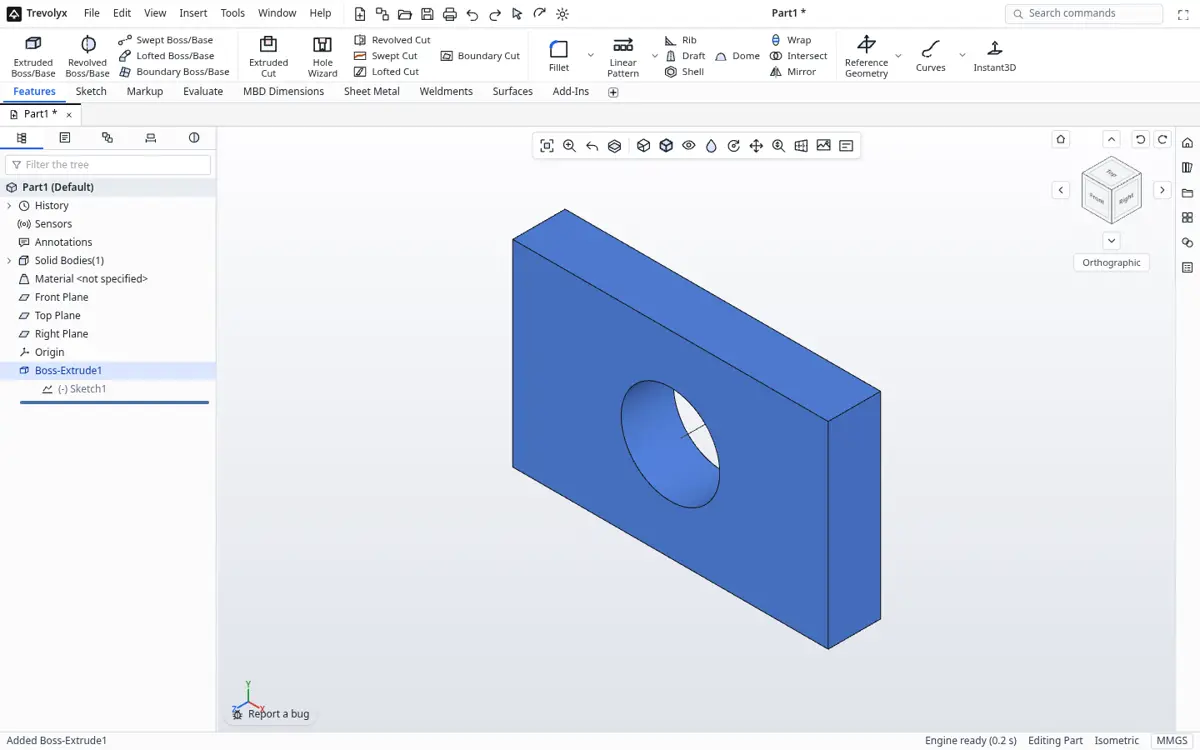
What Trevolyx is
Trevolyx is a parametric, history-based 3D CAD program that runs inside a desktop web browser. It follows the SolidWorks layout that most mechanical engineers in India learn: a CommandManager ribbon, a FeatureManager design tree, PropertyManager panels and familiar command names. The modelling kernel is an exact B-rep engine running on your own computer, so nothing you design is uploaded.
You can model parts, sheet metal and weldments, put them together in assemblies with mates and exploded views, and make 2D drawings with section and detail views, balloons and a bill of materials. It opens STEP and IGES files from any other CAD program and exports STEP, STL, 3MF, OBJ, GLB and DXF.
Who it is for
- Mechanical engineering and diploma students practising at home without a licence.
- Freshers preparing for design interviews.
- Fabrication shops that need a flat pattern DXF or a weldment cut list.
- Engineers and buyers who need to open, measure or tweak a supplier STEP file.
Getting started
- Free online 3D CAD with no download and no sign-up
Model real parametric parts, assemblies and drawings in a browser tab. Trevolyx needs no install and no account, and it never uploads your files. - Free CAD for mechanical engineering students
Practise SolidWorks-style parametric modelling at home for free, on any laptop, with no licence or student ID. Parts, sheet metal, assemblies and drawings. - What Trevolyx can do
Parametric sketches with relations and dimensions, extrude, revolve, sweep, fillet, chamfer, shell, patterns, sheet metal, weldments, assemblies and drawings, all in your browser. - Trevolyx system requirements
What you need to run Trevolyx browser CAD: WebGL2, WebAssembly, Chrome or Edge on a laptop or desktop, RAM and graphics card guidance from real measurements, and a one-click computer check. - Trevolyx FAQ
Is Trevolyx free, does it upload my files, which browsers does it support and which files can it open? Short answers to common questions.
How to
- Open STEP files online, free, and edit them too
Open .step and .stp files in your browser as exact solids. Measure, check mass properties, add features and export STEP or STL. No upload, no account. - Design sheet metal and export the flat pattern to DXF, free
Build sheet metal parts with base flange, edge flange, miter flange and hem, then flatten and export the flat pattern with bend lines as DXF for laser or punch cutting. - Design weldment frames and export the cut list
Sketch a frame, add structural members, trim corners, add gussets and end caps, and export a cut list CSV with quantity, profile, length and end angles. - Build assemblies with mates, exploded views and a BOM
Insert parts, add mates, pattern components, check interference, create an exploded view and place a bill of materials with balloons on a drawing. Free in your browser. - Make 2D engineering drawings from your 3D model
Create standard three views, projected, section and detail views, dimensions, balloons and a BOM, then save the drawing as DXF. Free in your browser. - File formats Trevolyx opens
Open STEP (.step, .stp), IGES (.iges, .igs) and mesh files (.stl, .obj, .3mf, .glb) in your browser. Parts, assemblies and drawings save as .tnprt, .tnasm and .tndrw.
Free alternatives
- Free alternatives to paid CAD software
Honest guides to free alternatives for SolidWorks, Inventor, Fusion, Onshape, CATIA, Solid Edge and FreeCAD, plus free CAD for Mac, Chromebook and Linux. What each free option can and cannot do. - Best free CAD software in 2026
Trevolyx, FreeCAD, Onshape Free, Fusion for personal use, SOLIDWORKS for Makers and Solid Edge Community Edition compared on price, install, OS, features, offline use and limits, with sources. - A free SolidWorks alternative that runs in your browser
Trevolyx is a free parametric CAD with a SolidWorks-style ribbon, feature tree, sheet metal, weldments, assemblies and drawings. No install, no licence, files stay on your PC. - A free SolidWorks alternative for Mac
SolidWorks desktop does not run natively on macOS. Trevolyx is a free SolidWorks-style CAD that runs in Chrome or Edge on your Mac: no Windows, no virtual machine, files stay on your Mac. - Free CAD software for Mac
The realistic free 3D CAD options for macOS in 2026: Trevolyx in Chrome or Edge, FreeCAD, Onshape Free and Fusion for personal use, with their limits. Plus how to move files from Windows CAD. - A free Onshape alternative where your files stay on your computer
Like Onshape, Trevolyx runs in the browser. Unlike Onshape's free plan, your designs are private, stored as files on your own disk, with no account needed. - A FreeCAD alternative with a familiar SolidWorks-style workflow
FreeCAD is powerful but has a steep learning curve. Trevolyx offers a single SolidWorks-style workflow in the browser with no install. An honest comparison. - A free alternative to Autodesk Inventor
Looking for a free Inventor alternative? Compare Trevolyx, FreeCAD, Onshape Free and Fusion for personal use, see what each can do, and move Inventor parts across with STEP. - A free Inventor alternative for Mac
Inventor does not run natively on macOS. See the honest options for Mac users, including Trevolyx, a free parametric CAD that runs in Chrome or Edge on a Mac. - A free alternative to Fusion 360
Hit the Fusion personal use limits? Compare free alternatives, including Trevolyx, a browser CAD with no document limit, no account and commercial use allowed. - A free alternative to Solid Edge
Solid Edge Community Edition is free but Windows only. Compare it with Trevolyx, a free browser CAD, plus FreeCAD and Onshape, and learn how to move files across. - A free alternative to CATIA
CATIA is high end and priced for enterprises. See what free tools like Trevolyx and FreeCAD can and cannot replace, with official CATIA pricing and student terms. - A free alternative to AutoCAD for 3D
Need 3D parts and DXF drawings without an AutoCAD subscription? See how Trevolyx, a free parametric browser CAD, compares, and what AutoCAD users should know. - Free CAD software for Chromebook
Which CAD works on a Chromebook? Compare browser options like Trevolyx and Onshape, see what a Chromebook can handle, and learn how to set it up. - Free 3D CAD for Linux
The realistic free 3D CAD options on Linux: FreeCAD, browser CAD like Trevolyx and Onshape, and why Fusion, SolidWorks and Inventor do not install.
Not in v1 yet
Simulation (FEA), 3D Sketch, Markup and MBD auto dimensioning. FEA is the next planned feature. Trevolyx is desktop only; these guides work on any device.
Related TaskNinja tools
- STEP viewer (works on phones)
- STEP to STL converter
- IGES viewer
- DXF viewer
- DWG viewer