Skip to content
TaskNinja

Trevolyx

Talk to your CAD.

Free AI-powered 3D CAD in the browser.

  • No install
  • Works in your browser
  • AI chat builds parts
  • Import and export STEP and STL

Guides: what Trevolyx can do, weldment cut lists, sheet metal flat patterns and 2D drawings.

Best on a computer with a mouse and keyboard.

Open in Trevolyx
Part
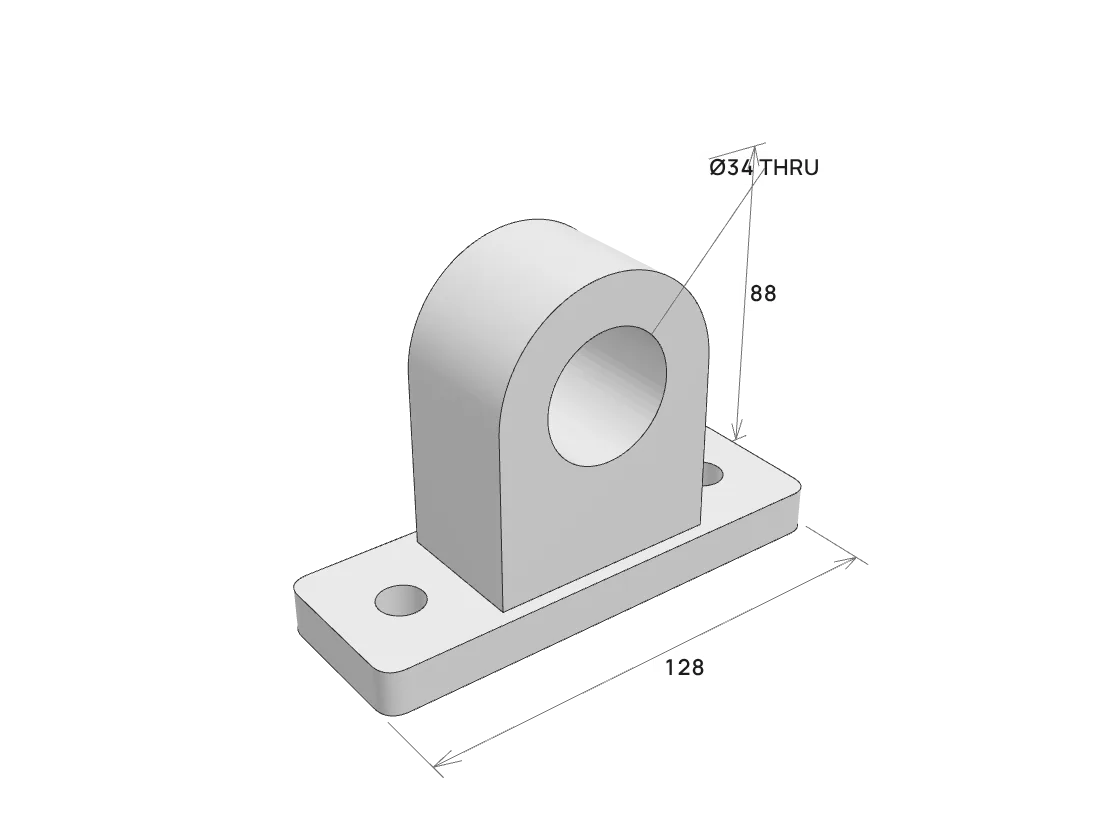
Pillow block
Size
128 × 44 × 88 mm
Units
mm
Pillow block, 128 by 44 by 88 mm, with a 34 mm through bore and two 12 mm bolt holes.
Example prompts

Nothing is uploaded. The file stays on your device.

Plus 77 free tools

Open CAD and engineering files, work with PDFs, convert and calculate. Nothing is uploaded, ever.

  • Free
  • No sign-up
  • No watermark
  • Nothing uploaded

Browse by category

New this week

What is TaskNinja?

TaskNinja is a free set of file viewers and everyday tools that run inside your web browser. You open a page, pick a file from your phone or computer, and the work happens on your own device. There is no app to install, no account to create and no watermark on what you save.

Most file formats here need heavy desktop software that costs a lot or only runs on one system. We take the open source readers for those formats, such as LibreDWG for AutoCAD drawings and QPDF for PDFs, and compile them to WebAssembly. WebAssembly is a compact program format that browsers run at close to native speed, so a DWG drawing or a large PDF can be read by the page itself instead of a server.

The heavy engines run in a Web Worker, a separate background thread in the browser. That keeps the page responsive while a file is read, and each file gets a fresh worker that is closed afterwards, so one damaged file cannot affect the next. Your file is read from your disk into the browser's memory and the result is saved straight back to your downloads.

Because of this, your files are never uploaded, stored or sold. You can check it yourself: open your browser's network panel while a file is processed and you will see no upload. The same is true of the text you type into a calculator or text tool. The site does use Google Analytics and AdSense, which set cookies to count visits and show ads, but they never receive your files or your text.

How privacy works · Open source we use

File viewers for formats that need expensive software

STEP and IGES 3D models

STEP (.step, .stp) and IGES (.iges, .igs) are the neutral 3D formats every CAD program exports, from any major CAD program. Our STEP viewer opens AP203, AP214 and AP242 files in 3D, lets you rotate, pan, zoom, switch standard views and hide parts, shows the model size, and saves a PNG or a binary STL ready for a slicer.

DWG and DXF files (AutoCAD)

DWG is the native drawing format of AutoCAD, used by architects, civil engineers, MEP consultants and site teams. DXF is its plain exchange cousin. Our DWG viewer opens both without AutoCAD, lets you pan, zoom, switch layers on and off and measure distances, and saves the drawing as PNG or PDF.

DGN files (MicroStation)

DGN is the format of Bentley MicroStation, common in highways, rail, utilities and government survey work. The DGN viewer reads both V7 and V8 files, shows levels you can toggle, measures, and exports PNG, PDF or DXF so the drawing can go into other CAD software.

STAAD.Pro .std models

A .std file is a STAAD.Pro structural model, the input that structural engineers use to analyse frames, towers and buildings. Our STAAD viewer draws the model in 3D, lists members, sections, supports and load cases, and saves a PNG, a PDF report or CSV tables for a quick check without a licence.

GraphPad Prism .prism and .pzfx

GraphPad Prism is the statistics and graphing tool used across biology, pharmacology and medical research. The Prism viewer opens .prism and .pzfx projects, shows every data table and result table with column statistics and info notes, and exports to Excel or CSV, which helps when a colleague sends a project and you do not have Prism.

Sketch .sketch design files

Sketch is a Mac app for UI and product design, so Windows and phone users often cannot open a .sketch file at all. Our viewer shows the preview, pages, artboards and layers, saves a PNG, and lets you copy the text from a design.

OneNote .one and .onepkg

OneNote saves sections as .one files and whole notebooks as .onepkg packages, often found in old backups or shared by email. The OneNote viewer reads and searches every page, saves to PDF or text, and pulls out the pictures and attached files.

JMP .jmp data tables

JMP and JMP Pro are statistics tools from SAS used in quality engineering, Six Sigma and research labs. The JMP viewer shows every row and column of a .jmp table with real dates and column statistics, and saves to Excel or CSV.

SPSS output .spv

An .spv file is the output of IBM SPSS Statistics, full of tables and charts from a survey or thesis analysis. Our SPV viewer shows every table, chart and note in output order and saves all tables to Excel, one sheet per table, or CSV.

Mathcad .mcdx and .xmcd

Mathcad worksheets hold engineering calculations with live units. The Mathcad viewer reads Mathcad Prime .mcdx and Mathcad 12 to 15 .xmcd files, showing the maths, results with units, text and plots, and saves the sheet as PDF, text or a results table.

Outlook for Mac .olm archives

Outlook for Mac exports mailboxes as .olm archives, which Outlook on Windows cannot open. Our OLM viewer lets you read and search every email, save attachments, and convert the archive to MBOX, EML, CSV, VCF or ICS for another mail app.
PDF, photo and money tools

PDF tools

Shrink a PDF so it fits an email or a portal limit, join several PDFs into one, split out the pages you need, turn sideways pages the right way up, add a password before you send a file, or turn photos into a single PDF. Compress PDF can aim for a portal limit like 200 KB or 1 MB, and unlocking and password protection use QPDF compiled to WebAssembly. Every step runs in the page, so bank statements and ID scans never leave your device. A PDF editor is coming next.

How it works

  1. 1. Pick a tool

    Search for a format like DWG or PDF, or choose from the lists above. Each tool is its own page, so you can bookmark the ones you use.

  2. 2. Choose your file

    Drag a file onto the page or tap to pick one from your device. It is read in your browser, so even large drawings and archives open without waiting for an upload.

  3. 3. View, convert or save

    Look through the file, then save a PDF, PNG, Excel, CSV or another format straight to your downloads. Close the tab and nothing is left behind on a server.

Latest from the blog

Frequently asked questions

How can I open a DWG file without AutoCAD?
Open the TaskNinja DWG viewer and choose your file. It reads DWG and DXF in your browser with LibreDWG, so you can pan, zoom, switch layers and save a PNG or PDF without installing AutoCAD.
Can I open a DGN file without MicroStation?
Yes. The DGN viewer opens MicroStation V7 and V8 files in the browser, shows levels you can turn on and off, and can export PNG, PDF or DXF.
How do I view a STAAD .std file without STAAD.Pro?
Use the STAAD file viewer. It draws the model in 3D and lists members, sections, supports and load cases. You can save a PNG, a PDF report or CSV tables.
How do I open a GraphPad Prism file without Prism?
The Prism file viewer opens .prism and .pzfx projects and shows every data and result table. You can export the tables to Excel or CSV.
Are my files uploaded to your server?
No. Viewer, PDF, photo and calculator tools process files in your browser using WebAssembly and Web Workers, so the file stays on your device. The same goes for the text you type into a calculator or text tool: nothing you enter leaves your device. The page does load Google Analytics and AdSense, which set cookies, but they never receive your files or text.
Is TaskNinja really free?
Yes. There is no sign-up, no watermark and no paid plan. Browser tools have no usage limits. Ads help keep the site running.
How do I compress a PDF to under 1 MB or 200 KB?
Open Compress PDF, add the file and choose a target such as 100 KB, 200 KB, 500 KB or 1 MB, or pick a quality preset. The file is compressed in your browser and never uploaded.
How do I open a STEP or IGES file without CAD software?
Use the STEP viewer. Drop a .step, .stp, .iges or .igs file and the 3D model opens in your browser. You can rotate it, hide parts, read its size, and save a PNG or an STL for 3D printing. The file is not uploaded.
Does TaskNinja work on a phone?
Yes. Every tool works in a mobile browser on Android and iPhone. Very large CAD drawings open faster on a computer with more memory.