How to open an IGS (IGES) file without CAD software (free, in your browser)
Open an .igs or .iges file free in your browser, with no upload. We tested solid and surface-only IGES files for size, units, volume, STL and editing.
To open an IGS or IGES file without CAD software, drop it into a free browser IGES viewer such as the TaskNinja IGES viewer. It reads the file on your own computer, shows the model in 3D, gives you its size in millimetres and can save a picture or an STL. If you need to change the part, open the same file in Trevolyx, our free browser CAD app.
That is the short answer. The longer one matters because IGES files are not all alike. Some hold a proper solid, and many hold only loose surfaces that look solid on screen but are not. We made four IGES files on 16 Nov 2026, opened each one in the viewer and in Trevolyx, and checked the results. Here is what you can expect.
The quick answer
- Open the IGES viewer in Chrome, Edge, Safari or Firefox. It works on Windows, Mac, Linux, ChromeOS and phones.
- Choose your .igs or .iges file, or drop it on the box. Nothing is uploaded and there is no account.
- Drag to rotate, scroll to zoom, and read the size, face count and volume under the view.
- Press Save view as PNG for a quote or a report, or Download STL for a 3D printer.
What is inside an IGS file?
IGES (Initial Graphics Exchange Specification) is the neutral CAD format from the 1980s that came before STEP. The last version, 5.3, dates from 1996. The file is plain text in 80 column lines, split into Start, Global, Directory Entry and Parameter Data sections, which is why you can open one in Notepad and see rows ending in S, G, D and P. The Global section records the unit; in our files it said 2 and MM for millimetres, or 1 and INCH for inches.
The part that trips people up is how the shape is stored. A sending program can write the model in one of two ways:
| How it is written | IGES entities | What you get | Good for |
|---|---|---|---|
| Trimmed surfaces (the usual default) | 144 Trimmed Surface | Separate faces that touch but are not joined | Viewing, measuring, CAM surface machining |
| Solid (B-rep) | 186 Manifold Solid, 514 Shell, 510 Face | One closed solid with a volume | Editing, mass, 3D printing |
Open CASCADE, the geometry engine both of our tools use, writes trimmed surfaces by default unless the solid mode is switched on. Other CAD programs offer the same choice in their IGES export settings, so whether a supplier's file is a solid or a set of surfaces depends on what they ticked.
What we tested
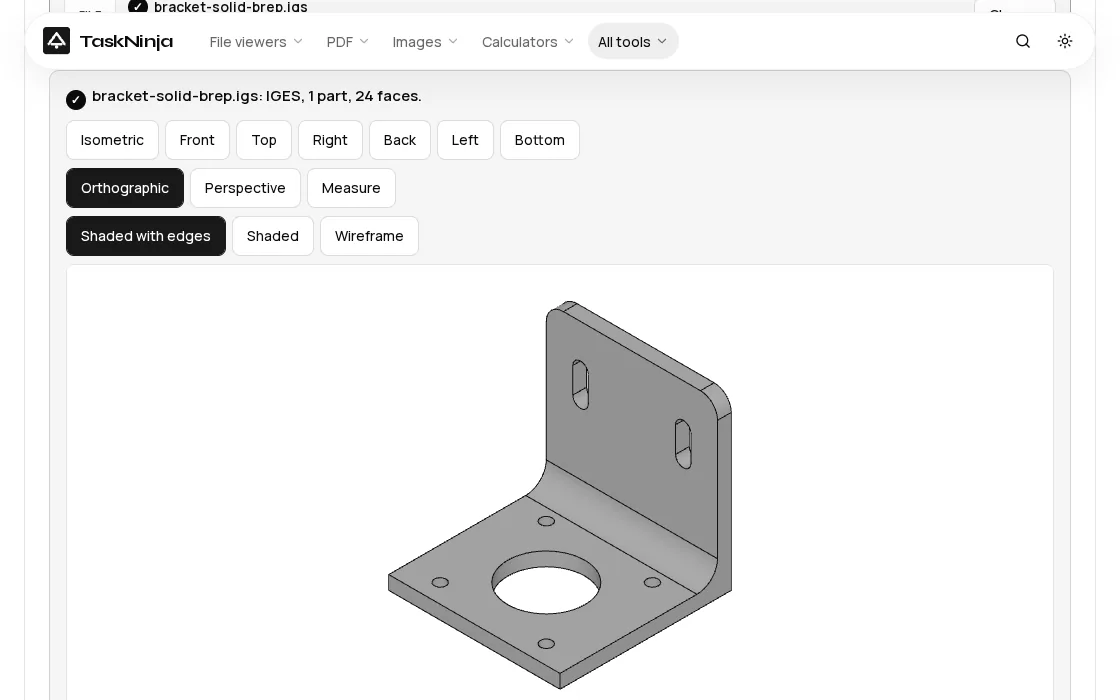
All four files came from CadQuery 2.8 with the Open CASCADE 7.9 IGES writer, so we know the exact shape. The bracket is a 50 mm L shaped motor mount, 4 mm thick, with a 22.5 mm bore, four 3.4 mm holes, two slots and a 6 mm inside bend. Its exact volume is 17,410.43 mm³. You can download the solid IGES and repeat the test.
| File | File size | Opened in | Size shown | Volume line | STL watertight |
|---|---|---|---|---|---|
| Bracket, solid (B-rep) | 75.9 KB | 0.27 s | 50 × 50 × 50 mm | 17.42 cm³ (+0.08%) | Yes, 980 triangles |
| Bracket, trimmed surfaces | 95.8 KB | 0.28 s | 50 × 50 × 50 mm | Not a closed solid | No |
| Bracket, surfaces, saved in inches | 103.5 KB | 0.36 s | 50 × 50 × 50 mm | Not a closed solid | No |
| Curved sheet, one surface | 4.9 KB | 0.28 s | 120 × 80 × 10.08 mm | Not a closed solid | No (it is a sheet) |
The viewer read every file in well under half a second once its engine had loaded. The solid file gave a volume within a tenth of a percent of the exact value, and its STL was watertight. The surface version looks identical on screen, with the same 24 faces and 980 triangles, but the viewer correctly reports that it is not a closed solid.
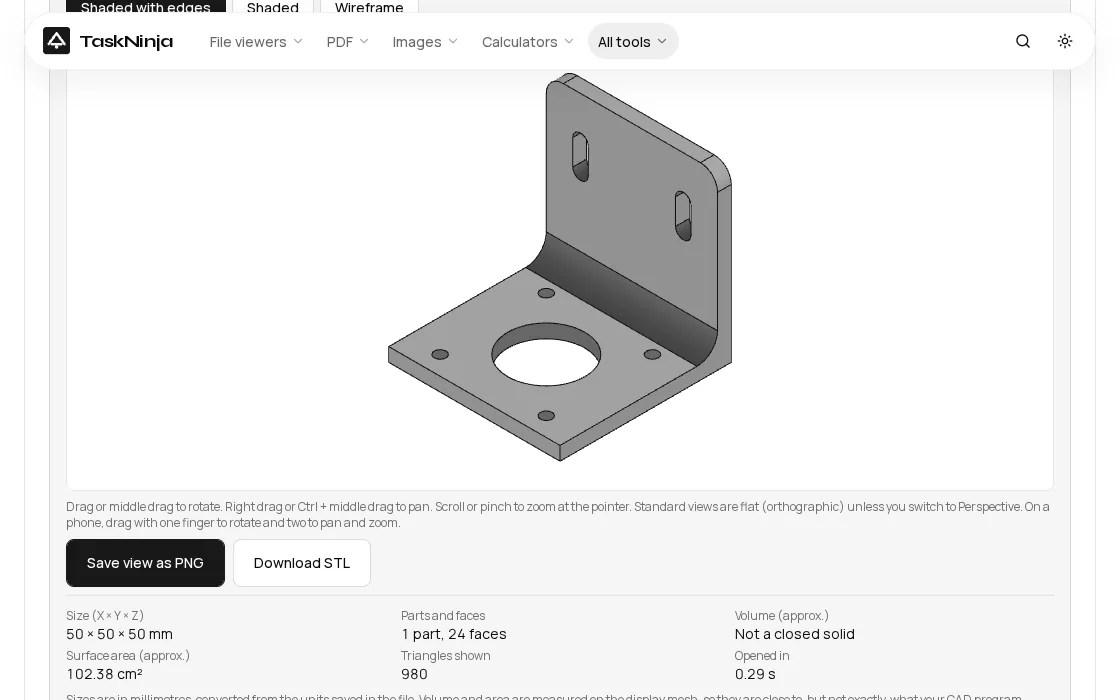
Why does my IGES file say "not a closed solid"?
Because the faces are only placed next to each other. Nothing in the file says that edge A of one face is the same edge as edge B of the next, so each face is meshed on its own and tiny gaps appear along the seams. For looking and measuring this does not matter. For anything that needs an inside and an outside, it does: volume and weight, a watertight STL for a slicer, or adding a cut or a fillet in CAD.
- Just checking a part? Surfaces are fine. Sizes, hole positions and the overall shape are all correct.
- Printing it? Ask the sender for a STEP file, or for IGES saved as a solid (the export option is usually labelled MSBO, type 186, or B-rep solid). An STL from loose surfaces may fail in the slicer.
- Quoting by weight? Use the solid file. Our surface bracket could not give a volume, which is the honest answer.
Units: inch files come out right
An IGES file declares its unit in the Global section. Our inch file stored the bracket as 1.968504 inches across, and the viewer still showed 50 × 50 × 50 mm, the same as the millimetre file. The viewer always converts to millimetres, and its Measure button can switch the readout to inches. If a model ever looks 25.4 times too big or too small, the sender wrote the wrong unit into the file.
Need to edit it? Open it in Trevolyx
The viewer looks and converts but does not edit. Trevolyx is our free browser CAD app for laptops and desktops. Use File, Open and pick the .igs file, or press Edit this model in Trevolyx under the viewer, which passes the file from tab to tab without uploading it. Both routes worked with our bracket. The model arrives as an Imported feature in the history tree. You can measure it, run Mass Properties, sketch on its flat faces and add your own features.
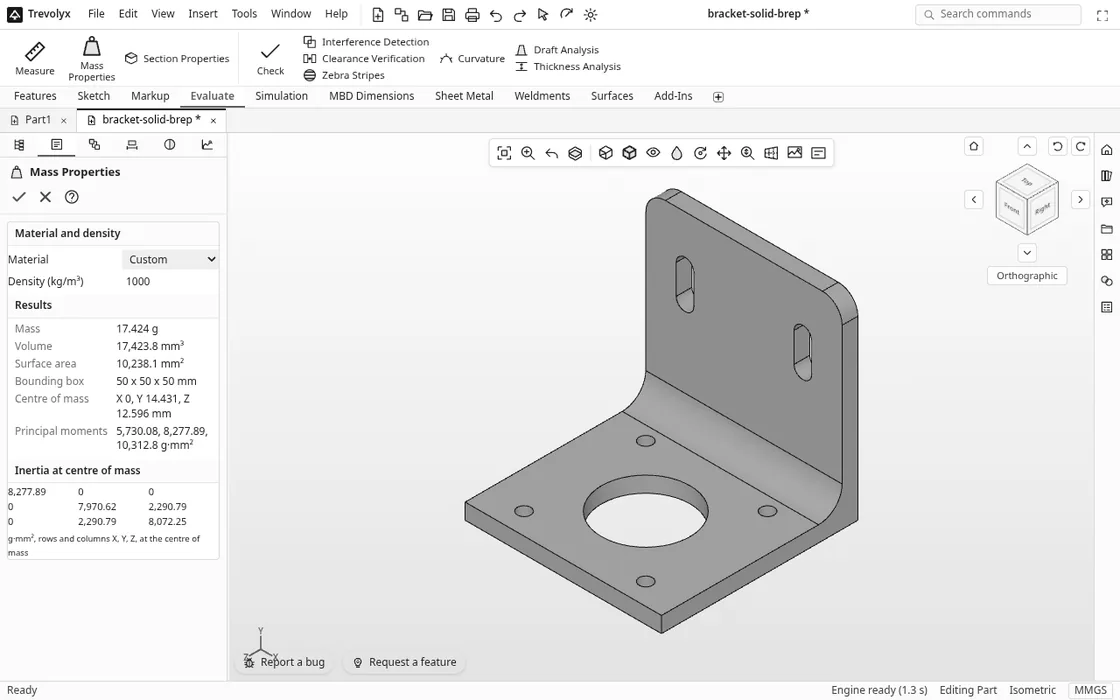
From Trevolyx you can export STL, OBJ, 3MF, GLB or STEP. Be aware that an imported IGES saved as STEP is written as a faceted (mesh) STEP: our 75.9 KB solid IGES became a 638.5 KB STEP made of triangles. That is fine for viewing and printing, but if a machinist needs exact geometry, keep the original IGES or ask for a STEP from the source. For the surface-only bracket and the curved sheet, Mass Properties in Trevolyx says "Not a closed solid" instead of reporting a volume, the same answer the viewer gives.
The file formats page lists everything Trevolyx opens and exports, and the guide to opening a STEP file without CAD covers the newer format.
Is my file uploaded?
No. We watched the network while opening all four files. The IGES viewer made no request carrying the file at all. Trevolyx sent only its anonymous usage count, which records the file extension ("igs"), not the file or its name. That matters when the part belongs to a client.
Honest limits
- Wireframe-only IGES (curves and points with no surfaces) has nothing to shade, so the viewer shows a message instead of a model.
- Colours and layers from IGES are not all kept.
- No sewing yet. Neither tool joins loose surfaces into a solid for you. Ask for a solid file instead.
- Faceted STEP out. Converting an imported IGES to STEP in Trevolyx gives a mesh STEP, as described above.
FAQ
What is an IGS file?
An .igs or .iges file is a neutral 3D CAD model in the IGES format. It can hold surfaces, solids, curves and drawing data, and almost every CAD and CAM program can write one. It is plain text, but you need a viewer to see the shape.
How do I open an IGS file without AutoCAD or SolidWorks?
Use a browser viewer. Choose the file in the IGES viewer and it opens in 3D in a second or so, free, with nothing to install. To edit it, open it in Trevolyx.
Is IGES better than STEP?
Usually not. STEP is newer and keeps solids, assemblies and colours more reliably. Ask for STEP when you can, and use IGES when an older system or a supplier archive only has IGES.
Can I convert IGES to STL?
Yes. Open the file in the IGES viewer and press Download STL, or use the STEP to STL converter, which also takes IGES. Check the Volume line first: if it says not a closed solid, the STL will not be watertight.
Does it work on a phone?
The IGES viewer does: one finger rotates and two fingers zoom and pan. Trevolyx is built for a laptop or desktop with a mouse.
Sources
- NIST FIPS PUB 177-1: Initial Graphics Exchange Specification (IGES) (solids, surfaces and drawings in a neutral format)
- The National Archives PRONOM: IGES, x-fmt/158 (80 column text, Start and Global sections, .igs and .iges)
- Open CASCADE: IGES translator user guide (entity 144 Trimmed Surface, 186 Manifold Solid, Faces mode as the default, IGES 5.3, units)
- NIST: IGES Version 4.0, NBSIR 88-3813
- Every timing, size and volume above was measured on the live IGES viewer and Trevolyx on 16 Nov 2026
Written by the TaskNinja team with help from an AI writing tool, then checked against the live IGES viewer and Trevolyx.