How to open a STEP file without CAD software
Open a .step or .stp file in your browser with Trevolyx: view the solid, measure it, and export STEP or STL. No install, and the file stays on your computer.
A supplier sends a bearing housing as a .step file. A classmate drops a .stp of their project on Drive. Purchasing forwards a vendor model so you can quote a fixture. You double click the file and Windows or macOS asks which app to use, because you do not have SolidWorks, Inventor, Fusion, CATIA or NX on this computer.
Excel and Word cannot open it. A PDF of a drawing is not the same as the solid. Here are the real ways to open a STEP file without installing a full CAD seat, what each option costs you in privacy and capability, and how we opened Trevolyx's live Pillow block (STEP) sample in the browser on 6 Nov 2026.
Why STEP files show up without a CAD seat
STEP is the usual handoff format between companies that use different CAD programs. Vendors publish catalogue parts as STEP. Job shops ask for STEP so they can quote without needing your native file. Students get STEP when a lab PC has SolidWorks but the laptop at home does not. The file is useful long before you need a licence to remodel it from scratch.
Native files such as .sldprt, .ipt, .prt or .catpart stay closed. If that is what you were sent, ask for a STEP export. Every major CAD program can write one in a few clicks. Once you have .step or .stp, you can view it without owning the same seat that made it.
What a STEP file actually is
STEP is ISO 10303, the Standard for the Exchange of Product model data. On disk you usually see a Part 21 text file that starts with ISO-10303-21, with the extension .step, .stp or sometimes .p21. Unlike an STL mesh of triangles, STEP keeps exact geometry: true cylinders, planes, cones and freeform surfaces with precise edges. That is why you can measure a hole diameter cleanly and pick a flat face to sketch on later.
The application protocols you meet most often are AP203 (configuration controlled 3D design of mechanical parts and assemblies), AP214 (automotive mechanical design), and AP242 (managed model based 3D engineering). NIST lists those three among the commonly used STEP standards, and notes that AP242 is the current series major CAD vendors have deployed. Aerospace and automotive long term archiving work in LOTAR builds on the same ISO 10303 protocols rather than inventing a separate geometry format.
Our built in sample, pillow-block-sample.step, is an Open CASCADE export that declares FILE_SCHEMA automotive_design, which is AP214. .step and .stp are the same format with two extensions. There is no difference in the content.
Your options
| Option | Cost | Runs on | Catch |
|---|---|---|---|
| Desktop CAD (SolidWorks, Inventor, Fusion, FreeCAD, etc.) | Paid seat, or free for FreeCAD | Installed desktop app | A large install when you only need to look at one file |
| NIST STEP File Analyzer and Viewer | Free | Windows desktop | A separate install; built for checking STEP and PMI, not full modelling |
| Trevolyx (browser CAD) | Free | Desktop Chrome or Edge | Desktop first; phones are for lighter viewers |
| TaskNinja STEP viewer | Free | Any current browser, including phones | View and rotate; measure is basic, no feature tree editing |
| Upload based online viewers | Often free with limits | Browser | The file is sent to someone else's server; fine for public parts, poor for NDA work |
If you will remodel STEP every day, a proper CAD seat through work or college is still the right answer. If you need to open one supplier file, check a dimension, or turn the solid into an STL for a printer, a browser tool is faster than installing a multi gigabyte program. Adobe Acrobat and ordinary office apps do not open STEP solids; ignore search results that imply a PDF reader will do it.
For a short overview focused on Trevolyx alone, see Open STEP files online. This guide goes deeper on choices, privacy and what happens after import.
How to open a STEP file in Trevolyx
- Open Trevolyx in a desktop Chrome or Edge tab. There is no account and nothing to install.
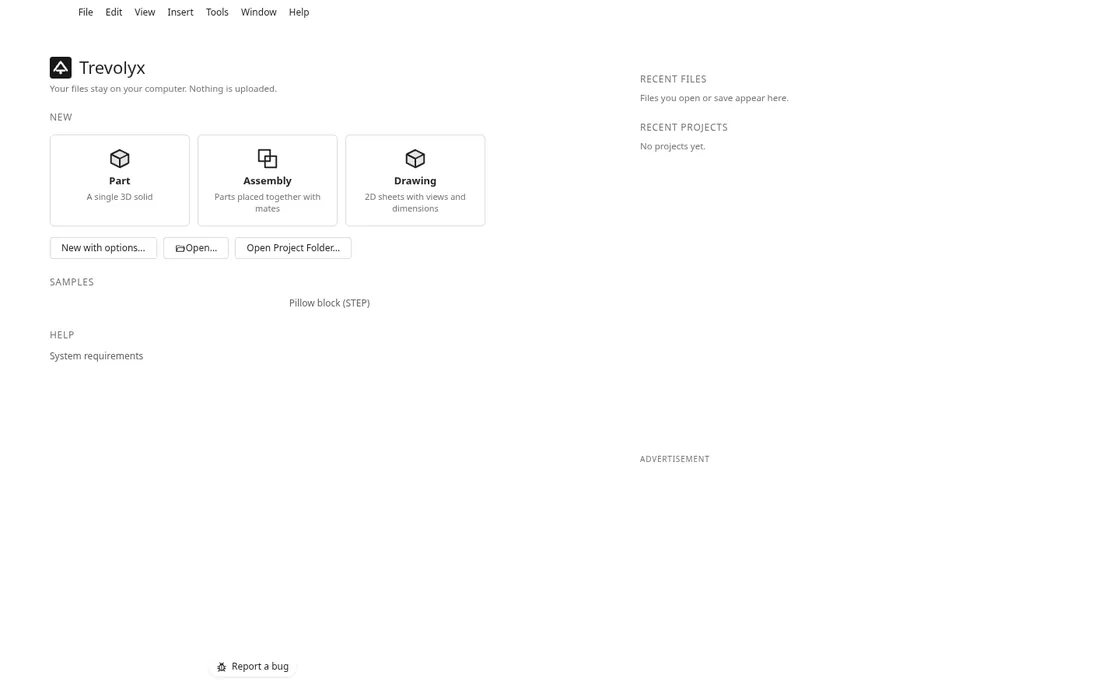
- On the start screen you see tiles for Part, Assembly and Drawing, plus Open... and Open Project Folder.... Under Samples, click Pillow block (STEP), or press Open... (Ctrl+O) and choose your own .step or .stp file.
- Trevolyx fetches the sample from its own site path
/samples/step/pillow-block-sample.step, or reads your file from disk into the tab. The geometry engine runs in WebAssembly on your computer. - When import finishes, the status bar reads something like Opened pillow-block-sample.step as pillow-block-sample, the feature tree lists Imported1 under the part, and the solid appears in the graphics area.
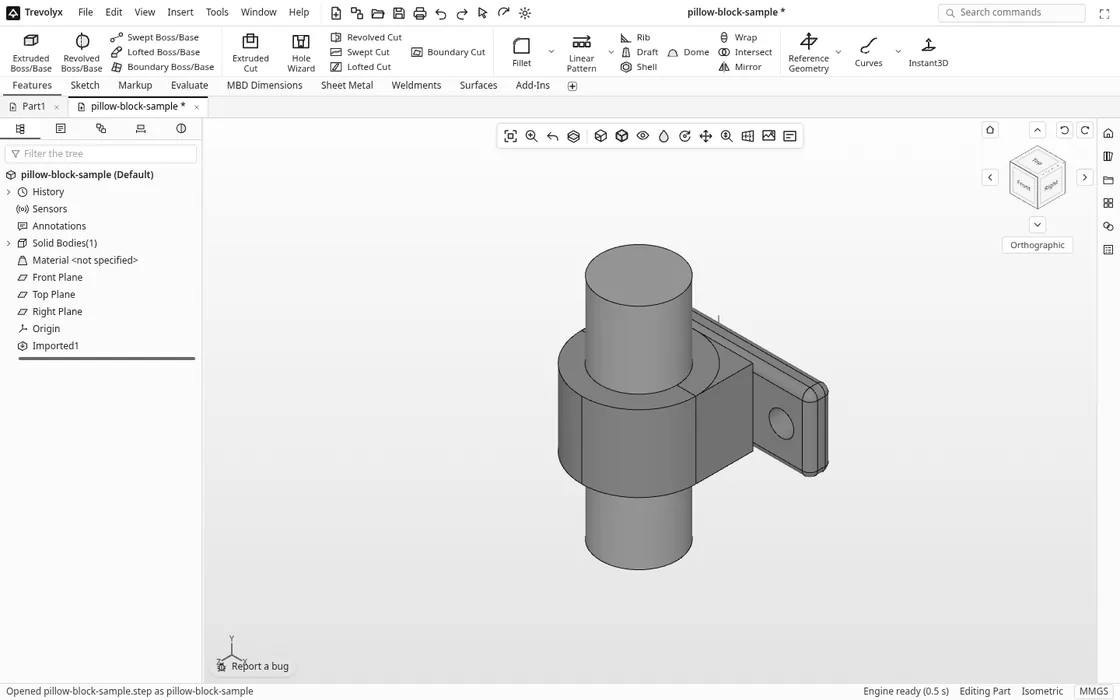
Middle mouse drag orbits, the wheel zooms, and Ctrl plus middle mouse pans, the same as most desktop CAD. The heads up view toolbar covers zoom to fit, pan, section view and display style. Switch to the Evaluate tab for Measure (distance, angle, radius and size) and Mass Properties (volume, surface area and bounding size).
What you can do after it opens
- View and section the solid. Use a section view when you need to look inside a housing or casting.
- Measure edges and faces from the Evaluate tab when a drawing is missing or you want a quick check before quoting.
- Mass Properties for a volume estimate. Assign a material later if you need mass from density.
- Add features on top of the import. Sketch on a plane or a flat face, then use Extruded Boss/Base, Extruded Cut, Fillet, Hole Wizard and similar commands. The original STEP arrives as an Imported feature, not as the native sketch history from SolidWorks or Inventor, so you are not regenerating the supplier's feature tree. You are building new features that reference the imported body.
- Export. File menu Export (STL, OBJ, 3MF, GLB, STEP)... writes a mesh or a fresh STEP. For print mesh alone, the lighter STEP to STL converter is enough.
- Save a Trevolyx part with Ctrl+S as a .tnprt on your computer if you will keep working on it.
Honest limits: Trevolyx does not open native .sldprt or .ipt files. Very large assemblies can take a while because every face is rebuilt exactly. Mesh heavy STEP files (STL converted to STEP by a model library) stay slow. Simulation, 3D Sketch, Markup and MBD are not in v1 yet. Modelling is desktop first; for a quick look on a phone use the STEP viewer instead.
If you want a broader free CAD seat for class or practice, see free CAD for students and the free SolidWorks alternative pages, or the 3D CAD hub.
STEP vs STL vs IGES
| Format | What it stores | Good for | Weak for |
|---|---|---|---|
| STEP (.step, .stp) | Exact B-rep solids and assemblies (ISO 10303) | Exchange, measure, further modelling, manufacturing quotes | Direct 3D print without meshing |
| STL (.stl) | Triangle mesh approximation | 3D printing and some CAM previews | Exact diameters, clean face picks, editing |
| IGES (.igs, .iges) | Older neutral curves and surfaces (and some solids) | Legacy vendor archives Trevolyx can open | New exchange; prefer STEP AP214 or AP242 when you have a choice |
When a printer or slicer asks for a file, convert STEP to STL or 3MF. When a supplier asks which format to send, ask for STEP. IGES files open in Trevolyx the same way as STEP; the dedicated IGES viewer is there if you only need a quick look.
Is the STEP file uploaded?
No, not for your own file. Trevolyx reads .step and .stp from your disk into the browser tab. The OpenCascade based kernel runs locally as WebAssembly. We watched the network while opening the Pillow block sample on the live site on 6 Nov 2026: the only STEP related request was a GET for https://trevolyx.taskninja.ai/samples/step/pillow-block-sample.step (the public sample on the same origin). Analytics and Cloudflare RUM beacons fired as empty or tiny POSTs. No request carried the STEP body of a user file, because a user file never leaves the tab.
That is the privacy difference versus upload based online viewers. Those services can be fine for a public catalogue part. They are a poor fit for a customer NDA model, a quoting package, or anything you would not paste into email.
FAQ
Can I open a STEP file without SolidWorks or Inventor?
Yes. Open Trevolyx, choose Open... or the Pillow block (STEP) sample, and the solid loads in the browser. FreeCAD and NIST's STEP File Analyzer are desktop alternatives if you prefer an installed app.
What is the difference between .step and .stp?
None. Both extensions refer to the same ISO 10303 Part 21 file. Some programs default to one spelling; Trevolyx accepts either.
Can I convert STEP to STL without CAD software?
Yes. In Trevolyx use Export (STL, OBJ, 3MF, GLB, STEP)... and pick STL, or open the file in the STEP to STL converter when you only need the mesh.
Does opening a STEP file in Trevolyx upload it?
No. Your file stays in the browser tab. The public sample is fetched with a normal GET from the Trevolyx site; your own STEP is not posted to a server.
Can I edit an imported STEP like a native part?
You get an Imported body, not the original feature history. You can sketch on faces, cut, extrude, fillet and export a new STEP, but you cannot roll back the supplier's sketches the way you would inside their CAD. For full history you need the native file and the original program.
Sources
- STEP at NIST (AP203, AP214, AP242 and related protocols)
- STEP File Analyzer and Viewer, NIST
- ISO 10303-242 (Managed model-based 3D engineering) catalogue entry
- LOTAR 3D Mechanical CAD and PMI (long term archiving on ISO 10303 AP203, AP214, AP242)
- Trevolyx live app, Pillow block sample path
/samples/step/pillow-block-sample.step - Open STEP files online, STEP to STL, IGES viewer
Sources and the live UI labels were checked on 6 Nov 2026. Network notes are from a headless Chromium session against the live Trevolyx origin that day.
Written by the TaskNinja team with help from an AI writing tool, then checked against NIST and LOTAR documentation and the live Trevolyx UI.