How to open a DGN file without MicroStation (V7 and V8)
Open a MicroStation DGN file (V7 or V8) in your browser with no install, check levels and units, and save DXF or PDF. Tested on 10 real road drawings.
Someone sends you a .dgn file and nothing on your computer opens it. DGN is the drawing format of Bentley MicroStation, common on road, rail, water and survey projects, and most people who receive one have never had a MicroStation licence.
You do not need one just to look. Here are the free ways to open a DGN, and what happened when we ran 10 real drawings through our DGN Viewer.
First, find out which DGN you have
There are two DGN formats with the same extension. The Library of Congress format record describes them: V7, the older Intergraph format used by MicroStation up to version 7 (95, SE and J), and V8, which Bentley introduced in 2000 for MicroStation 8 and still uses today in V8i and CONNECT Edition. Inside they are completely different, which decides what can read your file.
A V7 file starts with the bytes 08 09 FE 02 (2D) or C8 09 FE 02 (3D), while a V8 file is a Microsoft compound file starting with D0 CF 11 E0. Our viewer checks this first and prints the result under the file name, for example "MicroStation V8 (2004 and later), 2D". Most files made in the last 20 years are V8.
Your free options compared
| Option | Reads | Runs on | Catch |
|---|---|---|---|
| MicroStation | V7 and V8 | Windows | Paid Bentley licence |
| Bentley View | DGN, DWG, DXF and 50+ other formats | Windows 10 and 11 (64-bit), Windows Server | Free, but a desktop install |
| AutoCAD DGNIMPORT | V7 and V8 | AutoCAD and AutoCAD LT on Windows | Needs AutoCAD; not in AutoCAD for Mac |
| GDAL tools such as QGIS | V7; V8 only with the commercial ODA libraries | Windows, Mac, Linux | Standard builds read V7 only |
| TaskNinja DGN Viewer | V7 and V8 | Any current browser, including phones | Some V8 features not drawn yet |
On a Windows PC where you may install software, Bentley View is the most faithful free option, since it comes from MicroStation's maker. On a Mac, a Chromebook, a phone, or an office PC that blocks installs, a browser viewer is the quick way in.
How to open a DGN file in your browser
- Open DGN Viewer and press Choose a DGN file, or drop the file on the box.
- The first time, your browser downloads the 700 KB DGN engine from taskninja.ai and caches it. The drawing appears on a dark canvas.
- Use Fit to screen, the zoom buttons, or scroll and drag to move around. Light canvas switches to black lines on white.
- Turn levels on and off in the Levels list, or use All on and All off. MicroStation levels are the same idea as AutoCAD layers.
- Press Measure and click two points to read a distance in the drawing's own units, which the File info box names (feet, metres and so on).
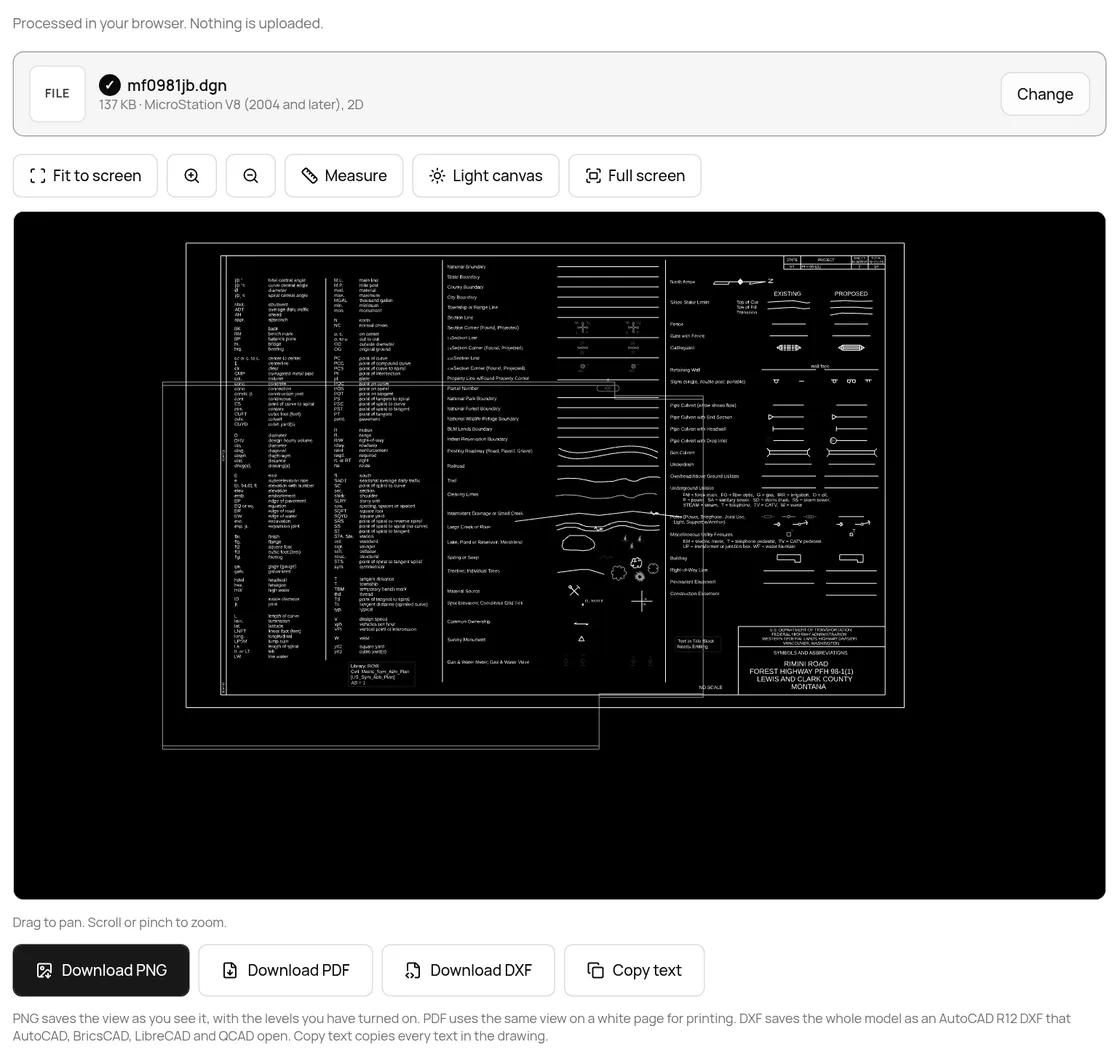
- Save what you need: Download PNG for an image of the view, Download PDF for a printable page, Download DXF for AutoCAD and other CAD apps, or Copy text for every text in the drawing.
We tested it on 10 real DGN files
We used public files. Eight come from the US Federal Highway Administration's sample right-of-way set for a Montana forest highway: title sheet, symbols sheet, typical section, vicinity map and four base files. Two are small test files from the GDAL project, one V7 and one V8. Each was opened on the live page in Chrome on 20 Oct 2026; the numbers are from its File info box.
| File | Type | Elements | Levels | Not drawn | Time |
|---|---|---|---|---|---|
| smalltest (GDAL) | V7, 2D | 4 | 2 | Nothing | 0.4 s |
| test_dgnv8 (GDAL) | V8, 3D | 45 | 2 | 1 dimension, 1 shared cell | 0.3 s |
| ja, title sheet | V8, 3D | 1,423 | 12 | Nothing | 0.4 s |
| jb, symbols sheet | V8, 2D | 832 | 80 | Nothing | 0.4 s |
| jc, typical section | V8, 3D | 686 | 20 | Nothing | 0.4 s |
| jd, vicinity map | V8, 3D | 3,172 | 27 | 896 shared cells | 0.3 s |
| ha, alignment | V8, 2D | 3,999 | 23 | 1 shared cell | 0.3 s |
| row, new right of way | V8, 3D | 4,845 | 19 | Nothing | 0.4 s |
| prw, existing property | V8, 2D | 6,113 | 30 | 28 shared cells, 85 texts without a size | 0.5 s |
| plm, survey (1 MB) | V8, 2D | 12,354 | 40 | 394 shared cells | 0.9 s |
All 10 opened in under a second, and the page said exactly what it left out. The weak spot is shared cells, MicroStation's reusable symbols: the vicinity map leans on them, so 896 were missing there, while sheets of plain lines and text came through complete.
Does the DXF really open in CAD software?
If you need to work on the drawing, the DXF matters. We read every DXF back with ezdxf 1.4.5, an independent open-source DXF library, and ran its audit.
| File | DXF size | Entities read back | Audit |
|---|---|---|---|
| smalltest (GDAL) | 1.1 KB | 4 | No errors |
| test_dgnv8 (GDAL) | 38 KB | 45 | No errors |
| ja, title sheet | 927 KB | 1,423 | No errors |
| jb, symbols sheet | 149 KB | 832 | No errors |
| jc, typical section | 121 KB | 686 | No errors |
| jd, vicinity map | 341 KB | 3,172 | No errors |
| ha, alignment | 993 KB | 3,999 | No errors |
| row, new right of way | 494 KB | 4,845 | 3 text decoding errors, fixed on reading |
| prw, existing property | 697 KB | 6,113 | 5 text decoding errors, fixed on reading |
| plm, survey | 9.8 MB | 12,354 | No errors |
Every file came out as an AutoCAD R12 DXF (AC1009), the most widely readable kind, with the entity count matching the viewer's count and each MicroStation level as a layer. The one honest flaw: some labels use symbols from MicroStation's own fonts, such as the fraction signs after section corner labels like "NE". Those became stray characters such as ˆ in 99 of the 9,082 texts, spread over 4 files; ezdxf repaired 8 of those lines. Degree signs in bearings such as S15°1'47"W came through correctly.
When parts of the drawing are missing
- Reference files. Sheets often show other DGNs attached as references; FHWA's sample page says its sheets need the base files. Each DGN opens on its own here, so open the base files too.
- Shared cells and dimensions in V8 files are not drawn yet. The note under the drawing counts them, for example "Not drawn: 896 shared cells".
- 3D designs are shown from the top as a plan view, and the page says so.
- Line styles, fills and fonts become solid lines, outlines and an open font.
- It is really a DWG. Some people rename AutoCAD files. The viewer spots the DWG signature and points you to our DWG Viewer instead.
Is the drawing uploaded?
No. We watched the network while opening all 10 files. Besides the page's own code and engine files from taskninja.ai, there were a few Google analytics and ad-quality GET requests, and no request carried a body. The DGN is read in a separate worker inside your tab, and the DXF, PDF and PNG are made on your device. TaskNinja never receives the file.
FAQ
Can I open a DGN file without MicroStation?
Yes. Use Bentley View on Windows, or open it in any browser with our DGN Viewer. Both read V7 and V8 files.
Is Bentley View free?
Yes, Bentley lists it as a free viewer. It needs Windows 10 or 11 (64-bit) or Windows Server, so it does not help on a Mac or a phone.
How do I convert DGN to DWG?
Save a DXF with DGN to DXF, then open it in AutoCAD, BricsCAD or DraftSight and save as DWG. With AutoCAD on Windows you can also use DGNIMPORT.
Can I open a DGN on a phone or a Mac?
Yes, in a browser. The viewer works in Chrome, Edge, Firefox and Safari. Large survey files open faster on a computer.
Why does QGIS not open my DGN?
QGIS reads DGN through GDAL, whose standard driver handles V7 only. V8 needs GDAL built with the commercial ODA libraries.
Sources
- MicroStation DGN Family, Library of Congress format description
- Bentley View, Bentley Systems (free viewer, system requirements)
- About Importing MicroStation DGN Files, Autodesk AutoCAD help
- What file formats can AutoCAD import?, Autodesk Support
- GDAL MicroStation DGN (V7) driver and DGN v8 driver
- Sample WFL right-of-way plans, plats and base files, FHWA Western Federal Lands
- GDAL autotest DGN files (GitHub) and ezdxf (GitHub, MIT)
Sources checked 20 Oct 2026. Counts and timings are from the live tool on that date; button labels are from the live page.
Written by the TaskNinja team with help from an AI writing tool, then checked against Bentley, Autodesk, GDAL and Library of Congress documentation and the tool itself.