How to open a STAAD .std file without STAAD.Pro (tested on 13 models)
Open a STAAD.Pro .std file free in your browser: see the frame in 3D, sections, supports and loads, and export to Excel or PDF. Tested on 13 real models.
A structural consultant emails you a file called something like building.std, and double clicking it does nothing useful. Open it in Notepad and you get pages of numbers under headings like JOINT COORDINATES. You wanted to see the building.
That file is a STAAD.Pro model. STAAD.Pro is Bentley's structural analysis program, widely used in India for RCC buildings, steel sheds, towers and bridges. It is paid and runs only on Windows. Here is what is inside an .std file, your free ways to open one, and what happened when we ran 13 real models through our STAAD File Viewer.
What is inside an .std file
An .std file is plain text. It is the list of commands STAAD.Pro reads to build the model, written in the command language described in Bentley's STAAD.Pro Technical Reference. That is why Notepad can open it, and also why Notepad is not much help: joints are numbers with three coordinates, and members are numbers that join two joints.
| Command in the file | What it tells you |
|---|---|
| STAAD SPACE (or PLANE, TRUSS, FLOOR) | The type of structure: a 3D frame, a 2D frame, a truss or a floor grid |
| UNIT METER KN | The length and force units for the numbers that follow |
| JOINT COORDINATES | Each joint number with its X, Y and Z position, or a rule that generates many joints |
| MEMBER INCIDENCES | Each member number with its start and end joint |
| MEMBER PROPERTY | The section of each member, such as a table section (ISMB 300) or a prismatic YD and ZD size |
| SUPPORTS | Which joints are fixed, pinned or partly restrained |
| LOAD and LOAD COMB | The load cases (dead, live, seismic, wind) and how they are combined |
| PERFORM ANALYSIS | Tells STAAD.Pro to run the analysis; the results are not stored in the .std |
Many files are shorter than you expect because STAAD can generate geometry. Bentley's own example in the reference defines the 51 members of one floor, then a REPEAT ALL command repeats that floor nine times, giving a ten storey, 3 x 4 bay frame of 510 members from a handful of lines.
Your options for opening a STAAD file
| Option | Shows the model in 3D | Runs on | Catch |
|---|---|---|---|
| STAAD.Pro | Yes, plus analysis and design | Windows (64-bit) | Paid licence, sign-in through Bentley's CONNECTION Client |
| STAAD.Pro through Bentley Education | Yes, full program | Windows (64-bit) | Free only for students and educators, educational use, renewed every year |
| Notepad or any text editor | No, only the commands | Anything | Numbers, not a picture |
| Bentley View | Not for .std | Windows 10 and 11, Windows Server | Free CAD viewer for DGN, DWG, DXF, IFC and more; STAAD files are not in its format list |
| TaskNinja STAAD File Viewer | Yes, model only | Any current browser, including phones | No analysis results; some details not drawn (see below) |
If you are a student, Bentley Education is the honest first answer: it gives you the real program free for a year at a time. If you are an architect, a client's reviewer, a site engineer or an estimator who only needs to look at the model, a browser viewer is quicker than installing anything.
How to open an .std file in your browser
- Open STAAD File Viewer and press Choose a STAAD file, or drop the file on the box. No file at hand? Press Open a sample G+3 frame.
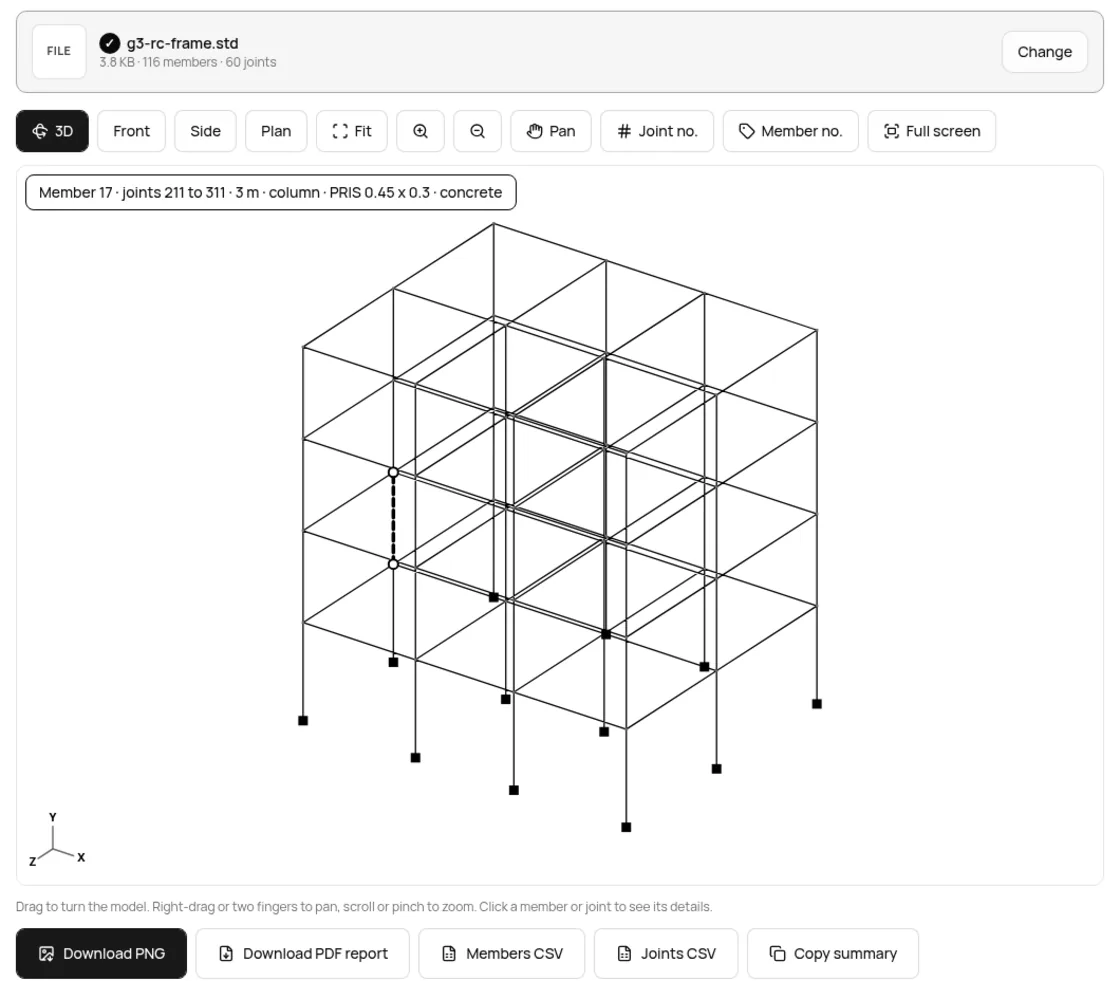
- The model opens in 3D, fitted to the screen. Drag to turn it, scroll or pinch to zoom, or switch to Front, Side or Plan.
- Click a member or joint to read its number, length, section and material. Joint no. and Member no. put the numbers on the drawing.
- Under the model, the Sections table groups members by section. Tap a row to show only those members.
- Save what you need: Download PNG, Download PDF report, Members CSV or Joints CSV for Excel, or Copy summary.
We tested it on 13 real STAAD models
We took 12 public .std files from GitHub, mostly Indian student and practice projects plus two MIT licensed samples from the OpenBuilding project, and added our own sample frame. Each was opened on the live page in headless Chrome on 24 Oct 2026. Times run from choosing the file to the export buttons being ready.
| Model | Type | Joints | Members | Supports | Sections | Loads | Time |
|---|---|---|---|---|---|---|---|
| TaskNinja G+3 sample | Space | 60 | 116 | 12 fixed | 3 | 4 / 3 | 0.16 s |
| G+3 residential building | Space | 80 | 160 | 16 fixed | 2 | 0 / 0 | 0.11 s |
| RCC plan 2 | Space | 73 | 123 | 13 fixed | 5 | 2 / 1 | 0.11 s |
| Plan imported from DXF (Xstruct sample) | Space | 122 | 215 | 15 fixed | 7 | 7 / 95 | 0.16 s |
| Pony truss bridge | Space | 44 | 89 | 4 fixed | 1 | 5 / 0 | 0.25 s |
| Roof truss | Truss | 40 | 97 | 5 fixed, 5 pinned | 3 | 3 / 0 | 0.12 s |
| OpenBuilding RC sample | Space | 30 | 45 | 8 fixed | 7 | 14 / 23 | 0.16 s |
| OpenBuilding steel sample | Space | 28 | 53 | 3 enforced | 11 | 2 / 0 | 0.18 s |
| IIT Hyderabad RCC course project | Space | 12 | 11 | 8 fixed | 2 | 8 / 8 | 0.19 s |
| Cable | Plane | 51 | 50 | 2 fixed but | 1 | 1 / 0 | 0.15 s |
| Underground bunker (plates only) | Space | 44 | 0 | 4 fixed | 0 | 4 / 3 | 0.11 s |
| Balcony grid | Floor | 4 | 3 | 2 fixed | 2 | 1 / 0 | 0.11 s |
| Portal frame | Space | 4 | 3 | 1 fixed, 1 pinned | 2 | 2 / 1 | 0.16 s |
All 13 opened in a quarter of a second or less, none had a member pointing at a missing joint, and the units, structure types and section tables (Indian, American and Japanese) were all read. The bunker has no beams or columns at all, only 22 plate elements, which the viewer draws as grey faces. To be fair about scale, these are small models of up to 215 members. Big industrial models open too, but take longer and need a computer with enough memory.
A quick quantity take-off from the model
The Sections table is the part estimators like. For prismatic RCC sections the viewer multiplies the area by the member length, so you get a rough concrete volume per section. Here is the table for our G+3 sample, exactly as the tool printed it:
| Section | Members | Total length | Concrete volume |
|---|---|---|---|
| PRIS 0.45 x 0.23 (beams) | 51 | 217.5 m | 22.51 m³ |
| PRIS 0.45 x 0.3 (columns) | 48 | 146.4 m | 19.76 m³ |
| PRIS 0.4 x 0.23 (beams) | 17 | 72.5 m | 6.67 m³ |
Treat this as a check, not a bill of quantities. The lengths run centre to centre between joints, so beam and column volumes overlap at every junction, and slabs, footings and staircases are usually not in a STAAD frame model at all. For steel table sections such as ISMB 300 you get counts and lengths, but the viewer does not look up section weights, so multiply by the kg per metre from the steel table yourself. Members CSV gives one row per member if you want to do that in Excel.
What the viewer does not do
- No analysis results. Bending moments, deflections and design ratios are not in the .std file, so they are not shown. The STAAD output report (.anl) has results but no geometry; ask for the .std as well.
- Some details are not drawn. Member releases, offsets and beta angles are read past, so a rotated column is drawn like any other.
- Other programs' files. ETABS (.e2k, .edb) and SAP2000 (.s2k, .sdb) are different formats. A few unrelated programs also use .std; if the file is not a STAAD model, the page says so instead of drawing nonsense.
- It does not edit or save the .std. It is a viewer. Changes still need STAAD.Pro.
Is the model uploaded?
No. The file is read by code running in your browser tab, and the PDF, PNG and CSV are made on your device. We watched the network while opening a model on 24 Oct 2026: after the file was chosen, the page made no requests at all. Client models often carry project names, so this matters more than it seems.
FAQ
Can I open a STAAD file without STAAD.Pro?
Yes. Choose the .std file in our STAAD File Viewer and the model opens in 3D in Chrome, Edge, Firefox or Safari, on Windows, Mac, Linux or a phone.
Can I open an .std file in Notepad?
Yes, it is plain text, so Notepad shows the commands. It will not draw the structure or count members for you.
Is STAAD.Pro free for students?
Bentley Education gives eligible students and educators free access for educational use, for up to a year at a time, renewable while you stay eligible. You verify with a college email or a student ID.
Can I convert a STAAD file to Excel?
Yes. Members CSV gives each member's joints, length, type, section and material, and Joints CSV gives every joint's X, Y, Z and support. Both open directly in Excel or Google Sheets.
Why does my STAAD file not open?
It may be the output report (.anl), an ETABS or SAP2000 file, or an unrelated .std. A STAAD input file starts with STAAD SPACE, PLANE, TRUSS or FLOOR. Ask the sender for the STAAD.Pro input file. Our .std file page explains the common mix-ups.
Sources
- STAAD.Pro 2026 Technical Reference: TR.11 Joint Coordinates Specification, Bentley
- STAAD.Pro 2026 Technical Reference: TR.12 Member Incidences Specification (the 510 member example), Bentley
- STAAD.Pro 2026 Technical Reference: TR.20.2 Prismatic Property Specification, Bentley
- STAAD.Pro 2026 System Requirements, Bentley help and Licensing, STAAD.Pro 2026 ReadMe
- Bentley Education help: eligibility and access length
- Bentley View, Bentley Systems (free viewer, formats and system requirements)
- Test files: OpenBuilding samples (GitHub, MIT), Xstruct Pro sample (GitHub, MIT) and public repositories by Dharmik10987, Rohit-Kankaria, Abhay1279, an-ash-iith, gliderabhi, poeticmage, GreatDevelopers and jerinjacob565 on GitHub. Only counts are reported here; the files are not republished.
Sources checked 24 Oct 2026. Counts and timings are from the live tool on that date; button labels are from the live page.
Written by the TaskNinja team with help from an AI writing tool, then checked against Bentley's documentation and the tool itself.