How to open a DWG file online without AutoCAD
Open a DWG file online without AutoCAD. Check layers, measure a distance, and save PNG or PDF in the browser. The drawing stays on your device.
A floor plan, a lab sheet, or a machine part arrives as a .dwg, and this computer has no AutoCAD. You need the lines, one distance, or a PDF, and the drawing should stay on the device.
The DWG Viewer opens it in the browser. The DXF Viewer is the same tool, for an interchange file. There is no install and no account.
Why the DWG shows up without AutoCAD
DWG is the native format for AutoCAD and other AutoCAD-based products. Autodesk's 2026 help says it stores blocks and 2D and 3D designs, and that the format changes every few years. Releases 2018 through 2026 share the AutoCAD 2018 format. An older program is the break: Autodesk's example is a colleague on AutoCAD 2016, who needs the 2013 format.
Many people who receive the file never run CAD. Autodesk's free Windows program for viewing, plotting, PDF and version conversion is DWG TrueView. It is an install. This page is for a phone or a shared computer, where you cannot install software and the drawing should stay in the browser.
DWG and DXF
Autodesk calls DXF the drawing interchange format: ASCII text, or a smaller binary file, for sharing a drawing with other CAD programs. This page reads the text form. A binary DXF stops with: save it again as an ASCII DXF, or as a DWG.
| DWG | DXF | |
|---|---|---|
| What it is | AutoCAD's native drawing file. | An interchange file. ASCII is text. Binary is compact. |
| What opens here | Release 13 through the 2018 format, codes AC1012 to AC1032. | ASCII DXF. Binary DXF is refused. |
| On open | LibreDWG turns the DWG into DXF in the browser, then the page draws it. | The page draws the file directly. |
The version code is the first six characters of a DWG. AutoCAD 2026 help says releases 2018 through 2026 still use the 2018 format, unless Options was set to an older one. File info prints it as DWG, AutoCAD 2018 (AC1032), with units, size, objects and layers. Release 12 and earlier may not open. Save those as ASCII DXF.
| Code | Release |
|---|---|
| AC1012 | Release 13 |
| AC1014 | Release 14 |
| AC1015 | 2000 to 2002 |
| AC1018 | 2004 to 2006 |
| AC1021 | 2007 to 2009 |
| AC1024 | 2010 to 2012 |
| AC1027 | 2013 to 2017 |
| AC1032 | 2018 format |
How to open a DWG online
Open the DWG Viewer.
- Press Choose a DWG or DXF file, or drop the file on the box. The hint says the drawing opens in this browser and nothing is uploaded. The wrong type gets "Choose a .dwg or .dxf file." Over 250 MB, the message names the size and stops.
- The status line says "Reading the file…". A first DWG then says "Loading the DWG engine (about 2.5 MB, first time only)…", then "Converting DWG (AutoCAD 2018 (AC1032)) to DXF…" using your file's code, then "Drawing…". A DXF skips the engine and the conversion. Later DWGs skip the download.
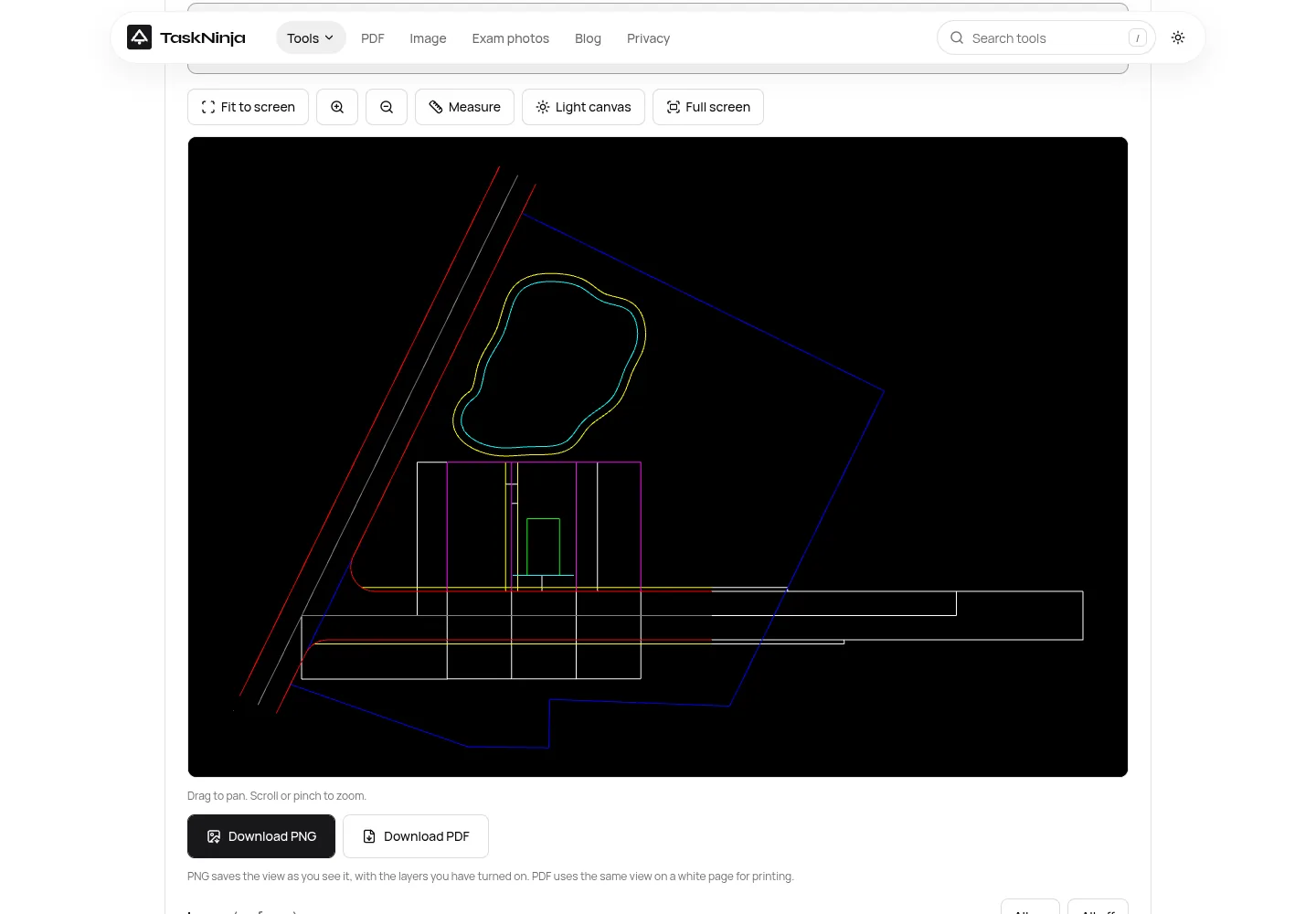
- The drawing opens fitted on a black canvas. Drag to pan. Scroll or pinch to zoom. Fit to screen frames the main drawing again, for the layers that are on.
- Far-off objects stay outside that frame, and a line under the canvas says to zoom out. Full screen fills the display. The box then shows the name, size and version, and the button reads Change.
Layers, measure, and the canvas
Layers sit under the drawing, each name a checkbox, with a count of how many are on. The first 12 show. Show all opens the rest ("Show all 40 layers" when there are 40). All on and All off cover a long list. Hide furniture, or leave only a cut layer, before you measure or save.
Measure switches the button to Measuring. The box says "Click the first point", then "Click the second point". You get the straight distance, then ΔX and ΔY, in the file's units (inches, millimetres, metres) or plain units if the file never set them. Clicks do not snap, so zoom in first. A third click starts again. A drag still pans.
The canvas starts black. Light canvas turns it white, and the button then reads Dark canvas. The shot above is that dark canvas.
Save a PNG or a PDF
Download PNG is the dark button under the canvas. It saves the view, the layers left on, and the black or white canvas, at up to three times screen resolution. The long side stops at 4096 pixels. The file uses the drawing name plus .png.
Download PDF puts that view on a white A4 page, landscape or portrait, with the file name at the bottom. The page stays white even if the canvas is black. A title block and a true scale still belong in a CAD plot. There is no watermark. A heavy file can go through Compress PDF next.
The file stays in the browser
Above the file button: "Processed in your browser. Nothing is uploaded."
Conversion is GNU LibreDWG, a C library that reads and writes DWG under GPL version 3 or later. Here it is WebAssembly, libredwg-web 0.7.17, in a worker that starts fresh each time: DWG bytes in, DXF bytes out, then the worker closes. The engine downloads from taskninja.ai once and stays cached. dxf-viewer 1.0.49 draws it with WebGL in the same tab, using Liberation Sans. No Autodesk font is shipped.
TaskNinja does not receive the drawing, store it, or send it to an AI model. Close the tab and it is gone. Usage events record an open or a download, a size bucket, and an extension such as dwg or png, and they leave out the file name, the geometry and the text. Open-source credits name both programs.
When you still want AutoCAD or TrueView
You can hide layers and read a distance. The DWG on disk stays as it was. Nothing writes edits back.
- Dashed and centre lines draw solid. SHX text uses Liberation Sans, so lettering can shift.
- 3D solids, surfaces and meshes are left out. A file with only those says to open it in a 3D CAD app.
- Linked images and external references stay unloaded. They are separate files.
- You see model space. Paper-space layouts are not plotted to scale.
- LibreDWG's readme says some very advanced Release 2010 objects fail and are skipped. A damaged file shows an error, and the page stays usable.
A plot with the original line types, fonts, references and a scaled layout needs AutoCAD or DWG TrueView on Windows, which can also resave an older DWG. If a very old file will not open, write an ASCII DXF or a Release 13 or later DWG. Past about 100 MB, have spare memory. The page stops at 250 MB.
FAQ
Can I open a DWG file online without AutoCAD?
Yes. Open the DWG Viewer in Chrome, Edge, Firefox or Safari, on a computer or a phone, and choose the file.
Does this DWG viewer upload the drawing?
No. LibreDWG converts the DWG in the browser, and the page draws it in the same tab. The file is not sent to TaskNinja.
Which DWG versions open?
AC1012 (Release 13) through AC1032, the 2018 format that AutoCAD 2019 to 2026 still save. ASCII DXF opens. Binary DXF does not, and a Release 12 DWG may not.
Why does my drawing look different from AutoCAD?
Line types draw solid, SHX text uses an open font, and 3D solids are left out. Geometry, layers and colours follow the file. The canvas is black until you press Light canvas.
Can I edit the DWG and save it back?
No. You can hide layers, measure, and download a PNG or PDF of the view. The original file is unchanged.
How do I turn a DWG into a PDF or PNG?
Press Download PNG for the canvas you see, or Download PDF for a white A4 page. Use Compress PDF if that PDF is too big to send.
What if the file is only a 3D model?
You get a message that a 2D viewer has nothing to draw. Open it in a 3D CAD app, or in DWG TrueView if you need the solid.
Sources
- About Drawing (DWG) File Changes (AutoCAD 2026)
- Drawing format version codes for AutoCAD (15 December 2023)
- About Importing and Exporting DXF Files (AutoCAD 2025)
- View and print DWG files without AutoCAD (DWG TrueView)
- DWG TrueView
- GNU LibreDWG
- LibreDWG readme
Sources last checked on 16 October 2026. Labels, the 250 MB limit, and PNG and PDF behaviour come from this viewer. The Release 2010 note is from the LibreDWG readme shipped with this page.
Written by the TaskNinja team with help from an AI writing tool, then checked against Autodesk's DWG and DXF help, the LibreDWG readme, and the viewer's labels.