Free FEA online: run a stress analysis in your browser and check it by hand
Run a free linear static FEA in your browser with Trevolyx. We checked stress, deflection and factor of safety on a beam against hand calculations.
Finite element analysis (FEA) used to mean a desktop licence, a powerful PC and a long install. For a quick question such as "will this bracket bend too much?" that is a lot of overhead. Trevolyx, our free browser CAD app, now has a Simulation tab, so you can model a part, add a fixture and a load, and see stress, displacement and factor of safety in the same browser tab.
A stress plot is only useful if you can trust it. So instead of a pretty demo, we ran the textbook test case, a cantilever beam, on the live app on 15 Nov 2026 and compared every number with a hand calculation.
The quick answer
- Open Trevolyx in Chrome or Edge on a desktop and make (or open) a part. STEP files work too.
- Go to the Simulation tab and press New Study. Choose Static for stress or Frequency for natural frequencies.
- Add Fixed Geometry to the face that is held, and a Force, Pressure or Gravity load.
- Set the mesh size under Mesh, then press Run and Solve.
- Switch the plot between stress (von Mises), displacement and factor of safety, and check the numbers in the Results box.
There is no account, nothing to install and the model is never uploaded. The mesh and the solver run on your own computer.
The test: a 200 mm aluminium cantilever
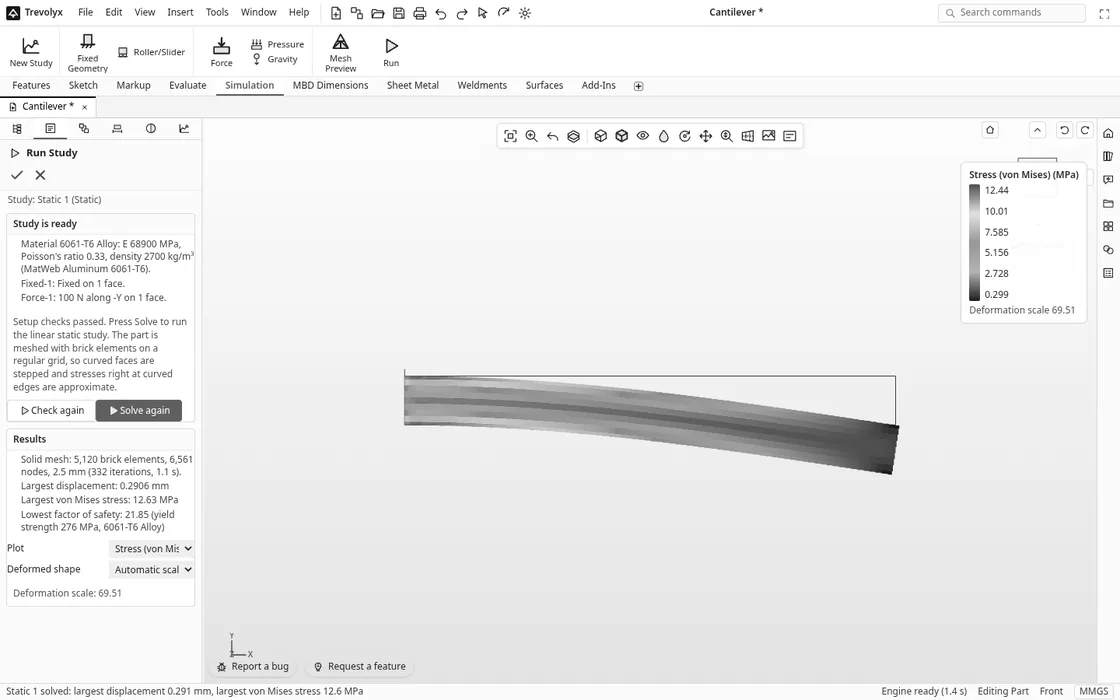
We built a 200 × 20 × 20 mm bar in 6061-T6 aluminium, fixed one end face and pulled the other end face down with 100 N. Trevolyx took the material values from its library: E 68,900 MPa, Poisson's ratio 0.33, density 2,700 kg/m³ and yield strength 276 MPa, the same figures MatWeb lists for 6061-T6.
What the hand calculation says
- Second moment of area: I = b h³ / 12 = 20 × 20³ / 12 = 13,333 mm⁴.
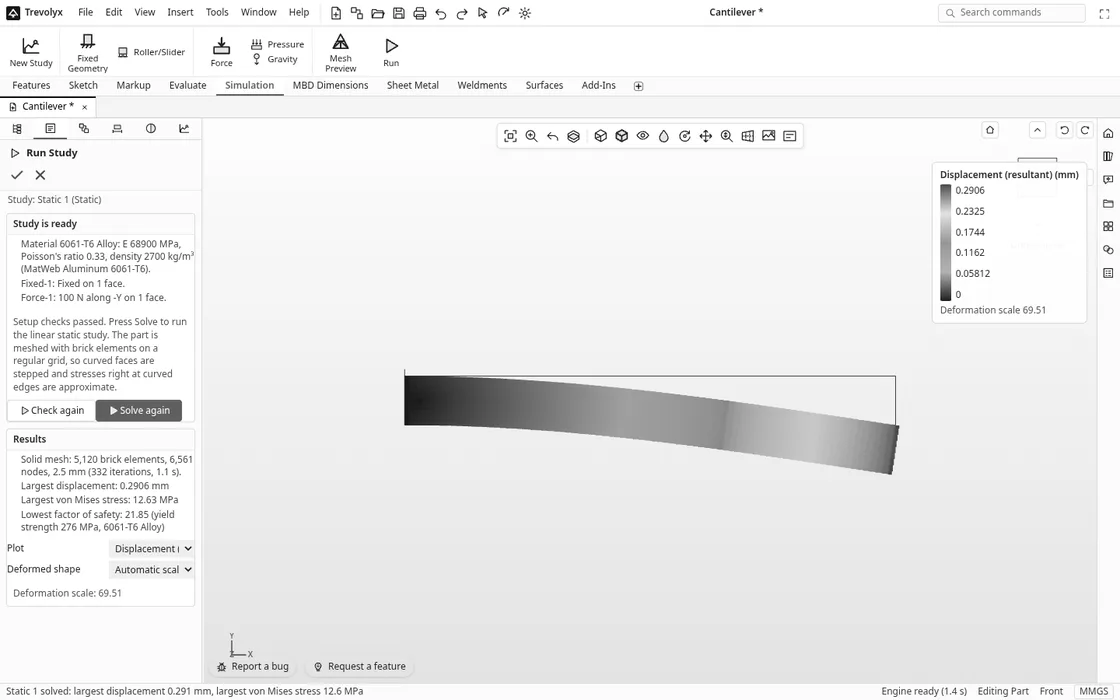
- Tip deflection from beam theory: δ = P L³ / (3 E I) = 100 × 200³ / (3 × 68,900 × 13,333) = 0.290 mm. Adding the small shear term gives 0.293 mm.
- Bending stress at the top and bottom of the fixed end: σ = M c / I = (100 × 200) × 10 / 13,333 = 15.0 MPa.
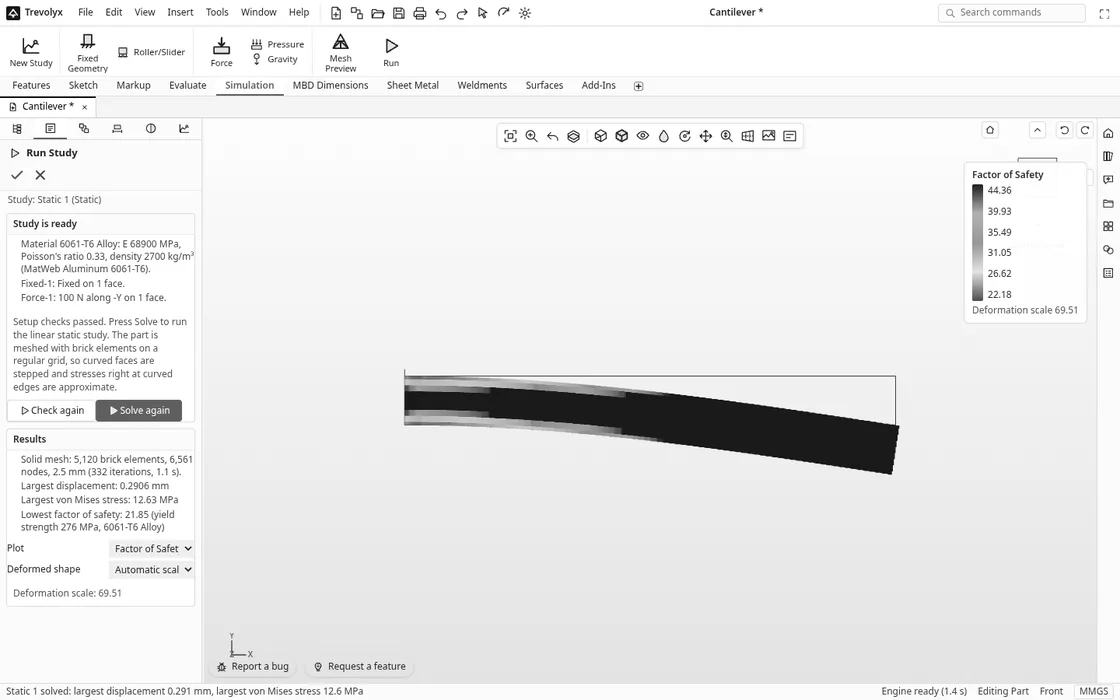
- Factor of safety against yield: 276 / 15.0 = 18.4.
What Trevolyx got, at three mesh sizes
| Mesh size | Elements | Solve time | Tip deflection | Largest von Mises stress | Lowest factor of safety |
|---|---|---|---|---|---|
| 5 mm | 640 bricks | 0.1 s | 0.2900 mm | 10.89 MPa | 25.34 |
| 2.5 mm | 5,120 bricks | 1.1 s | 0.2906 mm | 12.63 MPa | 21.85 |
| 1.25 mm | 40,960 bricks | 17.1 s | 0.2909 mm | 14.72 MPa | 18.76 |
| Hand calculation | 0.290 to 0.293 mm | 15.0 MPa | 18.4 |
Deflection was right from the coarsest mesh, within 1% of beam theory every time. Stress needed a finer mesh: it climbed from 10.9 to 14.7 MPa as the elements shrank, and at 1.25 mm it was within 2% of the hand value. That is the normal behaviour of FEA, not a quirk of this app.
Why stress needs a finer mesh than deflection
Deflection depends on the stiffness of the whole beam, so it averages out quickly. Peak stress lives in a thin layer at the surface of the fixed end. A large element reports stress near its centre, a few millimetres inside the surface, where the real stress is lower. As the elements get smaller, their centres move closer to the surface and the peak goes up toward the true value.
So the habit to build is a mesh convergence check: solve, halve the element size, solve again. If the number you care about changes by only a few per cent, you can trust it. If it keeps rising sharply at a sharp inside corner or right at a fixed edge, you are looking at a stress singularity, and you should read the stress a little away from that point instead.
Reading the factor of safety plot
The factor of safety plot divides the material's yield strength by the von Mises stress at each point. A value of 1 means the part starts to yield there. Most designers want 2 or more for static loads, and more again when loads are uncertain or repeated. Our beam sits at about 19, so it is far stronger than it needs to be for 100 N: you could use a thinner bar.
Step by step on your own part
- Pick the material first. Right click the material in the design tree, choose Edit Material... and pick one from the library. Stress results depend on it, and the factor of safety uses its yield strength.
- Fix only what is really held. A bolted face is usually Fixed Geometry. A face that can slide along a surface is Roller/Slider. Fixing too much makes a part look stiffer than it is.
- Apply the load to the right face. Force can be the total shared over the faces or applied to each face, and you can pick the direction and reverse it. Pressure is in MPa, and Gravity adds self weight.
- Preview the mesh. The Mesh panel shows a surface preview and the element size. Start coarse, then refine.
- Run, then Solve. Run first checks the study and lists what it found (material, fixtures, loads). Solve meshes the part into bricks and computes the result.
- Check the Results box, not just the colours. It lists the element count, largest displacement, largest stress and lowest factor of safety. Compare one number with a quick hand estimate whenever you can.
A Frequency study works the same way without loads: fix the part, solve, and you get the lowest natural frequencies with their mode shapes. That is handy for anything that spins, vibrates or sits near a motor. We checked it against the textbook formula in cantilever beam natural frequency, worked example.
Honest limits
- Linear static only. Results assume small deflections and stress below yield. There is no plasticity, contact between parts, large deformation or fatigue.
- Parts, not assemblies. Studies run on a single part (sheet metal bodies included). Bolted joints and contact need a full commercial package.
- Brick mesh. Curved edges are stepped by the regular brick mesh, so stresses right at curved edges are approximate. Refine the mesh and read results a little away from them.
- Not for certification. For pressure vessels, lifting gear or anything safety critical, use validated software and a qualified engineer. Trevolyx is for learning, early design checks and quick what-ifs.
See the full list of commands on the Trevolyx features page, or how it compares in the free SolidWorks alternative guide.
FAQ
Is there free FEA software that runs online?
Yes. Trevolyx runs linear static and frequency studies in a desktop browser for free, with no account and no upload. The solve runs on your own computer.
How accurate is browser FEA?
As accurate as the mesh you give it. In our cantilever test the tip deflection matched beam theory within 1% at every mesh size, and the peak stress came within 2% of the hand value at a 1.25 mm mesh.
What does von Mises stress mean?
It combines the stresses acting in different directions into one number you can compare with the yield strength from a simple tensile test. If von Mises stress reaches the yield strength, a ductile metal such as aluminium or steel starts to yield.
Can I run FEA on a STEP file?
Yes. Open the STEP file in Trevolyx, where it arrives as an exact solid, assign a material and set up the study as above. See opening STEP files online.
Is my model uploaded to a server?
No. Modelling, meshing and solving all happen in your browser tab and its Web Workers on your own device.
Sources
- MatWeb: Aluminum 6061-T6 material data (modulus, Poisson's ratio, density, yield strength)
- MIT OpenCourseWare 2.001 Mechanics and Materials I (beam bending and deflection)
- Every element count, solve time and result above was measured on the live Trevolyx Simulation tab on 15 Nov 2026
Written by the TaskNinja team with help from an AI writing tool, then checked against the live app and hand calculations.