A free Onshape alternative where your files stay on your computer
Like Onshape, Trevolyx runs in the browser. Unlike Onshape's free plan, your designs are private, stored as files on your own disk, with no account needed.
Open TrevolyxFree, desktop browser, nothing uploaded.
Why look beyond Onshape
Onshape proved that serious CAD can run in a browser. Its free plan, though, is meant for hobby use, requires an account, and makes documents public. Commercial use needs a paid plan. If you want private designs, commercial use and no sign-up, Trevolyx is worth a look.
How they differ
Check Onshape's site for its current plans. Not in v1 yet: simulation (FEA), 3D Sketch, Markup and MBD auto dimensioning. FEA is planned next.
| Trevolyx | Onshape (free plan) | |
|---|---|---|
| Price | Free | Free for non-commercial use |
| Account | Not needed | Required |
| Where files live | Your own disk | Onshape cloud |
| Documents private | Yes | Public on the free plan |
| Real-time multi-user editing | No | Yes |
| Version control | Your own files or Git | Built in |
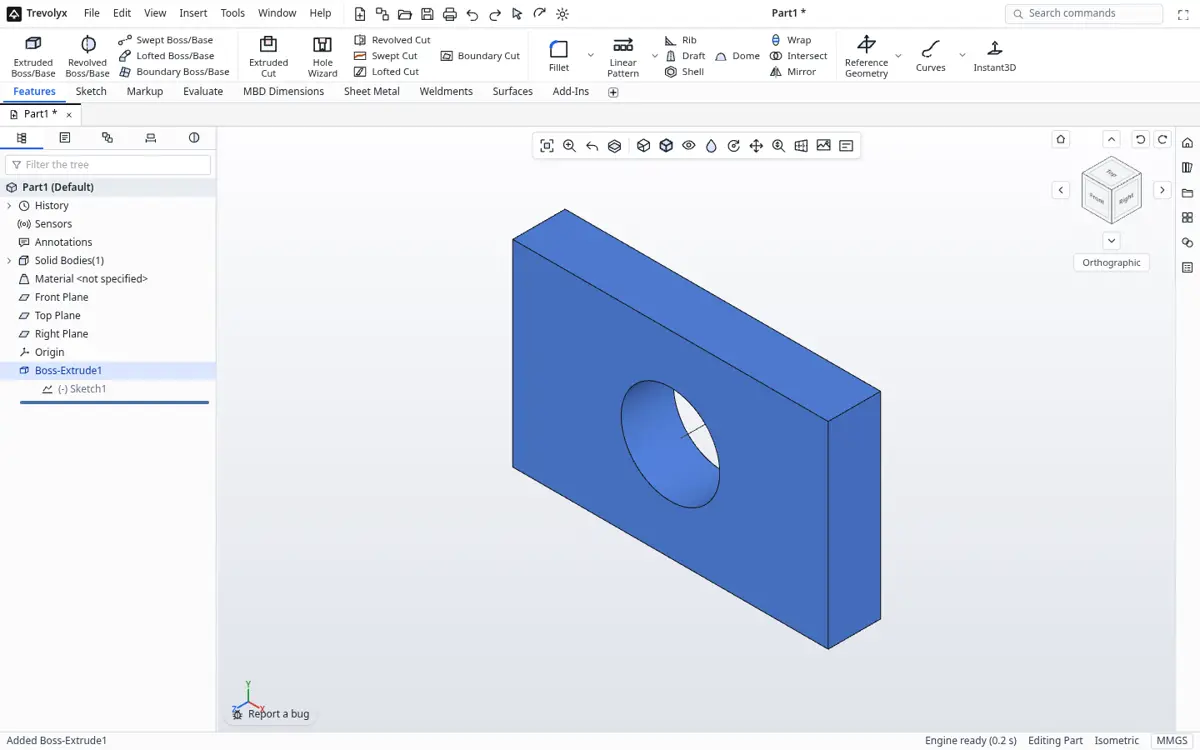
| SolidWorks-style ribbon and tree | Yes | Own interface |
| Sheet metal, assemblies, drawings | Yes | Yes |
| Simulation | Not yet | Paid tiers |
Moving designs over
- In Onshape, right-click a Part Studio or Assembly tab and Export as STEP.
- In Trevolyx, click Open and choose the STEP file.
- Add features on top, or rebuild key parts parametrically using the original as a reference.
When Onshape is the better fit
If your team edits the same model at the same time from different places, Onshape's cloud collaboration is hard to beat. Trevolyx is a single-user tool that keeps files local, which suits students, freelancers and small shops who care about privacy and cost.
How the two approaches differ
Onshape is a cloud CAD: the geometry is computed on its servers and your documents live in its cloud. That makes real-time collaboration easy, but it also means you need an account and a steady internet connection, and on the free plan your documents are public. Trevolyx computes geometry on your own computer and saves files where you choose. There is no account, and nothing you design is visible to anyone else.
Neither approach is wrong. If you need several people editing the same model at the same time, a cloud tool fits. If you work alone, care about privacy, have patchy internet or simply want files you own, a local browser CAD fits better.
Moving models between them
Both programs read and write STEP. Export a STEP from one and import it into the other to carry geometry across. Feature history does not transfer between any two CAD programs, so plan to keep editing in whichever tool you made the model in, and use STEP as the hand-off.
Who should choose Trevolyx
Students who do not want their coursework public, freelancers handling client designs under NDA, small shops that need sheet metal flat patterns and weldment cut lists, and anyone who prefers a SolidWorks-style layout. It is free for commercial use, with one small ad on the start screen and none while you model.
Slow connections
Once Trevolyx has loaded in your browser, modelling happens on your machine, so a slow or dropping connection does not freeze the model or lose edits. That suits students on mobile data and engineers visiting factories with weak signal. Save to your own disk with Ctrl+S and your files are there next time.
Cloud CAD has real advantages for teams, such as built-in version history and sharing links. If you need those with Trevolyx, keep your files in a shared drive or a git repository and use STEP for exchanges with partners.
What Trevolyx covers
Trevolyx is a parametric modeller with sketches, solid and surface features, sheet metal with flat pattern DXF export, weldments with a CSV cut list, assemblies with mates and exploded views, and drawings with section and detail views, balloons and a bill of materials. Equations, design tables and configurations handle families of parts.
It also has an Evaluate tab with measure, mass and section properties, interference detection, clearance verification, draft and thickness analysis, and curvature and zebra stripe display.
Honest gaps
Trevolyx has no real-time multi-user editing, no version control built into a cloud, no app store and no simulation (FEA), 3D Sketch, Markup or MBD in v1. Onshape includes cloud collaboration and version history in its product. If those matter more than private local files, Onshape is the better fit. Check Onshape's own plan pages for current terms.
Feature by feature: Trevolyx and Onshape Free
Onshape facts come from the Onshape Free plan page and the pricing page linked under Sources. Plans change, so check those pages before deciding.
| Area | Trevolyx v1 | Onshape Free (per onshape.com) |
|---|---|---|
| Price | Free, including commercial use | Free for non-commercial use |
| Document visibility | Files on your own disk | Designs are public online |
| Account | Not needed | Required |
| Devices | Desktop Chrome or Edge on Windows, macOS, Linux, ChromeOS | PC, Mac, Linux, Chrome, iPad, iPhone and Android |
| Parts, assemblies, drawings | Yes | Yes |
| Sheet metal and weldments | Yes, with flat pattern DXF and CSV cut list | Yes |
| Data management | Your own folders, drive or git | Built-in PDM that tracks all design changes |
| Real-time collaboration | No | Yes, sharing similar to Google Docs |
| FEA, 3D Sketch, Markup, MBD | Not in v1 | See onshape.com for current plan features |
| Exchange format | STEP in and out, IGES in | STEP and other formats, see Onshape help |
Migrating from Onshape to Trevolyx
- In Onshape, open the document, right-click the Part Studio or Assembly tab and choose Export.
- Pick STEP as the format and download the file. For an assembly you plan to re-mate, also export each part as its own STEP file.
- In Trevolyx, click Open and choose the STEP file. It opens as exact geometry you can measure and build on.
- Check the import with Measure and Mass Properties on the Evaluate tab, then add features or rebuild critical parts parametrically.
- Make drawings in Trevolyx and save them as PDF or DXF. Keep the original Onshape document as an archive, because feature history and PDM history do not transfer through STEP.
- To send work back to Onshape users, export STEP from Trevolyx and import it in Onshape.
When not to switch from Onshape
Stay with Onshape if several people edit the same model at the same time, or if your team depends on its built-in PDM and change tracking. Stay if you design on an iPad or phone, since Trevolyx is a desktop browser tool. Stay if your work relies on features that Trevolyx does not have in v1, such as simulation (FEA), 3D Sketch, Markup or MBD.
Trevolyx is the better fit when designs must stay private without a paid plan, when the work is commercial, or when you want files on your own disk with no account. If you are on a paid Onshape plan and your team is happy, there is little reason to move.
Frequently asked questions
Does Trevolyx work offline?
After it has loaded, modelling runs in your browser on your machine, so short connection drops do not interrupt work.
Does Trevolyx have sheet metal?
Yes, with base, edge and miter flanges, hems, sketched bends, unfold, fold, flatten and flat pattern DXF export.
Can I open Onshape files?
Export STEP from Onshape and open that in Trevolyx.
Can I use Trevolyx commercially?
Yes, it is free for commercial work.
Does Trevolyx support collaboration?
Not real-time. Share files or a project folder the usual way.
Related
Sources
Competitor details checked on their official pages on 5 November 2026. Plans change; please confirm there.
SolidWorks, CATIA and 3DEXPERIENCE are trademarks of Dassault Systemes. Inventor, AutoCAD and Fusion are trademarks of Autodesk. Onshape is a trademark of PTC. Solid Edge is a trademark of Siemens. FreeCAD is a project of its community. Trevolyx is not affiliated with or endorsed by any of them; names are used only to describe compatibility and comparisons.