A FreeCAD alternative with a familiar SolidWorks-style workflow
FreeCAD is powerful but has a steep learning curve. Trevolyx offers a single SolidWorks-style workflow in the browser with no install. An honest comparison.
Open TrevolyxFree, desktop browser, nothing uploaded.
FreeCAD in brief
FreeCAD is a mature open source parametric modeller with many workbenches, including finite element analysis, CAM and architecture. It is a genuinely good project, and it is the right choice if you need FEA today or want to script everything in Python. Many new users struggle with switching between workbenches and with topological naming changes, though recent releases have improved this a lot.
Where Trevolyx is different
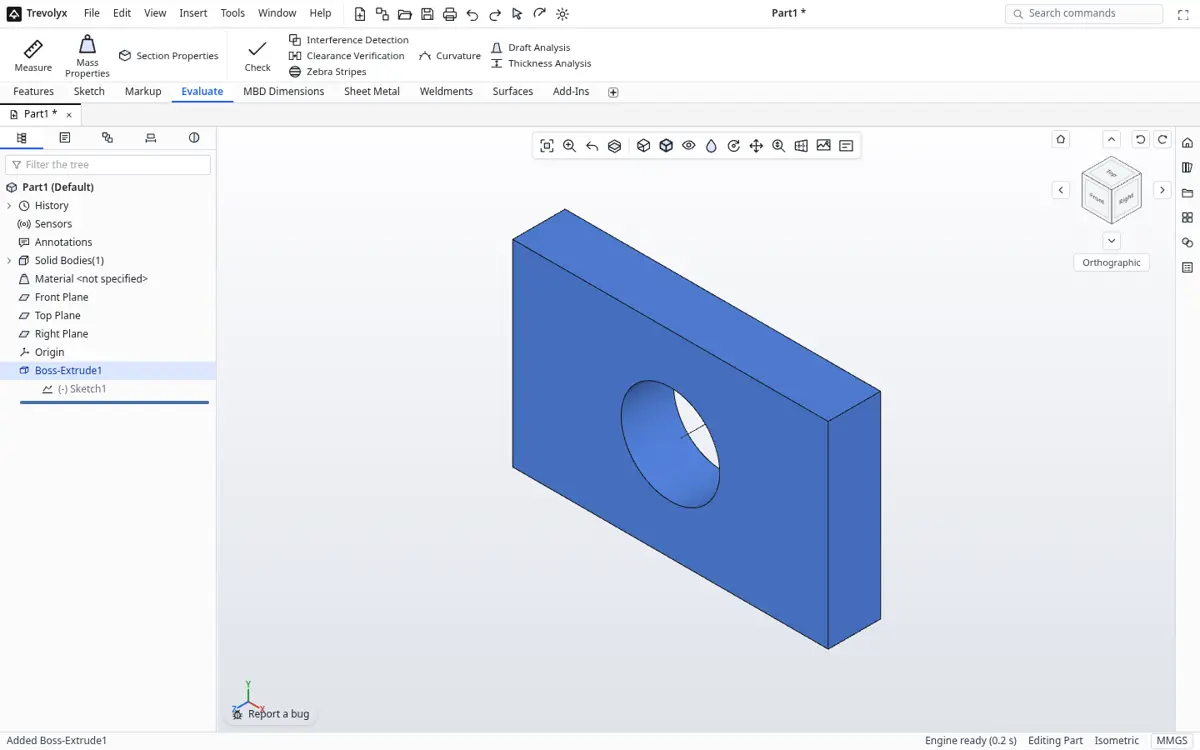
Trevolyx has one consistent workspace modelled on SolidWorks: the ribbon, feature tree and PropertyManager. There is nothing to install, so it works on locked-down college or office PCs. It is narrower in scope than FreeCAD and does not try to be a platform.
Side by side
| Trevolyx | FreeCAD | |
|---|---|---|
| Price | Free | Free and open source |
| Install | None, browser | Desktop install |
| Interface | SolidWorks-style, single workspace | Multiple workbenches |
| Parts, sheet metal, assemblies, drawings | Yes | Yes (some via add-ons) |
| Weldment cut list | Yes | Via add-ons |
| FEA | Not yet | Yes |
| CAM | No | Yes |
| Python scripting | No | Yes |
| Works on locked PCs without admin rights | Yes | Needs install |
Using both
STEP is the bridge. Model in Trevolyx, export STEP and run FEA in FreeCAD today, or open a FreeCAD STEP export in Trevolyx for quick edits and drawings.
Different strengths
FreeCAD is a mature open source desktop program with many workbenches, including FEM simulation, CAM paths, architecture and a large add-on ecosystem. It is very capable, and if you need FEA today it is a strong choice. Its interface, however, is organised around workbenches and differs from the SolidWorks layout most Indian engineers learn, and the topological naming problem has long been a source of broken models after edits.
Trevolyx takes a narrower path: one ribbon, one design tree, SolidWorks-style command names and PropertyManager panels, and no installation. The goal is that someone who learned SolidWorks in college can start working within minutes.
When to pick which
Choose FreeCAD if you need simulation, CAM or a specific add-on, or if you want fully open source software you can modify. Choose Trevolyx if you want a familiar SolidWorks-style workflow, cannot install software on the computer you are using, or need sheet metal flat patterns and weldment cut lists without hunting for add-ons. Many people use both and move geometry between them with STEP.
Moving files between them
Export STEP from FreeCAD (File, Export, STEP with colors) and open it in Trevolyx, or the reverse. Meshes for printing move as STL or 3MF, and 2D drawings move as DXF.
Learning curve compared
New FreeCAD users often struggle with choosing the right workbench, attaching sketches to faces and fixing models after references break. Long-time users learn workarounds, but the first weeks can be frustrating. Trevolyx aims for a shorter first week by matching the layout and naming taught in most Indian colleges and training institutes. The trade-off is fewer specialised tools today: there is no FEA, CAM or architecture workbench in v1.
If you already know FreeCAD well, Trevolyx is useful as a quick, install-free option on a borrowed or locked-down computer, and for sheet metal flat patterns and weldment cut lists without add-ons.
Feature coverage in Trevolyx
Trevolyx covers the everyday mechanical workflow in one workspace. Sketches include lines, rectangles, circles, arcs, slots, polygons, ellipses, splines and text, with relations and smart dimensions. Features include extruded, revolved, swept, lofted and boundary bosses and cuts, fillets, chamfers, shells, drafts, ribs, the Hole Wizard and patterns. Surfaces can be extruded, revolved, swept, lofted, knitted, trimmed and thickened.
Sheet metal, weldments, assemblies with mates and exploded views, and drawings with section and detail views, balloons and a bill of materials are all in the same ribbon, so there is no workbench switching. Equations, design tables and configurations handle parametric families.
Honest gaps
Trevolyx v1 has no simulation (FEA), no 3D Sketch, no Markup and no MBD auto dimensioning. It has no CAM and no Python scripting. FreeCAD has FEM and CAM workbenches and a Python console, so for those jobs FreeCAD is the better tool today. Trevolyx is also not open source, while FreeCAD is under the LGPL.
Feature by feature: Trevolyx and FreeCAD 1.1
FreeCAD facts come from the FreeCAD features and downloads pages linked under Sources. Sheet metal in FreeCAD is provided by add-on workbenches rather than the core, according to its ecosystem description; check the add-on manager for the current state.
| Area | Trevolyx v1 | FreeCAD (per freecad.org) |
|---|---|---|
| Price and licence | Free to use, not open source | Free and open source |
| Install | None, runs in Chrome or Edge | Desktop app for Windows, macOS and Linux |
| Geometry kernel | Exact B-rep engine in WebAssembly | Open CASCADE Technology |
| Parametric sketcher | Yes, relations and smart dimensions | Yes, constraint-based Sketcher |
| Assemblies | Built in, with mates and exploded views | Built-in Assembly workbench since 1.0, plus add-ons |
| Sheet metal | Built in, flat pattern DXF | Through community add-on workbenches |
| Weldments and cut list | Built in, CSV cut list | Not listed as a built-in feature |
| 2D drawings | Views, sections, details, balloons, BOM, PDF and DXF | Yes, 2D drawings and views |
| FEA | Not in v1 | Yes, Finite Element Analysis |
| CAM and CNC | No | Yes, CAM workbench |
| BIM and architecture | No | Built-in BIM workbench |
| Scripting | No | Python console, macros and custom workbenches |
| File formats | Opens STEP, IGES, STL, OBJ, 3MF, GLB; exports STEP, STL, 3MF, GLB, OBJ, DXF | Dozens, including STEP, IGES, STL, OBJ, DWG, DXF, SVG, IFC |
Migrating a FreeCAD model to Trevolyx
- In FreeCAD, select the finished body or Part in the tree. Bodies export cleanly; unfinished sketches do not.
- Choose File, Export, and pick STEP with colors (*.step *.stp). Save the file to your disk.
- Open trevolyx.taskninja.ai in Chrome or Edge, click Open and choose the STEP file. It arrives as an exact solid you can measure.
- Add new features on top of the imported body, such as holes, cuts, fillets or patterns. Feature history from FreeCAD does not transfer, as with any STEP exchange.
- For parts you edit often, rebuild the key sketches and features parametrically in Trevolyx, using the imported solid as a reference, then delete the reference.
- To go back, export STEP from Trevolyx and use File, Import in FreeCAD. Meshes move as STL or 3MF and 2D outlines as DXF.
When not to switch from FreeCAD
Stay with FreeCAD if you run FEA, CAM toolpaths or BIM work, because Trevolyx has none of these in v1. Stay if you automate design with Python macros or custom workbenches, since Trevolyx has no scripting. Stay if open source licensing matters to your organisation, or if you need formats such as DWG, IFC or NASTRAN that Trevolyx does not read.
Also stay if you work offline on machines without a modern browser and GPU, or if you rely on a community add-on that has no Trevolyx equivalent. Many people use both: FreeCAD for analysis and CAM, Trevolyx for quick SolidWorks-style part, sheet metal, weldment and drawing work, with STEP as the bridge.
Frequently asked questions
Does Trevolyx run on Linux like FreeCAD?
Yes, in Chrome or Edge with WebGL2. Our automated tests run in Chromium on Linux.
Can I export drawings?
Yes. Drawings save as vector PDF at true sheet size or as DXF.
Is Trevolyx open source?
No. It is free to use but not open source. It uses open source libraries listed on our open source page.
Should I switch from FreeCAD?
If FreeCAD works for you, keep it. Try Trevolyx if you want a SolidWorks-style workflow with no install.
Related
Sources
Competitor details checked on their official pages on 5 November 2026. Plans change; please confirm there.
SolidWorks, CATIA and 3DEXPERIENCE are trademarks of Dassault Systemes. Inventor, AutoCAD and Fusion are trademarks of Autodesk. Onshape is a trademark of PTC. Solid Edge is a trademark of Siemens. FreeCAD is a project of its community. Trevolyx is not affiliated with or endorsed by any of them; names are used only to describe compatibility and comparisons.