A free alternative to AutoCAD for 3D
Need 3D parts and DXF drawings without an AutoCAD subscription? See how Trevolyx, a free parametric browser CAD, compares, and what AutoCAD users should know.
Open TrevolyxFree, desktop browser, nothing uploaded.
AutoCAD and 3D
AutoCAD is the standard for 2D drafting and also has 3D modelling. It is a paid subscription. Autodesk offers a 15 day free trial and free one year Education access for eligible students and educators, for learning only. AutoCAD 2026 runs on Windows 10 and 11 and on macOS, with 8 GB as Autodesk's basic memory figure and 32 GB recommended on Windows, and Autodesk lists 32 GB or more for 3D modelling and large datasets.
Many AutoCAD users only need 3D for mechanical parts: a bracket, an enclosure, a frame. For that, a parametric solid modeller is usually faster than AutoCAD's direct 3D tools, and it produces DXF drawings that open in AutoCAD.
What Trevolyx offers
Trevolyx is a free parametric 3D CAD that runs in Chrome or Edge on a desktop or laptop. It has sketches with dimensions and relations, extrude, revolve, fillet, chamfer, shell and patterns, sheet metal with flat pattern DXF export, weldments with a cut list, assemblies with mates and exploded views, and 2D drawings with standard, section and detail views that save as DXF and PDF. It opens STEP and IGES and exports STEP, plus STL and 3MF for printing. There is no account, and your files stay on your computer because the geometry engine runs inside the browser.
Parametric modelling for AutoCAD users
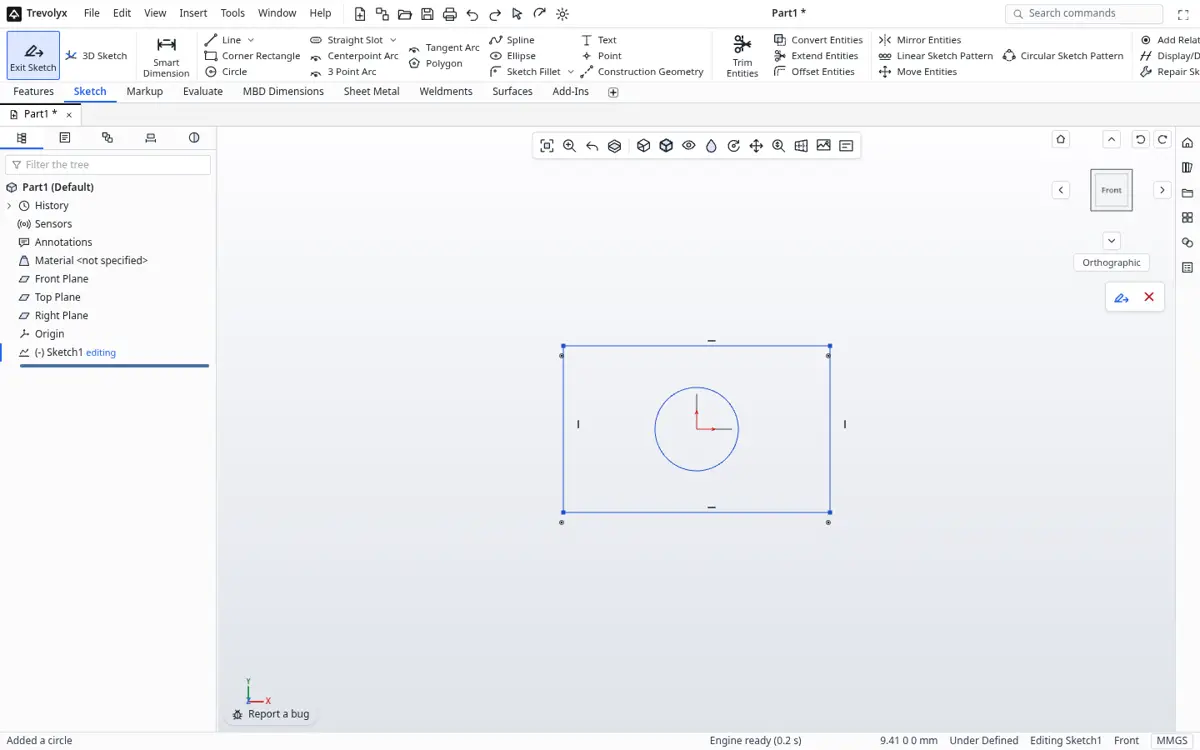
In AutoCAD you draw geometry at exact sizes. In a parametric modeller you sketch roughly, then add dimensions and relations that drive the shape. Change a dimension later and the part, its assemblies and its drawings update. Features such as extrude, revolve, fillet and shell build the solid in steps you can edit from the tree.
AutoCAD vs Trevolyx for 3D mechanical work
| AutoCAD | Trevolyx | |
|---|---|---|
| Price | Subscription; 15 day trial; free for education | Free |
| Platforms | Windows and macOS | Chrome or Edge on desktop |
| 2D drafting | Industry standard | Drawings from 3D models |
| Parametric 3D history | Limited | Yes |
| Sheet metal flat pattern | Not core AutoCAD | Yes, DXF |
| Assemblies with mates | No | Yes |
| DXF | Native DWG and DXF | DXF export |
| DWG | Native | No |
| STEP | Import and export | Import and export |
Where AutoCAD stays the right tool
For architectural plans, site layouts, schematics and general 2D drafting, AutoCAD remains the better tool, and Trevolyx does not edit DWG files. Trevolyx is for mechanical 3D: parts, sheet metal, weldments, assemblies and the drawings made from them.
Trevolyx v1 does not have simulation (FEA), 3D Sketch, Markup or model based definition (MBD). If your work depends on any of those, keep access to a tool that has them.
A typical AutoCAD to Trevolyx workflow
- Export your 2D profile from AutoCAD as DXF if you want to trace it, or simply note the key dimensions.
- In Trevolyx, start a New Part and sketch the profile on a plane with dimensions.
- Extrude or revolve it, then add holes, fillets and shells.
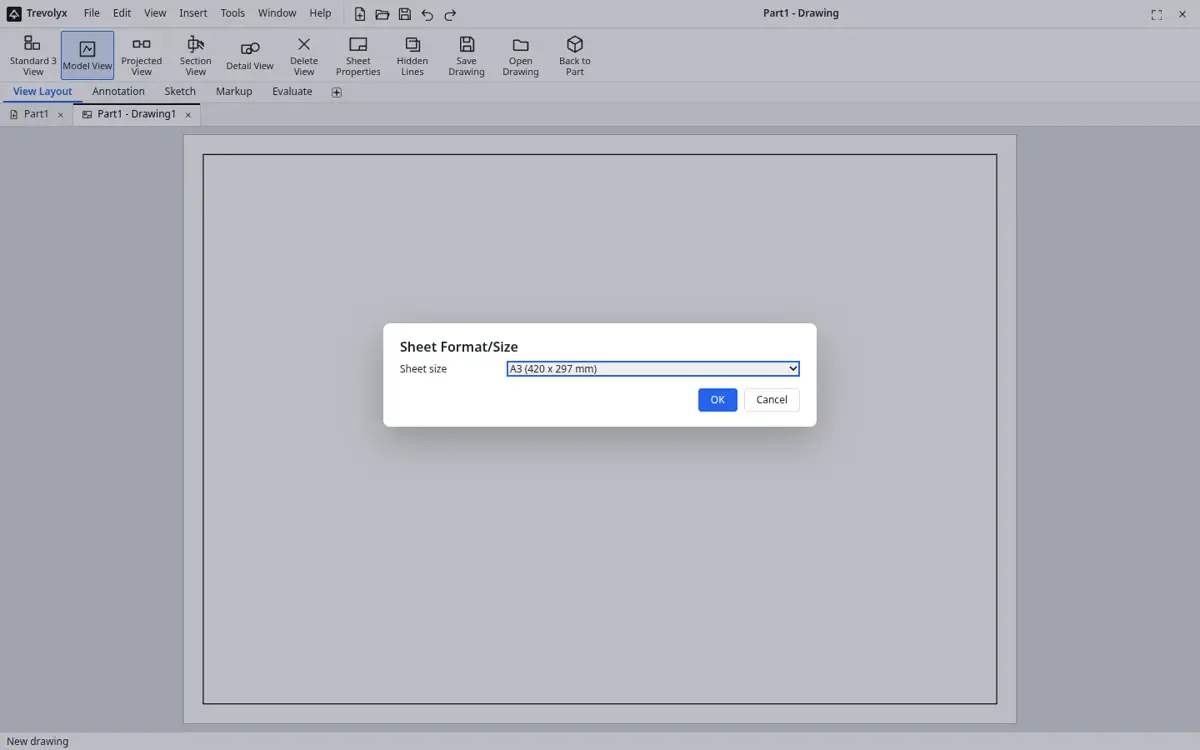
- Use New Drawing and Standard 3 View to create the drawing, then save as DXF.
- Open the DXF in AutoCAD for title blocks or to merge with your 2D sheets.
From layers to features
AutoCAD users organise drawings with layers and blocks. In a parametric modeller, the organising unit is the feature tree. Each feature, such as an extrude, hole or fillet, appears in order, and you can roll back, edit or suppress it. Parts are combined into assemblies instead of blocks, and drawings are generated from the 3D model, so views and dimensions stay consistent when the design changes.
Drawing output that AutoCAD users can use
Trevolyx drawings support standard three view layouts, projected, section and detail views, dimensions and balloons with a bill of materials. Export the sheet as DXF to open in AutoCAD, where you can add your company title block or combine it with other sheets. Export PDF for printing and review.
Laser cutting and fabrication
A common reason AutoCAD users try 3D is sheet metal. Model the part in the Sheet Metal tab with your material thickness and bend radius, and Trevolyx produces the flat pattern as a DXF ready for the cutting software. For frames, the Weldments tab gives a cut list with lengths, so you no longer measure members by hand from a 2D layout.
Cost compared
AutoCAD is a subscription product. Trevolyx is free for personal and commercial use, needs no account and runs in a browser. If you already pay for AutoCAD for 2D work, Trevolyx can sit alongside it for 3D mechanical parts at no extra cost.
Checking designs in 3D
One benefit of moving from 2D to 3D is checking fit before anything is made. The Evaluate tab offers Measure, Mass Properties, Section Properties, Interference Detection and Clearance Verification. Put parts into an assembly with mates, run Interference Detection, and fix clashes before you send drawings to the shop.
Mass Properties gives weight once you set a density, which helps with lifting, shipping and cost estimates that would take manual calculation in 2D.
Text and dimensions in sketches
Sketches support text, construction lines, slots, polygons, ellipses and splines, and smart dimensions drive the geometry through a constraint solver. If you are used to AutoCAD object snaps, relations such as coincident, tangent, horizontal and equal play a similar role, but they stay in place and keep the sketch correct when dimensions change.
Who should try it
Drafters in fabrication shops, maintenance engineers, makers and students who know AutoCAD and want proper 3D parts and assemblies without a new subscription. If most of your week is architectural or electrical 2D drafting, stay in AutoCAD; if you are drawing the same bracket in three views by hand, a parametric model will save time.
Start with one part you draw often, model it once, and generate its drawing. Next time the size changes, edit one dimension and the drawing updates.
AutoCAD has 3D solid modelling commands, but they are direct and not history based. In a parametric modeller, each feature remembers how it was made, so you can go back and change a sketch dimension, a fillet radius or a pattern count and the model rebuilds. That is the key habit to learn when moving across.
What to do with existing DWG drawings
Trevolyx does not open DWG files. Keep your AutoCAD drawings as the reference and redraw the key profiles as sketches in Trevolyx, adding dimensions and relations as you go. This takes a little time per part, but the result is a model that drives every future drawing.
For a quick look at a DXF without modelling, the free TaskNinja DXF viewer at taskninja.ai/tools/dxf-viewer opens it in the browser. When your 3D model is done, save the new drawing as DXF or PDF so colleagues in AutoCAD can still read it.
Other free options
FreeCAD has both a 2D drafting workbench and parametric 3D, and installs on Windows, macOS and Linux. Onshape Free runs in a browser with public documents. Fusion for personal use is free for qualifying non-commercial use.
Frequently asked questions
Is there a free AutoCAD for 3D?
Autodesk offers a 15 day trial and free Education access for eligible students. There is no free commercial version.
Can Trevolyx open DWG files?
No. It exports DXF, which AutoCAD opens, and imports STEP and IGES.
Is parametric modelling hard to learn after AutoCAD?
It is a different mindset, but sketch, dimension and extrude become natural quickly.
Can I make laser cut DXF files?
Yes. Sheet metal flat patterns and drawings save as DXF.
Does Trevolyx run on Mac?
In Chrome or Edge on macOS. Safari is not fully tested.
Related
Sources
Competitor details checked on their official pages on 5 November 2026. Plans change; please confirm there.
SolidWorks, CATIA and 3DEXPERIENCE are trademarks of Dassault Systemes. Inventor, AutoCAD and Fusion are trademarks of Autodesk. Onshape is a trademark of PTC. Solid Edge is a trademark of Siemens. FreeCAD is a project of its community. Trevolyx is not affiliated with or endorsed by any of them; names are used only to describe compatibility and comparisons.