How to resize a photo to 200 KB (and make a small one bigger)
Resize a phone photo to under 200 KB for NEET, JEE and other forms, or make it bigger when the form sets a minimum. Real sizes from our own tests inside.
The form wants a photo between 10 kb and 200 kb, and your phone photo is 4 MB. Or you squeeze it with some app and the portal says it is too small. Both come down to the same two settings.
Here are the NTA rules, what we measured running two real photos through our Resize Image to 200KB page, and the settings that land a file between a minimum and 200 KB.
Which forms ask for a photo up to 200 KB
| Exam | File | Format | Size |
|---|---|---|---|
| NEET (UG) 2026 | Passport size photograph | JPG/JPEG, colour or black and white | 10 kb to 200 kb |
| NEET (UG) 2026 | Finger and thumb impressions | JPG/JPEG | 10 kb to 200 kb |
| NEET (UG) 2026 | Identity proof (if not using Aadhaar or DigiLocker) | JPG/JPEG | 10 kb to 200 kb |
| NEET (UG) 2026 | Signature | JPG/JPEG | 10 kb to 100 kb |
| JEE (Main) 2026 | Passport size photograph | JPG/JPEG, colour | 10 kb to 200 kb |
| JEE (Main) 2026 | Identity proof (same condition) | JPG/JPEG | 10 kb to 200 kb |
| JEE (Main) 2026 | Signature | JPG/JPEG | 10 kb to 100 kb |
Both also want 80% of the image to be your face, ears visible, on a white background. Neither gives a pixel size, and that matters more than it seems. Many college and job portals use a 200 KB cap too; your own notice is the rule that counts.
Why 200 KB is easy to meet and hard to fill
A JPEG's size depends on its pixel count and its quality setting. A phone photo is heavy mainly because it has millions of pixels.
We took two CC0 photos from Wikimedia Commons: a 6.30 MB, 4844 × 5729 shot of a bust of Julius Caesar against a textured wall, and a 1.85 MB, 4859 × 5654 studio shot of a limestone bust from the Museo Egizio on plain grey. Each went through the live tool at several pixel sizes, maximum 200 KB.
| Pixel size | Caesar bust (textured wall) | Turin bust (plain background) |
|---|---|---|
| 413 × 531 (3.5 × 4.5 cm, the default) | 52.9 KB, quality 93 | 36.3 KB, quality 93 |
| 600 × 600 | 80.2 KB, quality 93 | 56.6 KB, quality 93 |
| 600 × 800 | 105.0 KB, quality 93 | 74.4 KB, quality 93 |
| 900 × 1200 | 180.0 KB, quality 90 | 162.2 KB, quality 93 |
| 1200 × 1600 | 199.4 KB, quality 82 | 185.2 KB, quality 87 |
| 1500 × 2000 | 191.6 KB, quality 68 | 185.4 KB, quality 76 |
| 2000 × 2667 | 193.7 KB, quality 45 | 194.3 KB, quality 53 |
On the passport frame even the busy photo came out near 53 KB at quality 93, a quarter of the limit. Past about 1200 × 1600 the file stops growing: the tool lowers the quality to stay under 200 KB, down to 45 at 2000 × 2667. More pixels stop helping once the cap bites.
The plain background is why the Turin photo is lighter. A white background, which NTA asks for, behaves the same way.
How to resize a photo to under 200 KB
- Open Resize Image to 200KB. The maximum is already 200 KB on a 3.5 × 4.5 cm frame at 300 DPI (413 × 531 pixels).
- Press Choose a photo or signature and pick your photo. The box shows its size and pixels, for example "6.30 MB · 4844×5729 px".
- If your form gives a width and height, type them under Exact size settings. If not, keep the passport frame.
- Press Resize. The result line gives the size, the pixels and the file name, for example "52.9 KB · 413×531 px. Under 200 KB."
- Press Download JPG and check the photo at full size before uploading.
When the form says your photo is too small
This is the "increase JPG size" problem: a form sets a minimum such as 50 or 100 KB, and a photo that was squeezed hard falls under it.
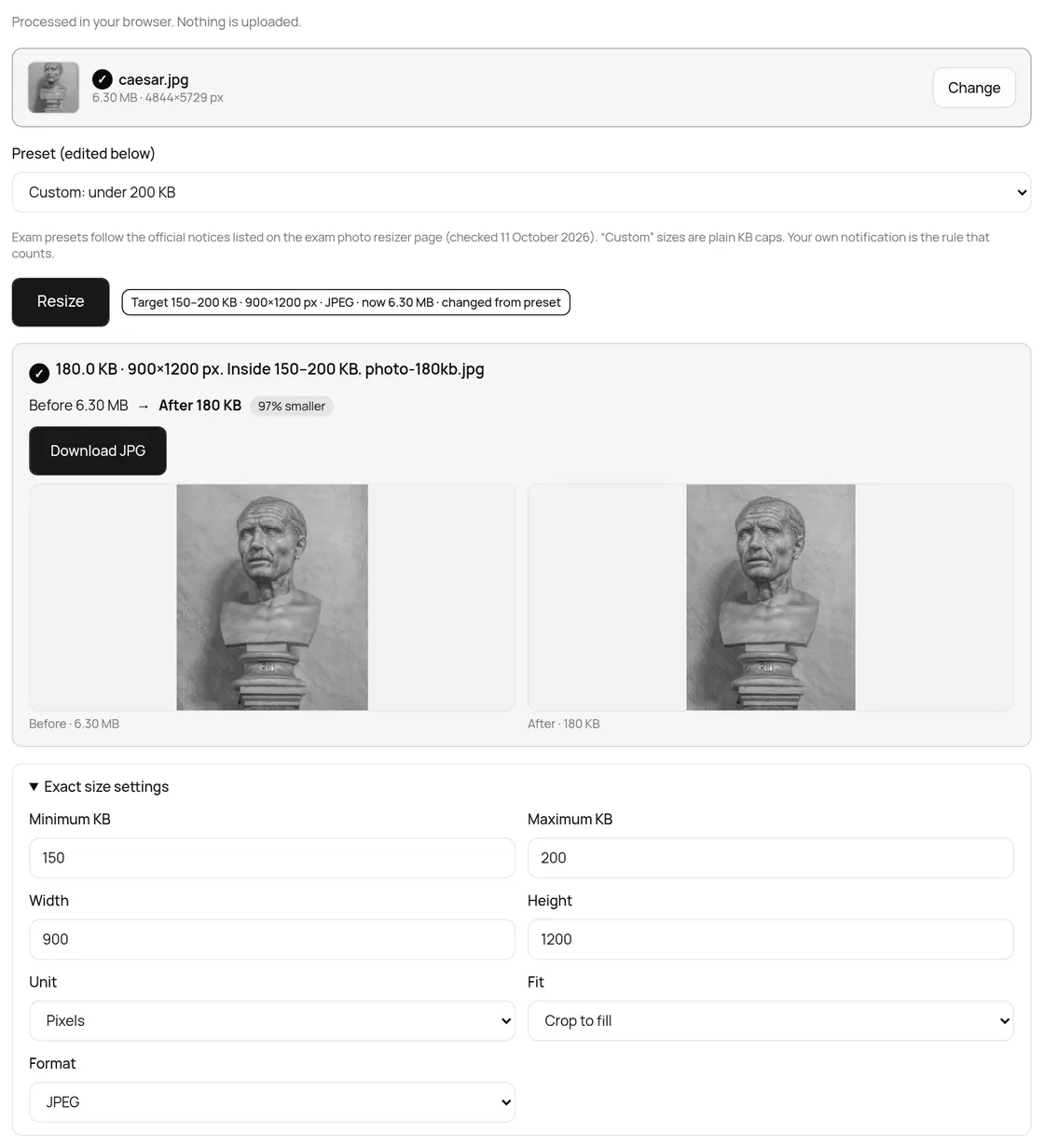
More quality only goes so far. With a 150 KB minimum on the 413 × 531 frame the tool tried quality 95 and still got 65.2 KB for Caesar and 45.4 KB for Turin. The honest way to make a JPEG bigger is more pixels.
| Frame | Caesar bust | Turin bust | What the result line said |
|---|---|---|---|
| 413 × 531 px | 65.2 KB | 45.4 KB | Under the 150 KB minimum |
| 900 × 1200 px | 180.0 KB | 162.2 KB | Inside 150 to 200 KB |
- Open Exact size settings and type your floor into Minimum KB.
- Switch Unit to Pixels and raise Width and Height in the same shape, such as 900 × 1200 for 3:4.
- Press Resize. If the result line still says under the minimum, go bigger. In our test 900 × 1200 gave 162 to 180 KB.
Start from the original photo: enlarging a squeezed one makes a bigger file, but lost detail does not come back. Only change pixels when the form does not fix them. On our NEET and JEE Main pages the tool does this for you: under the 10 KB floor, it enlarges the frame in the same shape and says so.
Does JPEG, PNG or WebP matter?
| Format | Caesar bust | Turin bust |
|---|---|---|
| JPEG | 52.9 KB | 36.3 KB |
| WebP | 41.6 KB | 23.3 KB |
| PNG | 192.8 KB | 199.9 KB |
PNG keeps every pixel exactly, so both only just fit. WebP is smallest, but neither NTA bulletin lists it. Stay with JPEG.
200 KB is not always 200 KB
The bulletins write "kb" without saying 1,000 or 1,024 bytes. Our tool counts 1,024 (what the IEC calls a kibibyte), so 200 KB here is 204,800 bytes. A portal counting in thousands stops at 200,000.
Our 1200 × 1600 Caesar file showed 199.4 KB, which is 204,165 bytes: fine by one count, over by the other. To be safe, type 195 in Maximum KB: 199,680 bytes, under both.
Your photo stays on your device
The resize runs in your browser tab with the open-source browser-image-compression library (MIT). We watched the network while resizing the Caesar photo: the page fetched the compression code from taskninja.ai and made one GET request to Google's ad quality service. No request carried a body, and the photo never left the tab. TaskNinja does not receive or store it.
Quick fixes
- Too big? The tool lowers quality first and cuts pixels itself only when its lowest quality is still too big.
- Head cut off? Pick Fit with padding instead of Crop to fill.
- iPhone HEIC photo will not open? Convert it with HEIC to JPG first.
- Smaller cap? Use the 100 KB or 50 KB page, or any range in the main photo resizer.
FAQ
How do I resize a photo to 200 KB for free?
Open Resize Image to 200KB, choose the photo and press Resize. No sign-up or watermark.
How can I increase a JPG to 200 KB?
Give it more pixels: set Minimum KB, switch Unit to Pixels and raise Width and Height in the same shape. Quality alone stopped at 65 KB in our test.
What pixel size should a 200 KB photo be?
Whatever your notice says. NEET and JEE Main give none, so the page uses 3.5 × 4.5 cm at 300 DPI (413 × 531 pixels), the usual passport shape.
Will a photo under 200 KB look blurry?
Not on a passport frame. Our test photos used a quarter of the limit or less at quality 93.
Is my photo uploaded?
No. It is resized in your browser tab. TaskNinja does not receive or store it.
Sources
- Information Bulletin NEET (UG) 2026, National Testing Agency (PDF)
- JEE (Main) 2026 Information Bulletin, National Testing Agency (PDF)
- Prefixes for binary multiples (NIST)
- browser-image-compression (GitHub, MIT)
- Bust of Julius Caesar, photo by Wilfredor (Wikimedia Commons, CC0)
- Bust of a male statue, limestone, Museo Egizio C 3081 (Wikimedia Commons, CC0)
Sources checked 19 Oct 2026. Sizes and result lines are from the live tool on that date; button labels are from the live page.
Written by the TaskNinja team with help from an AI writing tool, then checked against the NTA bulletins, NIST, and the tool itself.