How to convert iPhone HEIC photos to JPG (Windows, Android, online)
Why iPhones save HEIC, where it fails on Windows and exam portals, how to use Most Compatible, and how to convert in the browser without uploading.
If you have sent an iPhone photo to a Windows PC, an Android phone, a WhatsApp Web chat, or an exam form and watched it bounce, the usual culprit is the file type. Since iOS 11, iPhones save photos as HEIC by default. That format is fine inside Apple's world. Outside it, many apps and portals only accept JPG or PNG.
This guide explains why HEIC exists, where it fails, how to make the iPhone camera write JPG from now on, and how to convert the photos you already have. The conversion steps use our HEIC to JPG tool, which runs in your browser and does not upload the file.
Why iPhones save HEIC
HEIC is the usual extension for a still photo in the HEIF container, compressed with HEVC (also called H.265). Apple introduced HEIF for photos and HEVC for video in iOS 11 and macOS High Sierra. Its support page says these formats "offer better compression than JPEG and H.264, so they use less storage space on your devices and iCloud Photos, while preserving the same visual quality." Capture is available on iPhone 7 and later, and on matching iPads. The phone is saving space. The trade-off is compatibility: a portal that wants JPG, or a Windows PC without the right extensions, may reject the same photo that looks fine in the camera roll.
Where HEIC fails in practice
- Government and exam portals in India. Many GST, passport, and exam upload boxes accept JPG or PNG and refuse HEIC. The form often shows a vague error, or says the type is wrong, even though the picture looks fine on the phone.
- Windows without the Store extensions. Windows does not open every HEIC out of the box. Microsoft's HEIF Image Extension lets Windows read and write HEIF files. For .heic / .heif / .hif photos that use HEVC, Microsoft also says you need the HEVC Video Extensions package. Without those, File Explorer may show a blank thumbnail or refuse to open the file.
- Chrome and Firefox on Windows and Android. Those browsers usually cannot decode HEIC themselves. Safari on Apple devices can. That is why an online converter that runs a decoder in the page is useful on a PC.
- WhatsApp Web and many website uploads. Desktop browsers and upload widgets often filter by extension or MIME type. A .heic that works in the phone app can fail when you pick the same file on the computer.
| Place | HEIC usually works? | What to use instead |
|---|---|---|
| iPhone / iPad Photos | Yes | Nothing |
| Mac Photos / Preview | Yes (High Sierra and later) | Nothing |
| Windows 10 / 11 | Only with HEIF + HEVC extensions | Convert to JPG, or install the extensions |
| Android gallery | Depends on the phone and app | Convert to JPG before sharing |
| Chrome / Firefox upload form | Usually no | Convert to JPG first |
| Indian exam / GST portals | Usually no | JPG or PNG as the notice asks |
Make new photos JPG on the iPhone
If you often send photos to non-Apple devices or portals, make new shots JPG. Apple documents this under Settings, Camera, Formats:
- Open Settings, then tap Camera.
- Tap Formats.
- Tap Most Compatible.
Apple says that setting is only on devices that can capture HEIF or HEVC, and that new photos and videos then use JPEG or H.264. Choose High Efficiency to go back. Existing photos are not rewritten. AirDrop, Messages, or email may already convert for the other person, but that does not help when you plug the phone into a PC, download originals from iCloud, or pick the file on a website.
Convert existing HEIC files in the browser
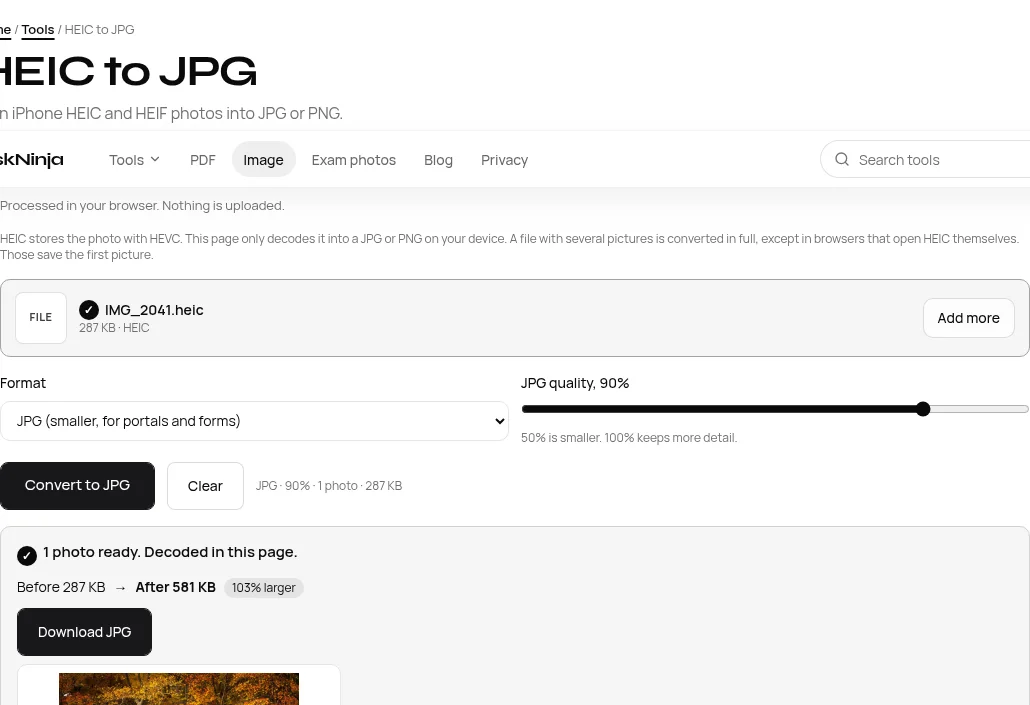
For photos you already have, open the HEIC to JPG converter. It turns .heic and .heif into JPG or PNG in this tab and does not upload anything. Chrome and Firefox load a decoder from this site after you press Convert. Safari can decode HEIC itself.
- Drop one or more .heic or .heif photos. Other types are refused.
- Leave the format on JPG for portals and WhatsApp, or switch to PNG if you need a lossless file.
- Set JPG quality. 90% is a fair start when the form does not name a kilobyte limit. Lower numbers make a smaller file.
- Press Convert, check the before and after size, then download one file or a ZIP of the batch.
If the portal also caps the file weight (20 KB, 50 KB, 100 KB) or the pixel size, converting the type is only the first step. Use Resize Photo on the JPG afterwards and follow your own notification.
What HEIC vs JPG actually weighs
Apple's claim is that HEIF saves space compared with JPEG at similar visual quality. We checked that with a real 1440×960 HEIC sample in the TaskNinja converter on 13 October 2026. The original file was 287 KB. The same pixels at different JPG quality settings came out as:
| Output | File size | vs HEIC |
|---|---|---|
| HEIC (original) | 287 KB | Baseline |
| JPG at 90% | 581 KB | 103% larger |
| JPG at 70% | 333 KB | 16% larger |
| JPG at 50% | 244 KB | 15% smaller |
At 90%, a common default for portals, the JPG is roughly twice the HEIC. That is the compatibility trade-off. Lower the slider for a smaller email attachment. PNG ignores the slider and is usually much bigger, so keep it for graphics, not everyday phone photos.
Windows: open HEIC without converting
To view HEIC on the PC without changing files, install Microsoft's free HEIF Image Extension from the Store. Microsoft's WIC docs also note that .heic files commonly use HEVC, which may need the separate HEVC Video Extensions package. Restart File Explorer or Photos after install. That helps browsing a folder. For website uploads that only accept JPG, convert.
Mac and sharing tips
- Mac Photos or Preview: open the HEIC, choose File, Export, then pick JPEG (or PNG) before saving. Apple lists this on the same HEIF support page.
- Keep Originals when importing: if you import from an attached iPhone and do not want the Mac or PC to convert on the way in, Apple says to open Settings, Apps, Photos, and choose Keep Originals.
- Live Photos: the still converts; the short video is not exported.
FAQ
Is HEIC the same as HEIF?
HEIF is the container format. HEIC is the common extension when the image inside is compressed with HEVC, which is what iPhones write. People say HEIC and HEIF for the same phone photos in everyday use.
Does converting upload my photo?
Not on TaskNinja. The HEIC to JPG page decodes in your browser tab. The photo is not sent to TaskNinja or anyone else. Close the tab and the working copy is gone.
Will an exam portal accept the JPG?
The page changes the type to JPG or PNG. If the portal also wants a size in KB or a fixed pixel size, resize the JPG next and read your own notification. The converter does not certify the file for any board.
Should I leave the iPhone on High Efficiency?
Yes if you stay mostly on Apple devices and want smaller files. Switch to Most Compatible if you often hit Windows, Android, or upload forms. You can convert older HEIC files either way.
Can I convert several photos at once?
Yes. Drop a batch, convert, then download one file or a ZIP. A damaged file is named and skipped; the others still finish.
Sources
- Apple Support: Using HEIF or HEVC media on Apple devices
- Microsoft Learn: HEIF extension codec (WIC)
- Microsoft Store: HEIF Image Extension
Sources last checked on 13 October 2026. File sizes in the table were measured with the TaskNinja HEIC to JPG tool on the same day.
Written by the TaskNinja team with help from an AI writing tool, then checked against Apple and Microsoft docs and a live conversion of a real HEIC sample. This is general information, not a guarantee that any portal will accept your file.