How to convert Kruti Dev to Unicode (Mangal) without breaking Hindi words
Convert Kruti Dev 010 text or Word files to Unicode Mangal Hindi, and back, free in your browser. Tested on 117 real samples, with the hard words shown.
You open an old office letter, a court draft or a typing practice file and the Hindi has turned into Hkkjr ,d egku ns'k gSA The reason is simple: Kruti Dev is not really Hindi text. It is English letters wearing a Hindi costume.
This guide explains why that happens, how to convert Kruti Dev to Unicode (the Mangal kind of Hindi) and back, and which words trip converters up. We ran 117 real Kruti Dev samples through our Krutidev to Unicode converter and its reverse, Unicode to Krutidev, and the numbers are below.
Why Kruti Dev text turns into English letters
Kruti Dev 010 is a legacy font. When you press k on the keyboard, the file stores the English letter k, and the font simply draws it as the matra ा. The word भारत is stored as Hkkjr. With Kruti Dev installed it looks like Hindi. Anywhere else, including phones, email and most government portals, you see the raw letters.
Unicode works the other way round. Each Hindi letter has its own code in the Devanagari block, so भारत is stored as भ, ा, र and त, and any Devanagari font can show it. Mangal is Microsoft's Unicode font for Devanagari and ships with Windows, which is why people say "Mangal font" when they mean Unicode Hindi. Nirmala UI and Noto Sans Devanagari read exactly the same text.
Kruti Dev is still alive because many typists learned on it, and some exams still allow it. The RRB notice for the CEN 06/2024 typing skill test, for example, says candidates who opt for Hindi typing must be familiar with the Krutidev or Mangal font.
How to convert Kruti Dev to Unicode, step by step
- Open the Krutidev to Unicode converter. Kruti Dev to Unicode is selected by default.
- Paste your Kruti Dev text as it is, even if it looks like Hkkjr. Or press Open a Word file and choose a .docx.
- Press Convert. The result appears as proper Hindi under "Converted to Unicode Hindi".
- Press Copy text, or Download .txt. For a Word file, press Download .docx and pick the Hindi font: Mangal, Nirmala UI or Noto Sans Devanagari.
- Need it the other way? Press Convert this back, or switch to Unicode to Kruti Dev at the top.
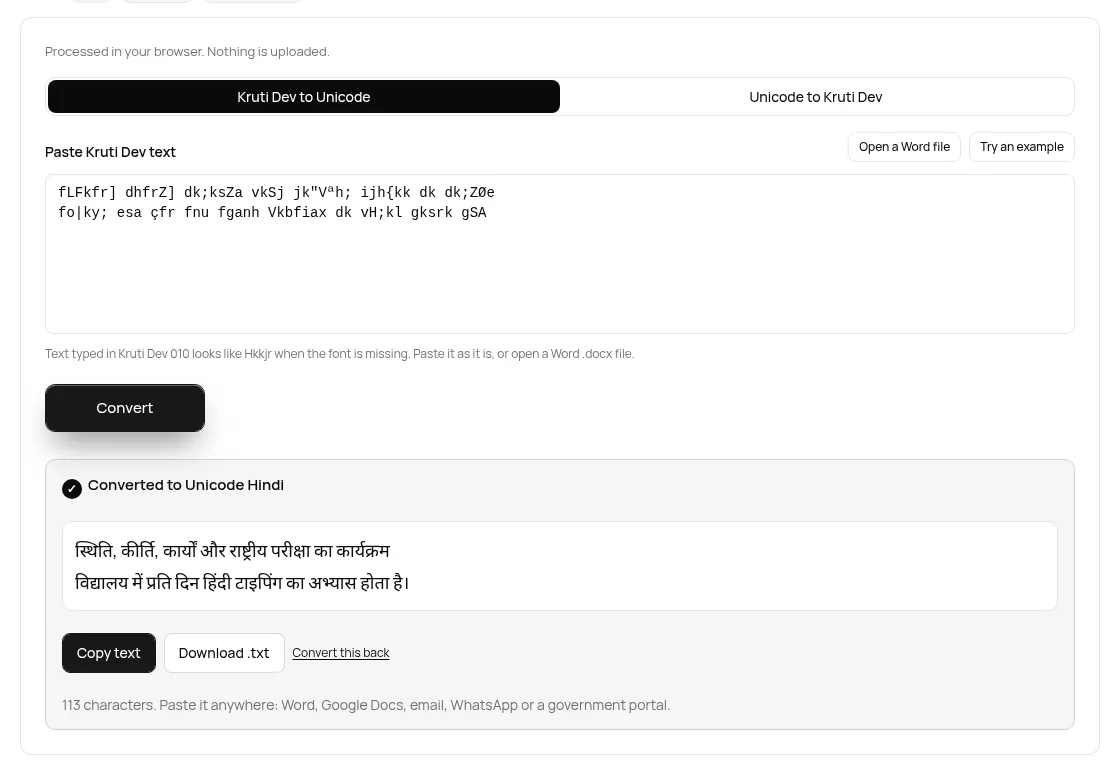
Your text stays on your device. While we typed the test line, the only network requests were two Google Analytics events that record a visit and that the form was used, with no text in them. When we opened a Word file, the events recorded the tool name, the file type and a size range (under 100 KB), not the file or its words.
The words that break simple converters
Converting Kruti Dev is not a letter for letter swap, because Kruti Dev stores Hindi in the order you see it, not the order you say it. Three things cause most errors:
- The short i matra comes first. In हिंदी you type f before the letter it belongs to, so it is stored as fganh. A converter has to move that f past the whole conjunct: fLFkfr must become स्थिति, not सि्थति.
- The reph comes last. The little र on top, as in कीर्ति, is typed as Z after the syllable: dhfrZ. The converter has to move it back in front of the right letter.
- Special keys for conjuncts. क्ष, त्र, ज्ञ, श्र, द्ध and क्र each have their own key, like {, =, K, J, ) and Ø.
Here is what our converter does with common hard words. Every row was produced by the site's own conversion code on 25 Oct 2026, and every one converts back to the same Hindi.
| Hindi (Unicode) | Kruti Dev keys | What makes it hard |
|---|---|---|
| भारत | Hkkjr | Plain word, the classic test |
| हिंदी | fganh | Short i typed first, bindu |
| स्थिति | fLFkfr | Short i before a half letter conjunct |
| कीर्ति | dhfrZ | Reph typed after the syllable |
| धार्मिक | /kkfeZd | Reph and short i on the same letter |
| कार्यों | dk;ksZa | Reph, o matra and bindu together |
| कार्यक्रम | dk;ZØe | Reph plus the क्र key |
| विद्यालय | fo|ky; | द्य has its own key |
| परीक्षा | ijh{kk | क्ष key |
| क्षेत्र | {ks= | क्ष and त्र keys |
| ज्ञान | Kku | ज्ञ key |
| श्रद्धा | J)k | श्र and द्ध keys |
| प्रश्न | ç'u | प्र key, half श |
| ग्रामीण | xzkeh.k | Lower र sign |
| राष्ट्रीय | jk"Vªh; | Three letter conjunct ष्ट्र |
| बड़ा | cM+k | Nukta typed as a separate key |
| फ़ाइल | Q+kby | Nukta on फ |
| रुपये | #i;s | रु has its own key |
| रूप | :i | रू has its own key |
| दिल्ली | fnYyh | Half ल |
| महत्त्व | egÙo | त्त key |
| हूँ | gw¡ | Chandrabindu |
| अधिवक्ता | vf/koDrk | Half क |
| सर्वोच्च | loksZPp | Reph after o matra, half च |
| वर्ल्ड | oYMZ | Reph over a conjunct |
What we tested, and the results
The tool ships with 117 real Kruti Dev samples: sentences from typing tests, office letters, legal phrases and single hard words. We converted each one to Unicode, converted it back, and also compared the reverse output key for key with the original Kruti Dev.
| Test | Result |
|---|---|
| Kruti Dev to Unicode matches the expected Hindi | 117 of 117 |
| Round trip (Kruti Dev to Unicode and back to the same Hindi) | 117 of 117 |
| Unicode to Kruti Dev gives the exact same keys as the sample | 112 of 117 |
| Extra hard cases in the built in self check | 31 of 31 pass |
| Speed on 312,000 characters | 22 milliseconds |
The 5 key differences are not errors. Kruti Dev often has two ways to type the same thing. प्र can be typed as iz or with the single ç key, क्त can be ä or Dr, कार्यों can end in Zsa or sZa, and कृ has two keys of its own. Our reverse converter picks one of them, the samples used the other, and both read as the same Hindi in the Kruti Dev font.
We also built a small Word file the way a typist would: a heading and a paragraph in Kruti Dev 010, an English line in Arial, and a two column table with a name and a post. One word had its short i stored in a separate run, which happens when you edit a word in Word. The live tool converted it in under a fifth of a second, fixed that split word, changed 7 paragraphs, table cells included, to Mangal, and left the English lines alone.
Honest limits
- Pasted text cannot be told apart. In plain pasted text, the tool cannot know which words were English and which were Kruti Dev, so English words get converted too. Use the Word file option for mixed documents, since a .docx keeps the font of each run.
- Missing nukta stays missing. If the typist wrote बडा without the nukta key, the result is बडा, not बड़ा.
- Kruti Dev 010 only. Chanakya, DevLys and other legacy fonts use different key maps and will come out wrong.
- Old .doc files need to be saved as .docx in Word first.
- We do not supply the Kruti Dev font. To see the Unicode to Kruti Dev result as Hindi, you need Kruti Dev 010 installed on your computer.
- Symbols differ. The % key is the visarga in Kruti Dev, so a line like fo"k; % becomes विषय ः. That matches the font, but check punctuation before you submit anything.
FAQ
How do I convert Kruti Dev to Mangal font?
Paste the Kruti Dev text, or open the .docx, in our Krutidev to Unicode converter and press Convert. The result is Unicode Hindi, which shows in Mangal, Nirmala UI or any Devanagari font. For Word files, pick Mangal before you download.
Why does my Hindi show as English letters like Hkkjr?
The text was typed in Kruti Dev and the font is not on this device, so you see the letters the font was hiding. Converting it to Unicode fixes it everywhere.
Can I convert Unicode Hindi back to Kruti Dev?
Yes. Use Unicode to Krutidev, paste the Hindi and press Convert. Paste the result into a document set in Kruti Dev 010 to see it as Hindi.
Which font is allowed in the RRB Hindi typing test?
The RRB notice for the CEN 06/2024 typing skill test says Hindi typists must be familiar with Krutidev or Mangal. Check the notice for your own exam.
Is my text uploaded when I convert it?
No. The conversion runs in your browser. In our test the only requests were analytics events without your text or file.
Sources
- RRB CEN 06/2024 notice on the computer based typing skill test (RRB file host), listed on RRB Ranchi's CEN page
- Mangal font family, Microsoft Typography
- Nirmala UI font family, Microsoft Typography
- Developing OpenType fonts for Devanagari script, Microsoft Typography
- Indic scripts and languages FAQ, Unicode Consortium
Sources checked 25 Oct 2026. Tables and test counts come from the site's own conversion code on that date; the screenshot and button labels are from the live page.
Written by the TaskNinja team with help from an AI writing tool, then checked against Microsoft's and Unicode's documentation, the RRB notice and the tool itself.