How to open an OLM file without Outlook for Mac, on Windows or any computer (tested on 4 archives)
Open an Outlook for Mac .olm archive free on Windows, Mac or a phone: read every email, save attachments and convert OLM to MBOX or EML. Nothing is uploaded.
An .olm file usually turns up at an awkward moment. A colleague leaves and IT hands you their old mailbox, or you swap a MacBook for a Windows laptop and need one email from an old backup. You double click the file and nothing opens it.
That is because .olm is the archive format of Outlook for Mac, and almost nothing else reads it. Here is what Microsoft offers, and how to open one in a browser on any computer, with timings from four test archives.
What is an OLM file?
OLM is the file you get from Tools, Export in Outlook for Mac, and Microsoft's help page says it is the only export option the app has. One .olm can hold your emails, contacts, calendar, tasks and notes.
Inside, an .olm is a ZIP container with each email stored as its own XML file and attachments beside it. The layout is nothing like a Windows .pst file, so renaming it does not help.
Your options
| Option | Works on | What you get | Catch |
|---|---|---|---|
| Import into legacy Outlook for Mac (Tools, Import) | A Mac with legacy Outlook for Mac | Everything, under On My Computer | Legacy Outlook support ends October 2026 for Microsoft 365 Personal, Family and Exchange Online |
| Import into Outlook for Windows | Not possible | Nothing | Not supported, and Microsoft has no OLM to PST tool; its routes need Exchange |
| Paid OLM converter apps | Usually Windows | PST, MBOX or EML files | Paid licence and an install |
| TaskNinja OLM File Viewer | Any current browser, including phones | Read, search, save attachments, MBOX, EML, VCF, ICS and CSV | Reads and exports; no .pst output |
The timing matters this month. Microsoft's .olm import and export instructions are written for legacy Outlook for Mac, and its end of support page says legacy Outlook for Mac stops working with Exchange Online mailboxes from October 2026, when Exchange Web Services is retired. Non-subscription Outlook for Mac 2024 has no legacy mode at all. If you hold an old .olm backup, opening it without that app matters more now.
How to open an OLM file in your browser
- Open OLM File Viewer and press Choose an OLM file, or drop the .olm file on the box. No file at hand? Press Open a sample OLM archive.
- The heading shows how many emails and folders it holds. Pick a folder in the Folder menu, or type in Search to look through subjects, people and email text.
- Click an email to read it, with its attachments and their sizes. Pictures from the internet stay hidden until you press Show them, so the sender cannot tell you opened it.
- Save what you need: Download .eml for that one email, Save next to an attachment, All attachments (ZIP), Print or save as PDF, or Copy text.
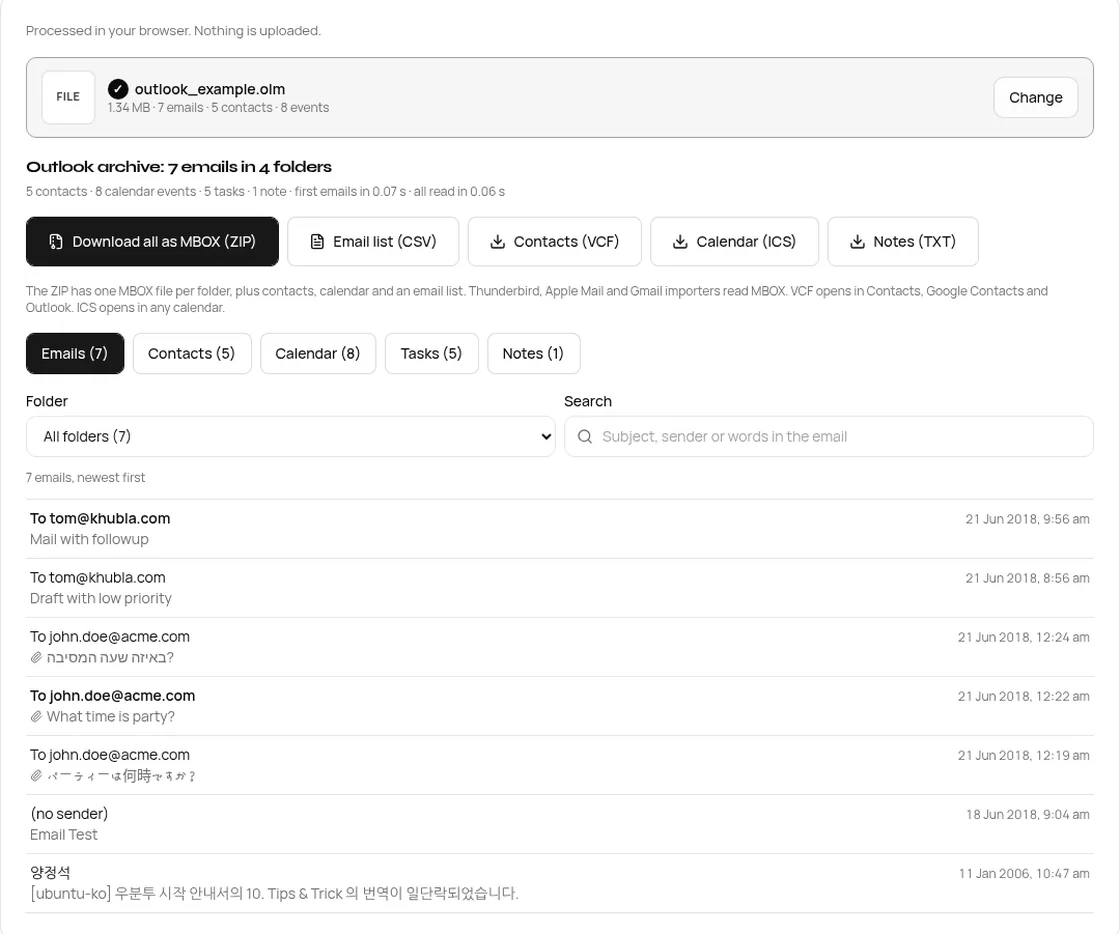
What we tested
We ran four archives through the live site on 30 Oct 2026, in desktop Chrome at 1440 px and in a 390 px phone window with the processor slowed four times on a 9 Mbps connection. Two are real test files from OLMReader. The other two repeat the folders of bill_rapp.olm 16 and 60 times, to stand in for a big mailbox. Times run from choosing the file to the first email on screen, and to the whole archive being read.
| Archive | Size | What is in it | Desktop: first email / all | Phone, slowed: first email / all |
|---|---|---|---|---|
| outlook_example.olm | 1.34 MB | 7 emails, 4 folders, 9 attachments, contacts, calendar, tasks, notes | 0.16 s / 0.17 s | 0.36 s / 0.37 s |
| bill_rapp.olm | 5.51 MB | 483 emails (2001 to 2002), 21 folders, 59 attachments | 0.17 s / 0.24 s | 0.30 s / 0.31 s |
| large_derived.olm | 20.9 MB | 7,728 emails, 336 folders | 0.16 s / 0.97 s | 0.53 s / 1.05 s |
| huge_derived.olm | 328.6 MB | 28,980 emails, 1,260 folders, uncompressed | 0.35 s / 2.03 s | 0.97 s / 1.48 s |
Big files open fast because the viewer never loads the whole archive into memory. It reads the ZIP directory at the end of the file, then only the pieces it needs from your disk. Small differences between runs are noise (a second desktop run of the 20.9 MB file took 0.81 s).
Converting OLM to MBOX, EML and the rest
If you are moving to Apple Mail, Thunderbird or another app, you want the mail in a standard format. These are the files our code made from the two real archives:
| Button | What you get | outlook_example.olm | bill_rapp.olm |
|---|---|---|---|
| Download all as MBOX (ZIP) | One .mbox per folder, attachments inside the emails | 8 files, 1.37 MB | 23 files (21 folders), 4.23 MB |
| Email list (CSV) | One row per email: folder, date, sender, To, Cc, subject | 877 bytes | 118 KB |
| Contacts (VCF) | vCard 3.0 contacts | 1,458 bytes, 5 contacts | 1 contact |
| Calendar (ICS) | Events and tasks | 2,259 bytes | Empty, no events |
| Download .eml (on an email) | One email with attachments, standard RFC 5322 | Per email | Per email |
To bring MBOX into Apple Mail, choose File, Import Mailboxes, then Files in mbox format. Thunderbird imports MBOX into Local Folders with the free ImportExportTools NG add-on. For a single folder, pick it in the Folder menu and press Download folder as MBOX. The OLM to MBOX converter page puts the export step first.
Files it refuses, and why
We fed it four wrong files to check that it says no clearly:
| File | What the page says |
|---|---|
| A Windows Outlook .pst | This is a Windows Outlook data file (.pst). This tool opens Outlook for Mac .olm files. |
| A plain text file | This is not an Outlook for Mac archive. Choose the .olm file you exported from Outlook for Mac (File, Export). |
| An .olm cut off halfway, like a failed copy | This .olm file looks damaged or only partly copied. Copy it again from the Mac, or export it again from Outlook for Mac. |
| An ordinary ZIP | This file is a ZIP archive but not an Outlook for Mac export. Choose an .olm file. |
What the viewer does not do
- No .pst output. Microsoft has no OLM to PST tool and neither do we. For Outlook for Windows, save EML files, or move the mail through an Exchange or IMAP account.
- No editing or saving back to .olm, and password protected archives are refused.
- It does not put mail back into an account. It gives you files to import.
Is my mailbox uploaded?
No. The archive is read inside your browser tab and every export is made on your device. Watching the network while opening the sample on 30 Oct 2026, we saw the 13 KB reader script, one ad and one 471 byte analytics event. No request carried the file or its contents.
FAQ
How do I open an OLM file without Outlook?
Choose it in our OLM File Viewer. It works in any current browser on Windows, Mac, Linux, Android or iPhone, with no install.
Can Outlook for Windows open an OLM file?
No. Microsoft says Outlook for Windows does not support .olm files, and that it has no utility to convert .olm to .pst.
How do I convert OLM to MBOX for free?
Open the file in OLM to MBOX and press Download all as MBOX (ZIP). There is no sign up and no email limit.
Can I get the attachments out of an OLM file?
Yes. Open an email and press Save next to an attachment, or All attachments (ZIP). MBOX and EML exports keep them inside the emails too.
Is there a size limit?
We set none. Our largest test, 328.6 MB with 28,980 emails, was fully read in about two seconds on desktop.
Sources
- Export items to an archive file in legacy Outlook for Mac, Microsoft Support
- Import email messages, contacts, and other items into legacy Outlook for Mac, Microsoft Support
- End of support for legacy Outlook for Mac, Microsoft Support
- Can't import .olm files from Outlook for Mac to Outlook for Windows, Microsoft Learn (KB 2649169)
- Import or export mailboxes in Mail on Mac, Apple Support
- ImportExportTools NG for Thunderbird
- RFC 4155, the mbox format and RFC 5322, Internet Message Format
- Test files: OLMReader by Tom Everett (GitHub, BSD 2-Clause); bill_rapp.olm holds email from the public Enron corpus (EDRM, CC BY 3.0 US, ZL Technologies).
Sources checked 30 Oct 2026. Counts, sizes and timings are from our test run that day.
Written by the TaskNinja team with help from an AI writing tool, then checked against Microsoft's documentation and the tool itself.