How to open a JMP file without JMP and convert .jmp to Excel or CSV (tested on 22 files)
Open a JMP .jmp data table free without JMP: see every row in your browser, keep real dates, and save it as Excel or CSV. Tested on 22 real JMP files.
Someone sends you a .jmp file: a supplier's measurement data, tables for a statistics course, or the numbers behind a figure in a thesis. You double click it and nothing useful happens, because it belongs to JMP, the statistics program that started life inside SAS, and you do not have it.
Excel, Google Sheets and LibreOffice cannot read the format either. Here are your real options, free and paid, and what happened when we ran 22 real JMP files through our JMP File Viewer.
What is inside a .jmp file
A .jmp file is a JMP data table: rows and columns like a spreadsheet, plus things only JMP uses, such as formulas, table scripts and row states (the colour and marker of each row in a graph). The data is stored in a binary layout, and some columns are packed with gzip, which is why a 4.9 KB test file held 10,000 rows and became a 1.88 MB CSV.
Dates are stored as seconds since 1 January 1904, so a careless reader shows 3787948800 where JMP shows 13 January 2024.
Your options
| Option | Cost | Runs on | Catch |
|---|---|---|---|
| JMP or JMP Pro | Annual subscription, priced in the JMP Store for your country | 64-bit Windows 10 (1809 or later) or 11, macOS 13 Ventura or later | Paid, licensed per user |
| JMP free trial | Free for 30 days | Windows or macOS computer, not phones or tablets | One machine only, and JMP says it cannot be extended past 30 days |
| JMP Student Edition | Free, renewed every 12 months while you qualify | Windows or macOS | Only for students, teachers and researchers at degree granting institutions; needs your institution email |
| JMPReader.jl | Free, open source (MIT) | Anywhere Julia runs | You need to write a little Julia code |
| TaskNinja JMP File Viewer | Free | Any current browser, including phones | Reads the data only: no graphs, scripts or formula recalculation |
Students should take the Student Edition, a full JMP Pro at no cost. For one or two files on a Windows or Mac computer, the trial works after a form and a large download. If you just need the numbers in Excel now, on any device, a browser viewer is quicker.
How to open a .jmp file in your browser
- Open JMP File Viewer and press Choose a JMP file, or drop the .jmp file on the box. No file at hand? Press Open a sample JMP table.
- The table opens straight away, with the row and column count, the JMP version and the save date on top.
- Wide tables page with Next columns, keeping the first column on the left. Long tables show more with Show all rows.
- The Columns list under the table gives each column's type, missing values and a quick summary, such as mean, SD, minimum and maximum for numbers.
- Save what you need: Download Excel for an .xlsx with real dates and a Columns sheet, Download CSV for plain text, Copy table to paste into Excel or Google Sheets, or Copy summary for a short text description of the file.
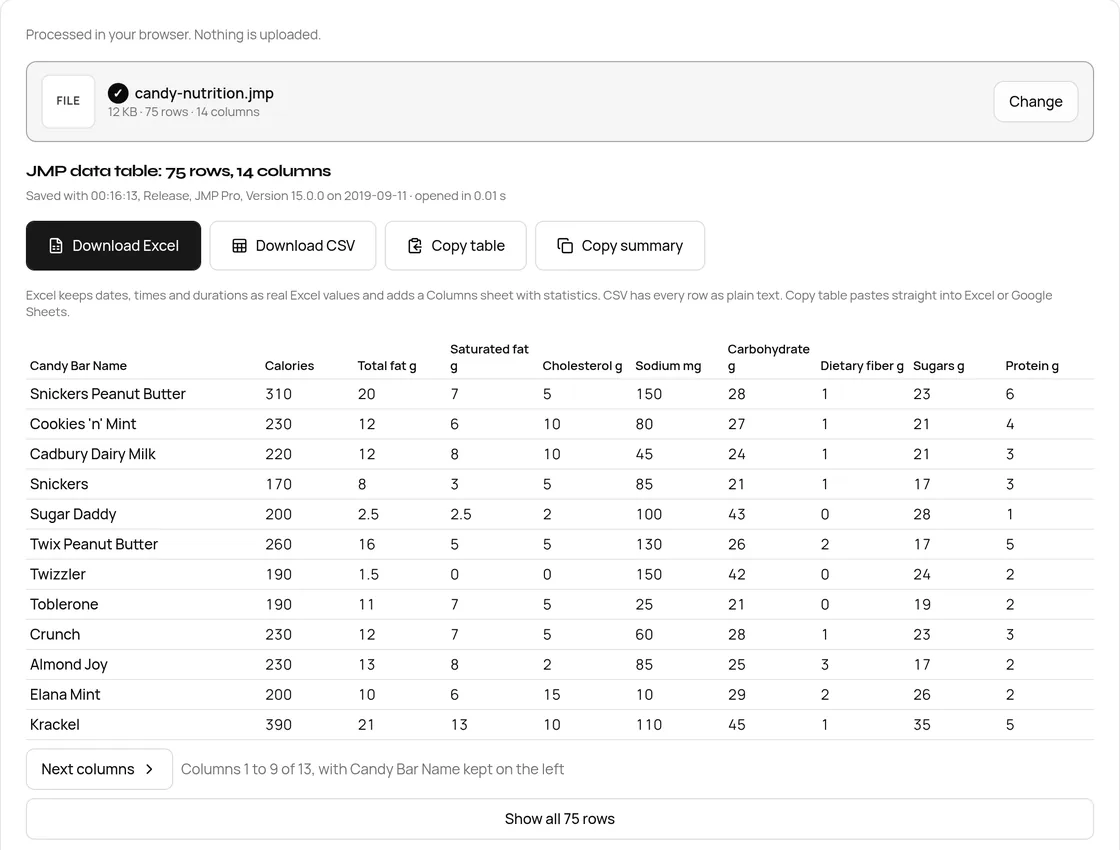
If you only want the spreadsheet, JMP to CSV and Excel is the same tool with the export step up front.
What we tested
We used openly licensed files: the 19 test tables of JMPReader.jl (MIT), saved by JMP 17, 18 and 19, two JMP Essentials book tables (Apache 2.0) saved by JMP Pro 15, and one older layout file from the Python JMPReader (MIT). All 22 went through the live site in desktop Chrome on 29 Oct 2026. Each opened in under 0.3 seconds or was refused with a message.
| Test files | Saved by | What is in them | Result |
|---|---|---|---|
| candy-nutrition.jmp, candy-bar-sizes.jmp | JMP Pro 15.0.0 | 75 rows each, 14 and 4 columns of names and numbers | Opened, all values shown |
| compressed.jmp | JMP 17.2.0 | 10,000 rows, 7 columns, all gzip packed, with a date, a date-time and a duration | Opened; CSV of 1.88 MB from a 4.9 KB file |
| compact_UInt16.jmp, compact_UInt32.jmp | JMP 18.2.1 | 32,770 and 65,537 rows of repeated text labels in JMP's compact storage | Opened |
| date.jmp, time.jmp, duration.jmp | JMP 17.2.0 | 14 date formats, 18 date-time and 2 duration formats, 5 duration formats | Opened as calendar dates and times |
| example1.jmp | JMP 17.2.0 | Integers, decimals, text, emoji and Chinese text, a formula column, missing values | Opened, text kept exactly |
| 12 more tables | JMP 17.2.0 to 19.1.1 | Byte integers, missing values, currencies, map coordinates, row states, long column names, one cell | All opened |
| old-layout-jmp11.jmp | An older JMP | The older file layout seen in some JMP 11 and earlier tables | Refused with a clear message asking for a fresh save or a CSV |
Our self test also repeats every value check in JMPReader.jl's own tests, plus our CSV and Excel exports: 160 checks, all passing.
Dates, times and missing values
This is where homemade converters go wrong. Here is example1.jmp:
| Column type | Stored in the file | Shown and saved in CSV | In the Excel file |
|---|---|---|---|
| Date | 3787948800 seconds since 1904 | 2024-01-13 | A real Excel date, formatted yyyy-mm-dd |
| Date and time | 2280085920 | 1976-04-01 21:12:00 | A real Excel date-time |
| Duration | 2322 seconds | 00:38:42 | A time value with the [h]:mm:ss format |
| Missing number or date | A missing value marker | A dot on screen, an empty cell in CSV | An empty cell |
| Text | UTF-8 text such as 辛口 or jäääär | The same text | The same text |
Real Excel dates mean sorting, filters and pivot tables just work. The CSV is UTF-8 with a byte order mark, so Hindi or Chinese text shows correctly in Excel.
What the viewer does not do
- No graphs, scripts or saved reports. Those only run inside JMP; ask the sender for a PDF.
- Formulas are not recalculated. You get the values JMP saved.
- Data tables only. Scripts (.jsl), journals (.jrn) and projects (.jmpprj) do not open.
- Some old tables. The older layout in some JMP 11 and earlier files is refused rather than shown with wrong numbers.
- No editing or saving back to .jmp.
If you do have JMP
Use File > Export or File > Save As. JMP's help lists Excel, text, SAS, JSON and SQLite on all systems, but CSV and tab separated files only on Windows. On a Mac, save as Excel.
Is the file uploaded?
No. The file is read in your browser tab and the exports are made on your device. We watched the network while opening all 22 files on 29 Oct 2026: no request carried a file, only Google Analytics usage events and the page's ad script.
FAQ
Can I open a JMP file without JMP?
Yes. Choose it in our JMP File Viewer and the table opens in any current browser, on a laptop or a phone, with dates shown as dates.
Can Excel open a .jmp file?
No. Excel has no reader for the JMP format. Open the file in JMP to CSV and Excel and press Download Excel to get an .xlsx with the same rows and real dates.
Is JMP free?
JMP and JMP Pro are paid annual subscriptions. JMP offers a 30 day free trial on one Windows or Mac computer, and JMP Student Edition is free for students, teachers and researchers at degree granting institutions.
Which JMP versions does the viewer read?
Data tables saved by current versions open, and our test files came from JMP 15, 17, 18 and 19. Some tables from JMP 11 and earlier use an older layout; those show a message asking for a fresh save or a CSV.
Why do the dates in my converted file look like big numbers?
JMP stores dates as seconds since 1 January 1904. A converter that does not know this writes the raw count. Our viewer converts them, so 3787948800 becomes 2024-01-13 in the CSV and a real date in Excel.
Sources
- Buy JMP, frequently asked questions (licensing, Student Edition) and JMP Store
- JMP Student Edition
- JMP Trial FAQs, JMP User Community
- JMP System Requirements (Windows) and (macOS)
- Save Data Tables, JMP 19.2 Help
- Test files: JMPReader.jl by Jaakko Ruohio (GitHub, MIT), JMP Essentials example data (GitHub, Apache 2.0) and JMPReader by Thomas K. Reynolds (GitHub, MIT).
Sources checked 29 Oct 2026. Counts, values and timings are from the live tool and our test run on that date; button labels are from the live page.
Written by the TaskNinja team with help from an AI writing tool, then checked against JMP's documentation and the tool itself.