How to open an SPV file without SPSS and save the output to Excel (tested on 10 real files)
Open an SPSS .spv output file without SPSS: read every table and chart in your browser, then save the tables to Excel or CSV. Tested on 10 real SPSS files.
Your guide, a classmate or a client sends you an .spv file with the results of an analysis. You double click it and Windows asks which app to use, because .spv is the output file of IBM SPSS Statistics, and you do not have SPSS on this computer.
Excel, Word and Google Sheets cannot open it. Here are the real ways to read it, what each one costs you, and what happened when we put 10 real SPSS output files through our SPSS Output Viewer.
What is inside an .spv file
An .spv file is what SPSS saves from its Viewer window: the tables, charts, notes and log of one session, in the order they were printed. It is not the data. The data lives in a .sav file, and the output is the result of running tests on it, such as frequencies, a t-test, a chi-square table or a regression.
Since SPSS 16 the output has been saved as .spv; older versions used .spo, a different format. Inside, an .spv is a ZIP archive of XML and binary parts. From SPSS 23 onward tables are stored in a compact binary form, which is why a simple unzip shows you nothing readable.
Your options
| Option | Cost | Runs on | Catch |
|---|---|---|---|
| IBM SPSS Statistics | Paid subscription or licence | Windows or macOS | A large install for one file |
| SPSS free trial | Free for 14 days | 64-bit Windows or macOS | Needs an IBMid and internet; one trial per 365 days |
| IBM SPSS Smartreader | Free | Windows and Linux (version 27); older versions for Mac | IBM stopped making it after SPSS 28, and newer output is not promised to open |
| GNU PSPP pspp-output | Free, open source | Mostly Linux | A command line tool with no viewer window |
| TaskNinja SPSS Output Viewer | Free | Any current browser, including phones | Reads and exports; no editing, some old and special items not drawn (see below) |
If you will work with SPSS output every week, a licence through your university or employer is the right answer, and many universities provide one. If you only need to read the results someone sent you, or move a few tables into a report, a viewer is faster than installing SPSS.
How to open an .spv file in your browser
- Open SPSS Output Viewer and choose your .spv file, or drop it on the box. No file at hand? Press Open a sample output.
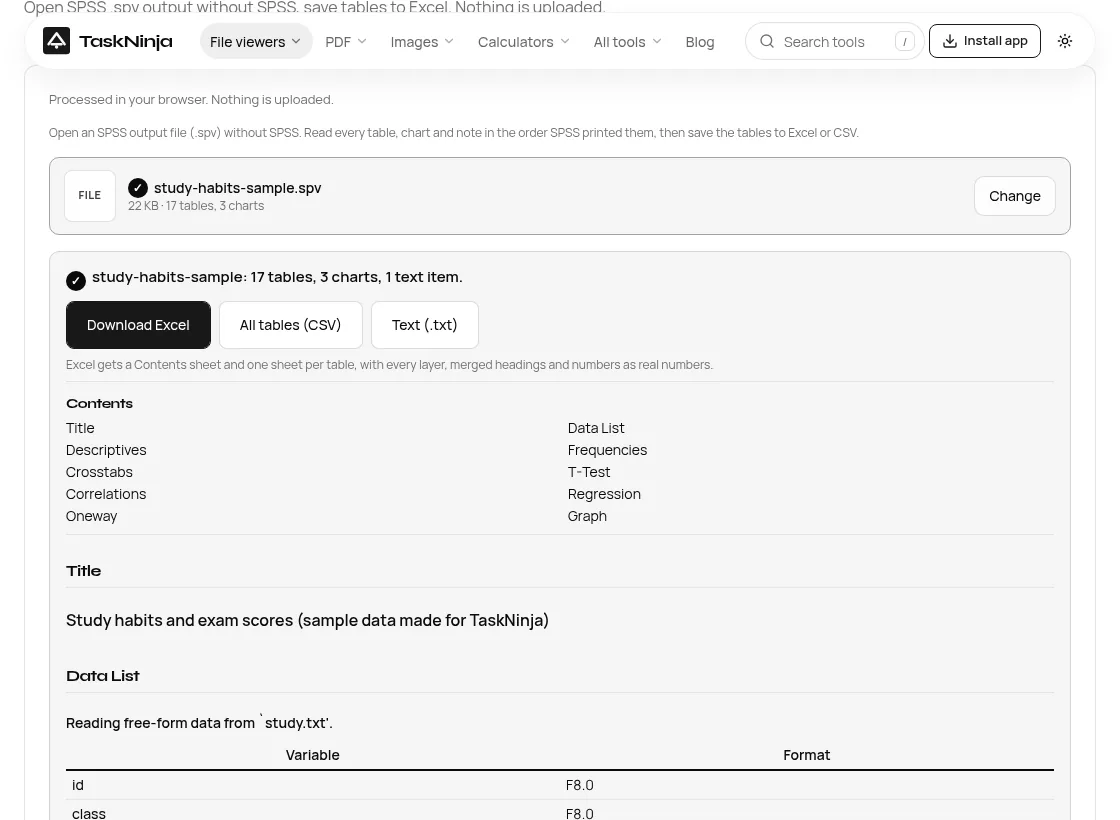
- The page shows the file name, size and a count of tables, charts and text items, then a Contents list that follows the SPSS outline (Descriptives, Crosstabs, T-Test and so on).
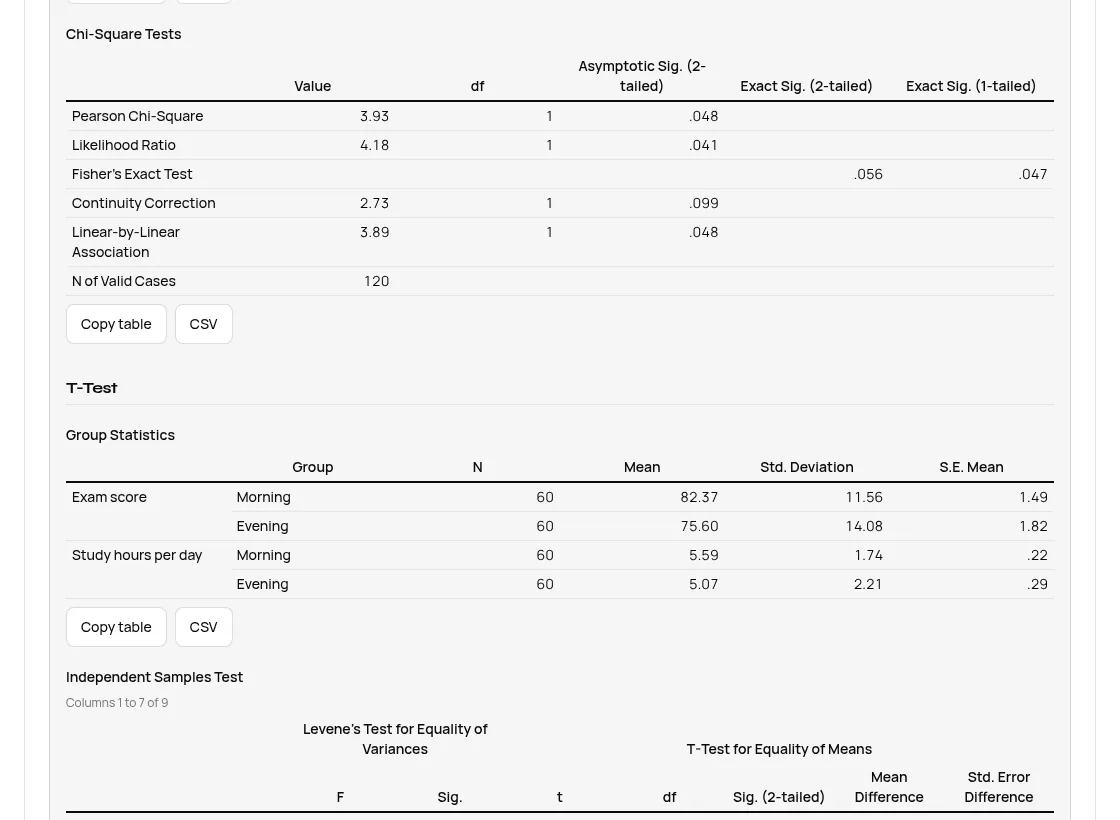
- Scroll through the tables and charts in the order SPSS printed them. Wide tables page through their columns, and layered tables let you pick a layer.
- Copy what you need: Copy table pastes one table into Excel, Word or Google Sheets with its columns intact, and CSV saves that one table. Charts have SVG and Chart data (CSV) buttons.
- Or take everything at once: Download Excel, All tables (CSV) or Text (.txt).
Saving SPSS output to Excel
Download Excel gives you one .xlsx with a Contents sheet and one sheet per table. Numbers stay numbers, so you can sort them or build a chart. For the sample file that meant 18 sheets: Contents, then Descriptive Statistics, Chi-Square Tests, Group Statistics, Independent Samples Test, ANOVA and the rest.
If you only want the spreadsheet, SPSS SPV to Excel is the same tool with the export step up front.
What we tested
We used 10 real .spv files saved by SPSS Statistics 25, 26, 28 and 29 (syntax logs, frequencies, crosstabs, reliability, time series models, regression and ANOVA, with charts), two files made with GNU PSPP, and three broken files. Each went through the live site in desktop Chrome on 5 Nov 2026.
| Test files | Saved by | What the page showed | Time |
|---|---|---|---|
| 4 syntax only files | SPSS 25 | No tables, just the syntax log, shown as text | Under 0.15 s |
| 3 frequencies and crosstabs files | SPSS 25 | 5, 15 and 8 tables with 2, 3 and 3 charts | Under 0.1 s |
| Time series file, 171 KB | SPSS 26 | 29 tables, 9 charts, plus 11 hidden items you can show | 0.12 s |
| Reliability analysis | SPSS 26 and 28 | 8 tables | 0.16 s |
| Regression and ANOVA file, 173 KB | SPSS 25 and 29 | 30 tables, 42 charts | 0.11 s |
| Built in sample and a test file | GNU PSPP | 17 tables and 3 charts; 6 tables | Under 0.1 s |
| A text file, a ZIP and a half downloaded .spv, all renamed .spv | Not SPSS | Refused with a message saying what is wrong | Under 0.05 s |
That is 95 tables and 59 charts from SPSS itself. When we built the tool we checked its table text against GNU PSPP's pspp-output on the same files; the cell values matched, and the only differences were in how warning notes are laid out.
What the viewer does not do
- Tables saved by SPSS 16 to 22 are listed by name only. Those versions store tables in an older layout. Ask the sender to resave or export from a newer SPSS.
- .spo files do not open. That is the output format of SPSS 15 and earlier.
- Password protected output needs SPSS. An encrypted .spv cannot be read without the password in SPSS.
- Model Viewer items are not drawn. Some procedures save an interactive model view instead of a plain table; it is listed so you know it is there, but you need SPSS to explore it.
- No editing and no saving back to .spv. You get the output as SPSS saved it.
- It does not run analyses. For that you need the .sav data and SPSS or PSPP.
If you do have SPSS
Open the .spv, then use File > Export to save the output as Excel, Word, PDF, HTML or text. To send results to someone without SPSS, PDF or Word is the kindest format. With syntax, OUTPUT EXPORT does the same job for many files at once.
Is the file uploaded?
No. The file is read in your browser tab by a small script the page loads once, and the Excel, CSV and text files are made on your device. We watched the network while opening all 15 test files on 5 Nov 2026: the only requests after choosing a file were for that script and for the chart pictures the page draws from your own file. None carried any file data.
FAQ
Can I open an SPV file without SPSS?
Yes. Choose it in our SPSS Output Viewer and the tables and charts open in any current browser, on a laptop or a phone, in the order SPSS printed them.
Can Excel open an .spv file?
No. Excel has no reader for SPSS output. Open the file in SPSS SPV to Excel and press Download Excel to get an .xlsx with one sheet per table.
Is SPSS Smartreader still available?
The IBM Community downloads page still lists Smartreader 27 for 64-bit Windows and Linux, and older versions for Mac. IBM staff said in the Community forum that it was removed from the product starting with SPSS 29 and is no longer produced, so output from newer versions may not open in it.
What is the difference between .spv and .sav?
A .sav file is SPSS data: cases and variables. An .spv file is SPSS output: the tables and charts made from that data. To redo an analysis you need the .sav; to read the results you only need the .spv.
Is the SPSS free trial enough to open one file?
It can be. IBM's trial runs for 14 days on 64-bit Windows or macOS, needs an IBMid and an internet connection, and is allowed once in 365 days. It is a large download for reading one file.
Can I open an .spv file on my phone?
Yes, in the phone's browser. Nothing to install, and wide tables page through their columns so they stay readable on a small screen.
Sources
- IBM SPSS Statistics resources: free trial FAQ
- Downloads for IBM SPSS Statistics, IBM Community (Smartreader)
- SPSS Smartreader discussion, IBM Community
- IBM SPSS Statistics: Saving output and OUTPUT SAVE command
- Invoking pspp-output, GNU PSPP manual and SPSS Viewer file format, GNU PSPP
- Data Curation Primer: SPSS, University of Minnesota
Sources checked 5 Nov 2026. Counts and timings are from the live tool and our test run on that date; button labels are from the live page.
Written by the TaskNinja team with help from an AI writing tool, then checked against IBM's and GNU PSPP's documentation and the tool itself.