How to compress a PDF to under 100KB or 50KB for government forms, without uploading it
Why a scanned certificate is so heavy, what actually makes a PDF smaller, real 2026 limits from exam notices, and when 50KB just isn't possible.
"PDF only, maximum 100 KB." If you've applied for a scholarship, a certificate or a job in India, you've seen that line. Your scanned marksheet is far bigger, and the portal won't tell you by how much.
This is a plain guide to what's inside that file, how to shrink it, and how to do it without handing your documents to a website you know nothing about. The steps work with any good tool.
Real limits from 2026 notices
Every form is different, so read yours. Some examples:
| Form | Document | PDF limit |
|---|---|---|
| NEET (UG) 2026, JEE (Main) 2026 | Class 10 certificate and other documents | 50 KB to 300 KB |
| PAN Form 49A on Protean | Proof documents, black and white, 200 DPI | Up to 300 KB per page |
| RRB NTPC (Graduate), CEN 06/2026 | SC/ST certificate | Less than 400 KB |
| IBPS PO/MT-XVI | Certificates on A4 | Up to 500 KB |
See the NEET and JEE floor of 50 KB? Over-compress a one-page document and it can be refused for being too small. State and college portals often go much tighter, 100 KB or even 50 KB. That's where people get stuck. The full photo and signature limits are in our 2026 exam sizes guide.
Why a scan is so heavy
A PDF made from a scan or a phone photo isn't really text. Each page is a picture of the page. Phone cameras take big, detailed pictures, and the PDF keeps every pixel: the paper grain, the shadow of your hand, the wooden table around the sheet.
So the size mostly comes down to how many pages there are, and how much detail each page picture holds (its resolution in DPI and its JPEG quality).
A typed PDF, like an e-certificate from DigiLocker, is different. It stores actual text and is usually small already. Compressing it barely changes anything, and that's fine.
Getting under 100 KB
- Remove pages the form doesn't need. Read the field label. If it asks for the Class 10 certificate, it doesn't need the instruction sheet or a blank back page. Each page you drop is a whole picture gone. Split PDF can pull out just the pages you need.
- Rescan if you can. Paper flat, daylight, the sheet filling the frame, dark edges cropped off. If you have a scanner, black-and-white or grayscale mode gives a much smaller starting file than colour.
- Lower resolution and quality, a step at a time. For scans, this is what compression really is. Each page picture is redrawn at a lower DPI and lower JPEG quality. Around 150 DPI usually still reads fine on screen. Go much lower and small print starts to smudge.
- Stop as soon as it fits. You want the biggest file that's still under the limit, not the smallest file possible. More bytes means sharper text.
- Then read the smallest text. Zoom in on the roll number, the date and the seal. If you can't read them, neither can the person checking your form.
Doing it on your own device
Many free "compress PDF" sites upload your file to their server, process it there, and send it back. For a marksheet or an address proof, that means a copy of a personal document sits on someone else's server, at least for a while.
Browser-based tools work differently. The page loads the compression code into your browser and the file is processed on your phone or laptop. You can check any tool yourself: our guide on how to check if an online tool uploads your file shows how.
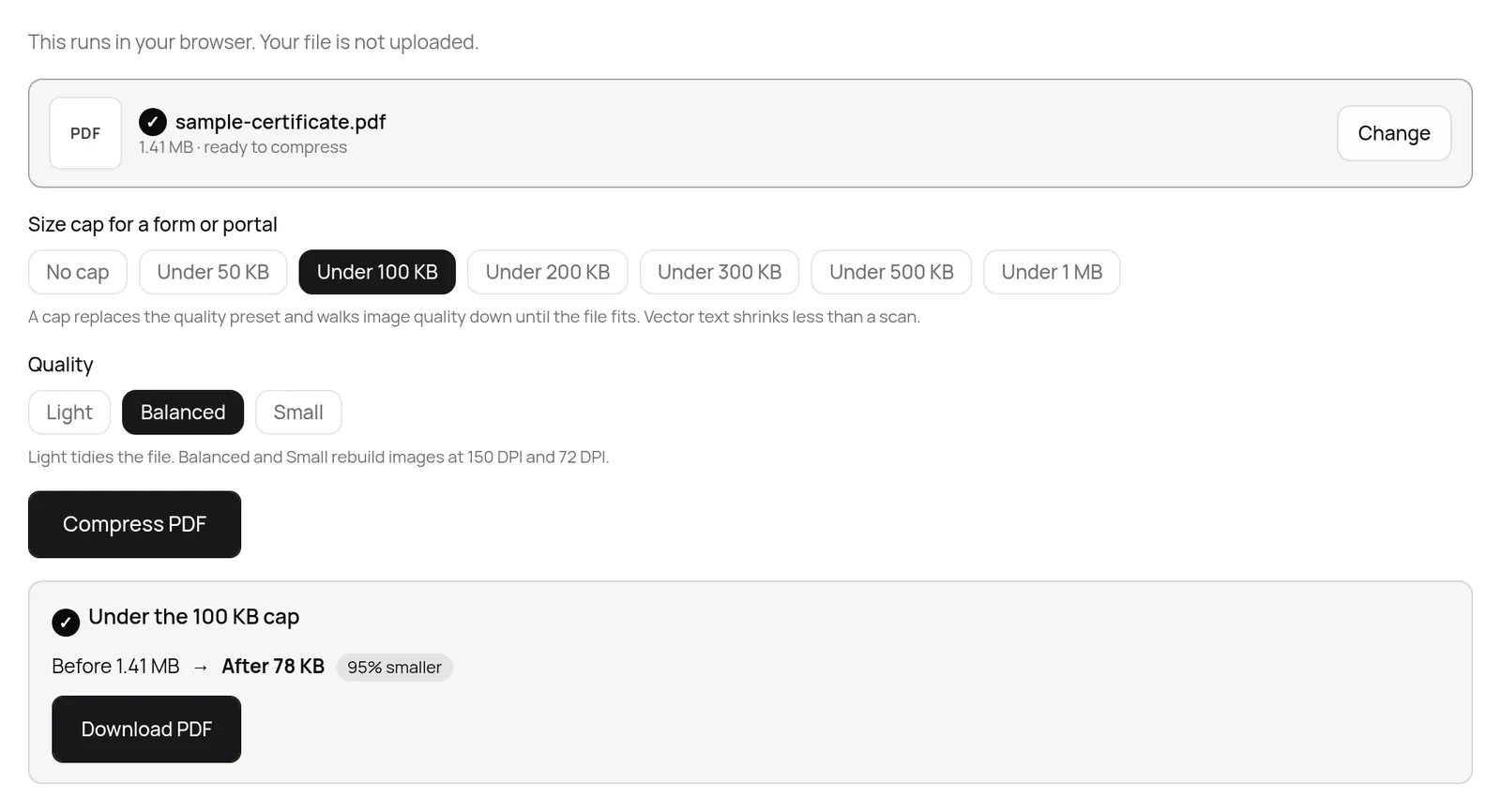
Our Compress PDF to 100KB page works this way. It starts at 150 DPI with good quality and steps down through lower settings until the file fits, then does a final pass that removes unused objects inside the PDF. It shows you the final size, including when it couldn't reach the target. There are 50 KB, 200 KB and 300 KB versions too.
The honest bit about 50 KB
50 KB is about as tight as PDF limits get. One scanned A4 page can usually get under it and still be readable. Three or four scanned pages often can't. At that size each page gets so few bytes that letters turn to mush, and no tool can change that, whatever it claims.
If you're stuck above 50 KB, check whether the portal has a separate upload box for each document. Many do. Then split the PDF so each upload holds one page.
It's also worth asking whether every page is needed. A two-sided certificate often only needs the front. And a black-and-white rescan is the biggest single saving for text documents.
Whatever you do, don't upload a file that's still over the limit. The portal will reject it, sometimes after you've filled in everything else.
Password-protected PDFs
Bank statements and some e-documents come locked with a password. Many compressors can't open them. If the file is yours and you know the password, remove it first with a tool that works on your device, such as Unlock PDF, then compress.
Before you upload
- Only the pages the form asked for.
- A flat, cropped, well-lit scan.
- Size inside the range, including any minimum.
- The smallest text still readable at full zoom.
- For personal documents, processed on your own device.
Once you see a scanned PDF as a stack of photos, the limits stop feeling random.
Written by the TaskNinja team with help from an AI writing tool, then checked against the official notices and our own tool's code. The 1.41 MB to 78 KB result is a real run on the live site with a generated sample scan.