How to open a .pub file now that Microsoft Publisher is retired
Microsoft Publisher left Microsoft 365 in October 2026. Here is how to open a .pub file without it, save it as PDF, and what to do when a file will not open.
A school newsletter, a society notice or an old brochure arrives as a .pub file, and nothing opens it. Since October 2026 that happens even on PCs with Microsoft 365, because Publisher is gone from it.
Here is what changed, what still works, and how to view or convert the file in a browser with the PUB File Viewer without uploading it.
What Microsoft changed in October 2026
Microsoft's support page says Publisher "will reach its end of life" in October 2026 and "will no longer be included in Microsoft 365". The dates that matter:
| Date | What happens | Who it affects |
|---|---|---|
| Until 1 Oct 2026 | Publisher works as before. | Everyone. |
| On or shortly after 1 Oct 2026 | Publisher is removed as the update rolls out. Subscribers can no longer open or edit .pub files in Publisher. | Microsoft 365 subscribers. |
| 13 Oct 2026 | Support ends, together with Office LTSC 2021 and Office 2021. | Bought-once (perpetual) Publisher 2021 and older. |
| After that | Perpetual Publisher still installs and runs, with no support. | Anyone who owns a perpetual copy. |
Microsoft's advice was to save files as PDF from Publisher before 1 October. Most people only find a .pub file after that, when Publisher is already gone.
Your options now
| Option | What you get | Watch out for |
|---|---|---|
| Publisher 2021 or older, bought once | Full editing, and Save as PDF. | No support or fixes after 13 Oct 2026. |
| LibreOffice Draw (free install) | Opens the pages as an editable drawing, exports PDF. | It cannot save back to .pub. Layout can shift. |
| Word, via a PDF | Editable text. This is Microsoft's suggested route. | You need the PDF first. Microsoft warns the layout may vary. |
| PUB File Viewer | Every page in the browser, PDF, PNG, copy text. No account. | View only. Some files cannot be drawn (see below). |
| Upload converter sites | A PDF by email or download. | The file goes to a stranger's server. Microsoft says these vary in quality and it does not support them. |
To read, print or forward the file, a browser viewer is quickest. To change the words, get a PDF and open it in Word, or use LibreOffice Draw.
How to open a .pub file in your browser
- Open the PUB File Viewer on a computer or phone. The hint under the box reads "Publisher 98 to 365 files. Up to 100 MB. Nothing is uploaded."
- Press Choose a .pub file, or drop the file on the box. The first time, the status line says "Loading the Publisher reader…" while the reader (about 700 KB) loads from this site, then "Reading the pages…".
- The result panel says how many pages are ready, for example "2 pages ready. Save as PDF or browse below." Use Previous, Next or the page thumbnails to move around.
- Press Download PDF for the whole publication, Page 1 as PNG for the page you are on, or Copy text for all the words. Longer files also get All pages as PNG (ZIP).
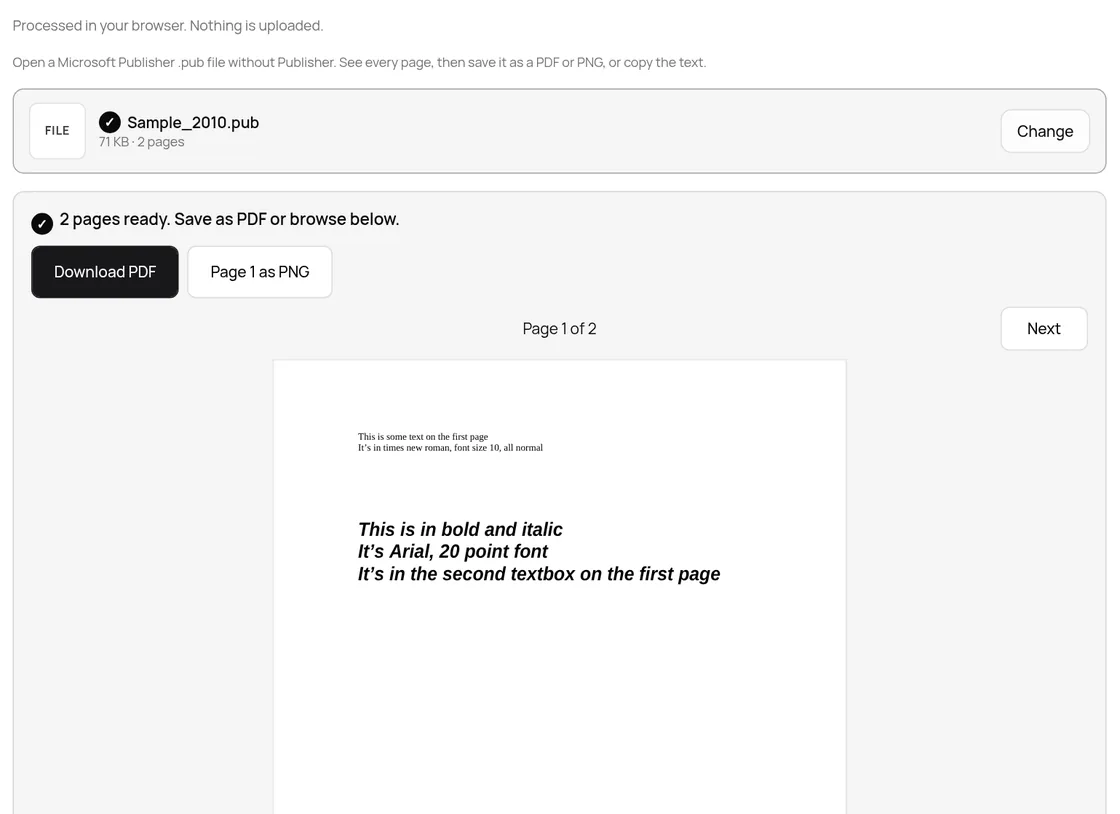
The PDF keeps the page size set in the file. Our Sample_2010.pub came out as a 2-page A4 PDF (595 by 842 points) with real, selectable text: pdftotext read back "This is some text on the first page" word for word. If a portal wants a smaller file, run it through Compress PDF afterwards.
What happened with eight real .pub files
We ran eight public test files through the viewer's own code (src/lib/publisher, the same libmspub reader the page uses) and, for comparison, through LibreOffice 25.2.3 on the same day.
| File (source) | Saved by | Size | TaskNinja viewer | LibreOffice 25.2 |
|---|---|---|---|---|
| fdo59355-1.pub (LibreOffice tests) | Publisher 97 | 11 KB | 2 pages, Russian text kept, 5 KB PDF | 2 pages |
| Sample98.pub (Apache POI) | Publisher 98 | 60 KB | 3 pages, 84 words, 18 KB PDF | 3 pages |
| Sample2000.pub (Apache POI) | Publisher 2000 | 60 KB | 3 pages, 84 words, 18 KB PDF | 3 pages |
| Sample_2010.pub (Apache POI) | Publisher 2010 | 71 KB | 2 pages, 100 words, 25 KB PDF | 2 pages |
| Sample.pub (Apache POI) | Not stated | 71 KB | 2 pages, 100 words, 25 KB PDF | 2 pages |
| testPUBLISHER.pub (Apache Tika) | Not stated | 64 KB | 1 page, 7 words, 7 KB PDF | 1 page |
| SampleBrochure.pub (Apache POI) | Not stated | 158 KB | Layout message (below) | 2 pages |
| SampleNewsletter.pub (Apache POI) | Not stated | 285 KB | Layout message (below) | 4 pages |
Six of eight opened in the browser. For the brochure and the newsletter the viewer said: "This Publisher file uses layout features the open-source reader (libmspub) cannot read yet, so its pages could not be drawn. Open it in Publisher and save it again, or ask the sender for a PDF." LibreOffice Draw opened both, so if you see that message, LibreOffice is your next try.
Files from Publisher 1.0 to 95 get their own message, and a renamed non-Publisher file is refused instead of showing a blank page.
Why the fonts look slightly different
Publisher files name their fonts but do not carry them. The viewer draws each one with a free font of the same or similar width, so lines break close to where they did in Publisher:
| Font in the .pub | Drawn with | Width factor |
|---|---|---|
| Arial | Liberation Sans | 1.00 |
| Times New Roman | Liberation Serif | 1.00 |
| Calibri | Carlito | 1.00 |
| Cambria | Caladea | 1.00 |
| Georgia | Liberation Serif | 1.10 |
| Verdana | Liberation Sans | 1.12 |
| Garamond | Liberation Serif | 0.93 |
| Comic Sans MS | Liberation Sans | 1.08 |
| Tw Cen MT | Liberation Sans | 0.86 |
| Any font not on the list | Liberation Sans or Serif | 1.00, or 0.80 if the name says condensed |
Body text in Arial, Times or Calibri looks right; decorative headline fonts look plainer. Pictures saved as WMF or EMF show as grey boxes, and the page says so.
The file stays on your device
Newsletters often carry phone numbers and member lists. The viewer reads the file in your browser tab with libmspub compiled to WebAssembly, and writes the PDF there too. We watched the network while opening Sample_2010.pub on taskninja.ai: the only requests were the site's analytics and Cloudflare's page timing beacon, each under 1 KB, and none carried the file. TaskNinja does not receive or store it.
If you need to edit the publication
- Download the PDF here, then in Word go to File, Open and pick the PDF. Microsoft documents this route and notes that a layout with many graphics may change.
- Open the .pub in LibreOffice Draw, change it, and export a PDF or save it as a Draw file.
- If you still have a bought-once Publisher, it keeps working. Save important files as PDF while you can.
- Looking for old files? Microsoft suggests searching for ".pub" on your PC, OneDrive or SharePoint.
FAQ
Can I still open .pub files after Publisher was retired?
Yes, just not in Microsoft 365. You can view them in a browser with the PUB File Viewer, open them in LibreOffice Draw, or use a bought-once Publisher 2021 or older if you have one.
How do I convert a .pub file to PDF for free?
Open the PUB to PDF Converter, choose the file and press Download PDF. Each page keeps its size and the text stays selectable. There is no sign-up or watermark.
Is my .pub file uploaded?
No. It is read and drawn in your browser tab. TaskNinja does not receive or store the file.
Why does my file say the open-source reader cannot read its layout?
Some publications use layout features libmspub cannot draw yet. In our test LibreOffice Draw opened both such files, so try that, or ask the sender for a PDF.
Can I edit a Publisher file without Publisher?
Not as a .pub. Save it as PDF and open that in Word, or open the .pub in LibreOffice Draw. Neither can save back to .pub.
Sources
- Microsoft Publisher will no longer be supported after October 2026 (Microsoft Support)
- Office LTSC 2021 lifecycle (Microsoft Learn)
- libmspub, the open-source Publisher reader (LibreOffice source)
- Download LibreOffice
- Apache POI test files (Apache-2.0)
Sources checked 18 Oct 2026. Page counts, word counts, PDF sizes, messages and font choices come from the test files run through this viewer's own code on that date. The LibreOffice column is from LibreOffice 25.2.3 converting the same files to PDF. Button labels are from the live page.
Written by the TaskNinja team with help from an AI writing tool, then checked against Microsoft's support and lifecycle pages, LibreOffice, and the viewer itself.