How to make a 3D CAD model from a text prompt, free in your browser
Type what you want and the free Trevolyx AI chat builds an editable 3D CAD part in your browser. Tested live: a plate, a fillet edit and a drone design plan.
Most "text to 3D" tools give you a mesh that looks fine in a render but has no dimensions you can change. For a part you want to print, machine or send to a workshop, you want real CAD: a sketch, exact sizes and a feature history you can edit.
Trevolyx, our free browser CAD app, now has an AI chat that does exactly that. You type a sentence, and it adds normal CAD features to the part. We tested it on the live app on 12 Nov 2026, and everything below, including the parts that did not go well, is what the app actually did.
What you need
- A laptop or desktop with Chrome or Edge. Trevolyx is desktop first.
- Nothing to install and no account. The chat gives you 2 free messages, so ₹0 to try. After that you can add your own key from OpenAI, Anthropic, Google Gemini, OpenRouter or another compatible provider and pay that provider directly.
Step 1: open the AI chat
- Open trevolyx.taskninja.ai and click New part on the start screen.
- The Trevolyx AI panel opens on the right. If you closed it earlier, click the AI icon in the right hand strip.
- Leave it on Build to make or change geometry. Help is for questions such as "How do I export STEP?".
The empty chat shows four example chips, such as "A 60×40 plate, 8 mm thick" and "Build a car", with more behind a More examples link. Tap one to try it, or type your own.
Step 2: describe one part, with numbers
We typed: A 100 x 60 mm plate, 8 mm thick, with a 20 mm hole through the centre. About six seconds later the part was there, built as three ordinary features:
| Step in the chat | Feature in the tree | Details shown |
|---|---|---|
| Sketch on Top Plane | AI: Base plate sketch | Rectangle 100 × 60 mm, centred |
| Extruded Boss | AI: Base plate | Blind, 8 mm |
| Hole Wizard | AI: Centre hole | ⌀20 mm, 1 hole, Through All |
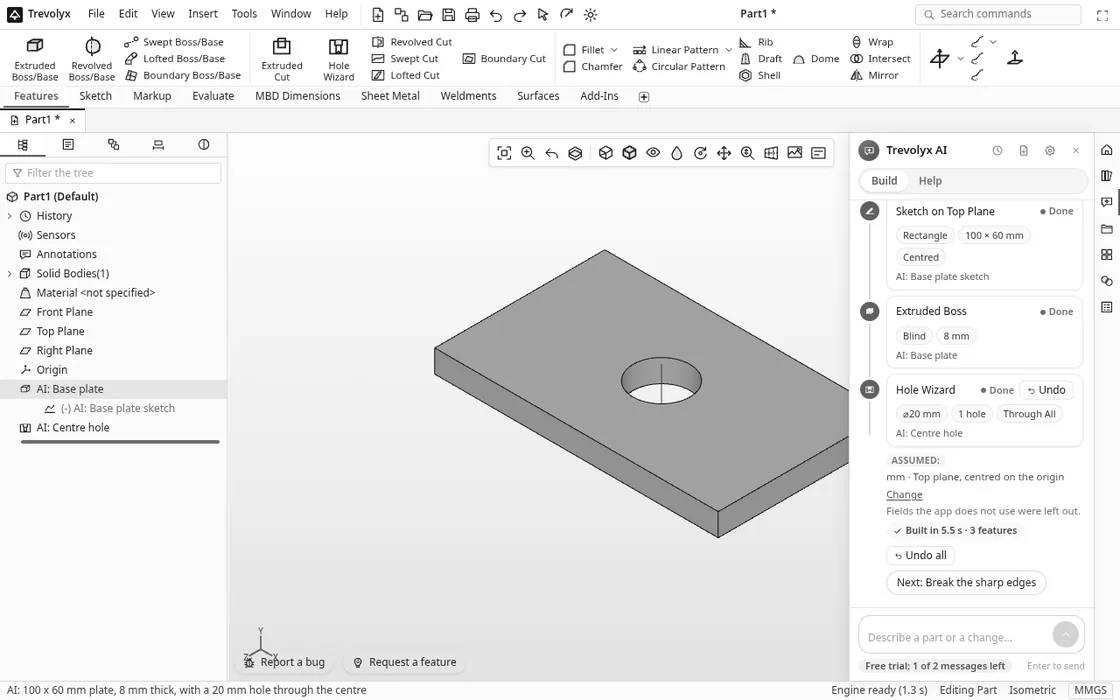
Three things make this useful. Every step is a normal feature you can edit, so a 10 mm plate is a change to the extrude, not a new prompt. An Assumed line tells you what the chat decided for you, with a Change link. And the whole build is one undo step: Undo all takes it back in one click, and the newest step has its own Undo.
Step 3: change it with a follow-up
Next we typed: Add a 2 mm fillet to all edges. The chat read the existing part, proposed a single Fillet step (R 2 mm, all edges) and waited for us to confirm before changing anything. After Confirm and build the fillet was added as AI: Fillet R2 in about 3 seconds.
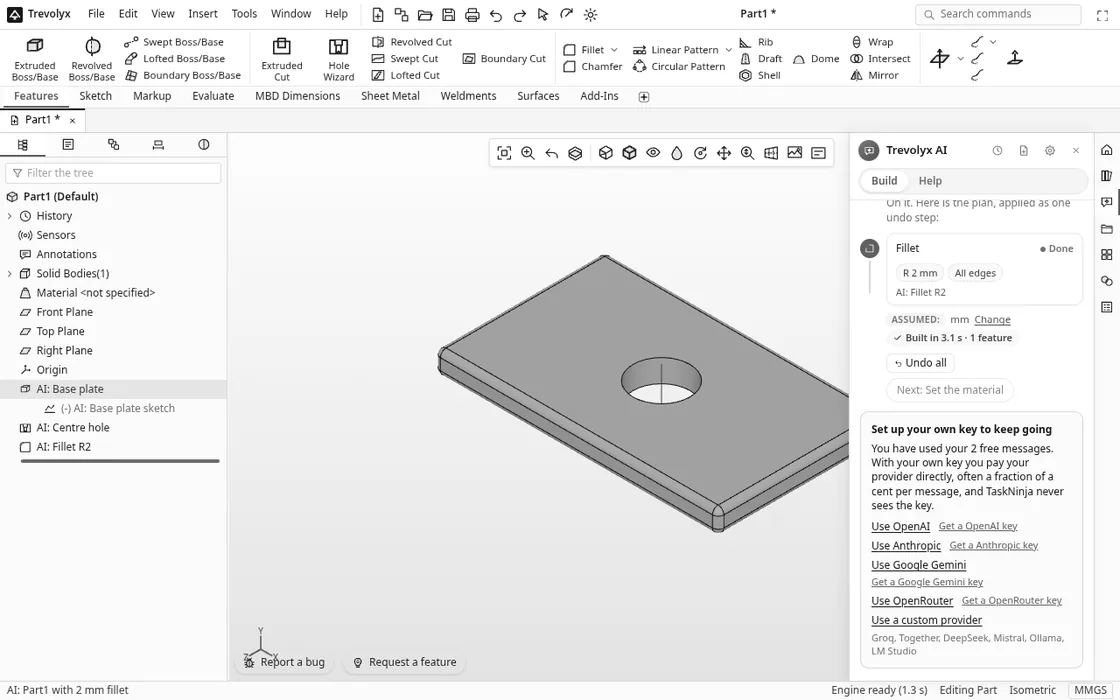
After each build the chat suggests a sensible next step, such as Next: Break the sharp edges or Next: Set the material. They are only suggestions; nothing happens until you tap one.
Step 4: ask for a whole product and get a plan first
A request like "build a car" or "build a drone" is too big for one shot, and a good designer would not start by guessing. Trevolyx does what a designer does: it writes a design plan and asks where to start. We typed Build a drone and got:
- Intent: a stacked X frame, sized as a 5 inch FPV quad (250 mm motor to motor), in mm.
- Assumptions: real frames are often carbon fibre, so Aluminium 6061 or ABS stand in; motors, props and electronics are bought parts, shown as mounting holes only.
- Six parts in build order: bottom plate 140 x 90 x 3 mm, four arms 160 x 22 x 4 mm, four standoffs 6 mm hex x 30 mm, top plate 120 x 80 x 2 mm, camera mount 30 x 25 x 20 mm L, canopy 90 x 60 x 35 mm.
- How the parts connect: arms clamped between the plates with 2 bolts each, standoffs concentric with the stack holes, top plate bolted on the standoffs, camera mount on pivot bolts at the front, canopy resting on the top plate.
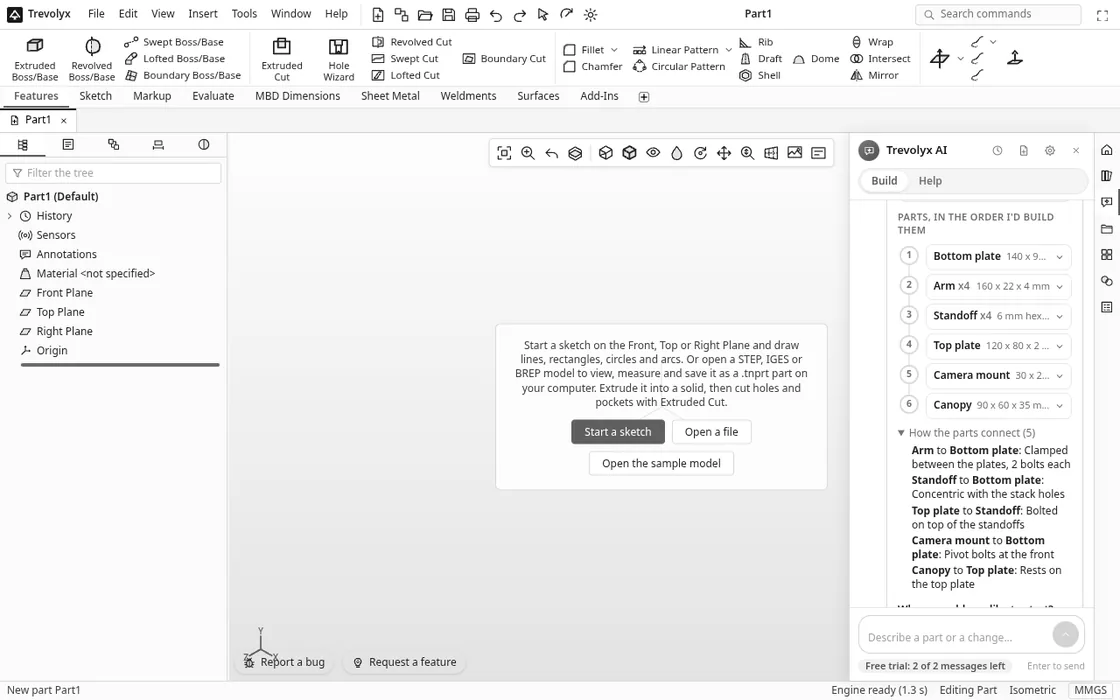
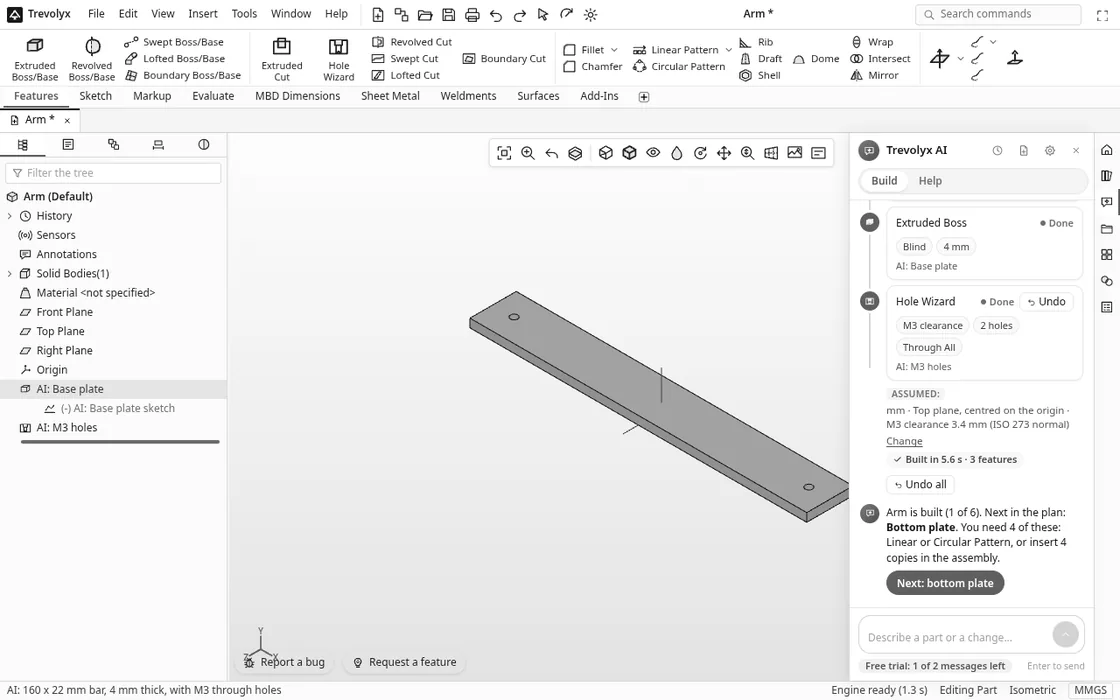
Under the plan are buttons: Start with bottom plate, Start with arms, Edit the parts list and Change size or style. We picked arms. The chat built the arm in its own part named Arm: a 160 x 22 mm bar, 4 mm thick, with two M3 clearance holes (3.4 mm, the ISO 273 normal fit) 140 mm apart. The plan then showed 1 of 6 built and reminded us that the frame needs 4 arms, made with a pattern or four copies in an assembly.
If the open part already has a body, the chat asks before mixing parts: it offers to start a new part for the next piece of the design, or build it in the current one. You then save each part and put them together with the assembly tools.
How to write prompts that work
- Give sizes and units. "A 100 x 60 mm plate, 8 mm thick" leaves little to guess.
- One part per message. For a product, let the planner split it into parts.
- Describe holes from the centre. The chat sketches parts centred on the origin, so "a 20 mm hole through the centre" or "holes 70 mm either side of the centre" lands where you mean.
- Name the edit. "Add a 2 mm fillet to all edges" or "make it 10 mm thick" are clear follow-ups.
Check what it built
Treat the chat like a fast junior designer: it saves clicks, but you check the work. In one test we asked for an 80 x 50 mm plate with an M5 hole in each corner 8 mm in from the edges. The chat reported 4 holes, but only one landed on the plate, because the hole positions were measured from a corner while the plate was centred. In another test, a round flange with a bolt circle could not be turned into buildable steps, so the chat said so and left the part unchanged. Both cost a free message. Look at the model after every build, and use Undo all or edit the Hole Wizard positions if something is off. We have reported both cases so they get fixed.
Privacy and cost
The app says free trial messages go through TaskNinja's server with only your request and a short summary of the feature tree, and nothing is stored. Your model and files stay on your computer. The chat list keeps your conversations on this device, with a New chat button. With your own key you pay your provider directly and, as the app puts it, TaskNinja never sees the key.
Honest limits
The chat is good at prismatic parts: plates, bars, brackets, boxes, holes, fillets and chamfers. Organic, sculpted shapes are better drawn by hand with Lofted or Boundary Boss. The design planner knows common products such as cars, drones, chairs, tables, robot arms, enclosures, bicycles and gearboxes; very unusual products may get a less fitting plan, so read it and use Edit the parts list. Two free messages go quickly, so plan your first prompts. Everything else in Trevolyx, listed on the features page, works without the chat.
FAQ
Is text to CAD in Trevolyx really free?
Trevolyx itself is free with no account. The AI chat gives 2 free messages per person. After that you add your own API key and pay your provider; TaskNinja does not charge for it.
Do I get a mesh or a real CAD model?
A real CAD model. The chat adds sketches and features such as Extruded Boss, Hole Wizard and Fillet to the feature tree, so you can edit dimensions later and export STEP, STL or other formats.
Can it build a whole product like a car or a drone?
It plans the whole product first: the parts with sizes, how they connect and a build order. Then you choose a part and it builds that part. You assemble the saved parts yourself.
What happens if the AI gets it wrong?
Click Undo all and the build disappears in one step, or edit the feature it made. If a request cannot be turned into steps, the chat says so and does not change your part.
Does it work on a Mac or Chromebook?
Yes. It runs in the browser, so a laptop with a current Chrome or Edge is enough, including Macs and Chromebooks. See free online CAD for more on running Trevolyx without an install.
Sources
- ISO 273:1979, Fasteners, Clearance holes for bolts and screws (M3 medium 3.4 mm, M5 medium 5.5 mm)
- Trevolyx live app: every prompt, step name, size and timing above run on 12 Nov 2026
- Trevolyx features, Free online CAD, 3D CAD hub
Written by the TaskNinja team with help from an AI writing tool, then checked against the live Trevolyx app.