How to open an AEP file without After Effects and see the version, fonts and plug-ins it needs (tested on 644 projects)
Open an After Effects .aep project free in your browser: see the version that saved it, every comp and layer, fonts, plug-ins and missing footage. No upload.
Someone sends you an .aep file. Maybe a freelancer delivered the source of your logo animation, maybe you bought a YouTube intro template, or maybe it is an old college project. You double click it and either nothing happens, or After Effects says the project was saved in a newer version and refuses to open it.
You do not always need After Effects to find out what is inside. This guide explains what an AEP file holds, why it often will not open, and how to read one in your browser. We tested 644 real project files saved by six After Effects releases.
What is an AEP file?
AEP is the project format of Adobe After Effects. Adobe's help page describes a project as a single file that stores compositions plus references to the source files used by footage. So the .aep holds the structure: compositions, layers, timing, effects, text, expressions and the paths to your videos and images. It does not hold the footage itself, the fonts or the plug-ins.
Two related types exist. .aet is a template project and .aepx is the same project saved as text based XML. Adobe says .aep, the binary format, is the main one.
Why an AEP file will not open
- No After Effects. It is a paid Creative Cloud app, and outside Adobe's own apps nothing edits .aep files.
- Saved in a newer version. Adobe's beta notes put it plainly: projects saved in v26 cannot be opened in earlier versions, including 25.x. The project only opens in the release that saved it or a newer one.
- Missing fonts and plug-ins. The project opens, but text shows in a default font and third-party effects turn into red errors.
- Missing footage. The videos and images stayed on the original computer, so layers appear as colour bars.
Your options
| Option | What you need | What you get | Catch |
|---|---|---|---|
| Open in After Effects | A Creative Cloud plan with After Effects | Full editing and rendering | Must be the same release that saved the file or newer |
| Ask the sender for an older copy | The sender's After Effects | A file your version opens | File, Save As, Save a Copy As the previous major version. New features are dropped |
| Ask for an .aepx copy | The sender's After Effects | Readable XML in a text editor | Hard to read by hand, and Adobe says not to use it as your main format |
| TaskNinja AEP File Viewer | Any modern browser | Version, comps, layers, fonts, plug-ins, footage, text, expressions | Read only. It cannot play frames or edit |
How to open an AEP file in your browser
- Go to the AEP File Viewer.
- Choose your .aep or .aet file, or drop it on the box. It is read by code running in your tab and is never uploaded.
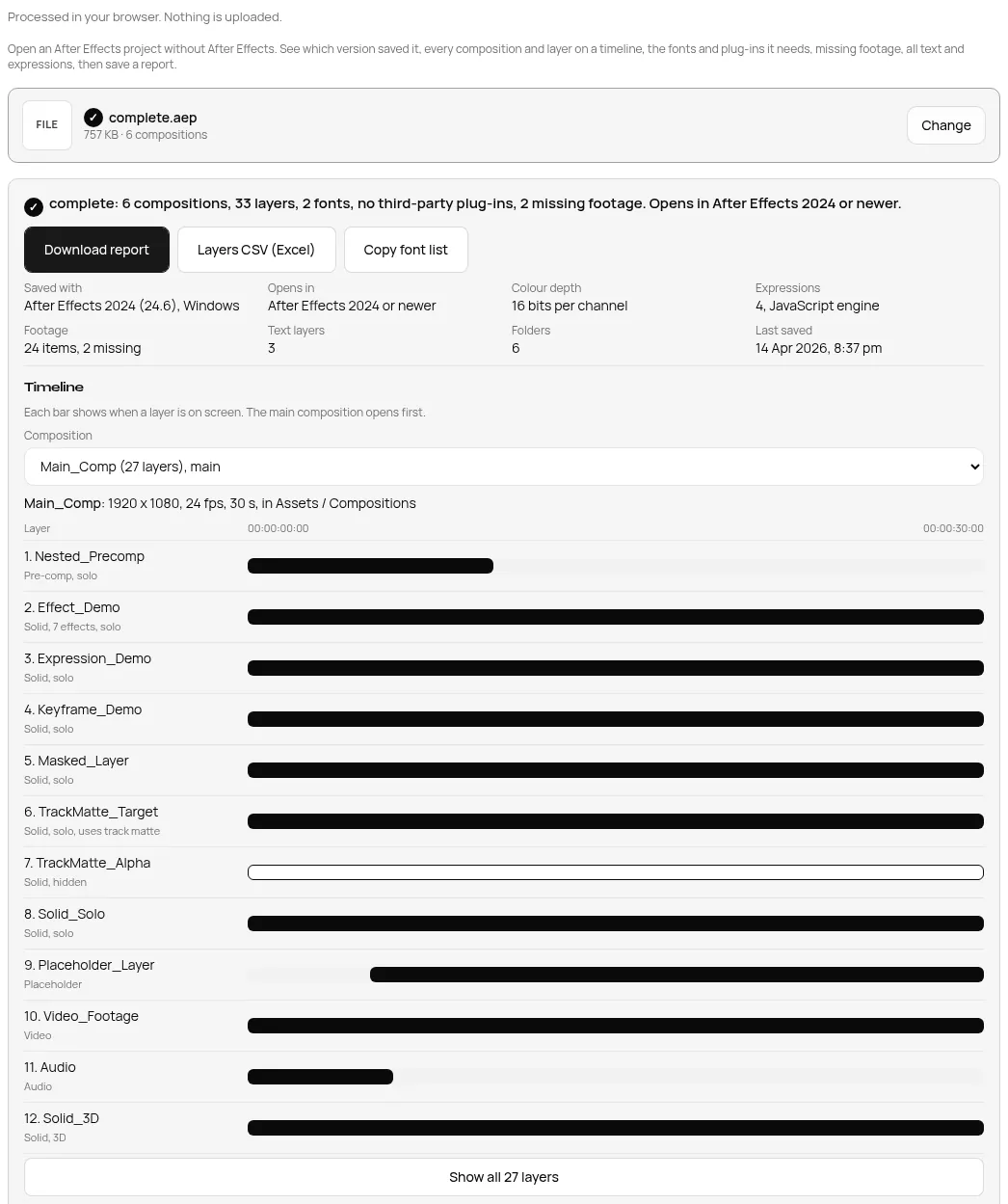
- Read the top line first. It shows the After Effects release that saved the file and the version you need to open it.
- Pick a composition to see its layers on a timeline, with type, timing, parent, track matte and effects.
- Check Fonts, Effects and plug-ins and Footage, then press Download report, Layers CSV (Excel) or Copy font list.
If you only care about what to install, the AEP Font and Plugin Finder opens the same file with the fonts and plug-ins at the top.
Test 1: the same project saved by six releases
The open source py-aep project publishes one test project saved by six After Effects releases. We opened each copy on the live site in Chrome on a desktop. Times run from choosing the file to the full result on screen, and the first one includes loading the 16 KB reader.
| Saved with (shown by viewer) | Opens in | Comps | Layers | Footage (missing) | Time |
|---|---|---|---|---|---|
| After Effects CC 2018 (15.1) | CC 2018 or newer | 6 | 33 | 24 (2) | 0.24 s |
| After Effects 2022 (22.5) | 2022 or newer | 6 | 33 | 24 (2) | 0.05 s |
| After Effects 2023 (23.6) | 2023 or newer | 6 | 33 | 24 (2) | 0.04 s |
| After Effects 2024 (24.6) | 2024 or newer | 6 | 33 | 24 (2) | 0.04 s |
| After Effects 2025 (25.6) | 2025 or newer | 6 | 33 | 24 (2) | 0.03 s |
| After Effects 2026 (26.0) | 2026 or newer | 6 | 33 | 24 (2) | 0.05 s |
Every copy gave the same counts, which is what you want: only the version line changes. All six also listed the same 2 fonts (Times New Roman and Arial), 7 built in effects, 3 text layers and 4 expressions.
Test 2: 644 project files
Next we ran our reader over every .aep in the py-aep sample set that we could download, 644 files from 1 KB to 3.9 MB. All 644 opened. Between them they held 1,046 compositions and 1,600 layers.
| Saved with | Files | Opened |
|---|---|---|
| After Effects 2026 | 136 | 136 |
| After Effects 2025 | 498 | 498 |
| After Effects 2024 | 2 | 2 |
| After Effects 2023 | 2 | 2 |
| After Effects 2022 | 2 | 2 |
| After Effects CC 2018 | 4 | 4 |
| Total (631 Windows, 13 macOS) | 644 | 644 |
The largest file, a 3.9 MB project with 45 compositions and 85 footage items, opened on the live site in 0.05 s. While testing we watched the browser's network traffic. The project never left the computer. The only requests were the reader script and the usual analytics and ad calls, none of them carrying the file.
What you can and cannot see
| You can see | You cannot do |
|---|---|
| Release and OS that saved it, colour depth, expression engine | Play or preview the animation |
| Every composition with size, frame rate and length | Render a video or GIF |
| Layers on a timeline with type, in and out points, parent, 3D, matte | Edit and save the project |
| Fonts with the layers that use them | Open the footage, which is not inside the .aep |
| Third-party plug-ins with their maker | Install missing fonts or plug-ins for you |
| Footage paths and missing files, all text and expressions | Read .aepx (open it in a text editor instead) |
When the viewer refuses a file
| What you chose | Message you see |
|---|---|
| A video, image or ZIP renamed to .aep | This does not look like an After Effects project |
| An .aepx XML project | This is an XML project (.aepx). Open it in any text editor |
| A file cut off after a few KB | This project looks damaged or only partly downloaded |
One honest caveat: a copy cut off halfway can still open and show only part of the project. If the counts look low, download the file again. Templates often arrive as a ZIP with the .aep and a footage folder, so unzip first. Our RAR and ZIP opener also runs in your browser.
Fixing "saved in a newer version"
The version line tells you exactly what you need. If it says After Effects 2026 and you run 2025, ask the sender to use File, Save As, Save a Copy As 25.x. Adobe's help page describes this option for the previous major version. Features that are new in the later release are dropped from the copy, so check the result.
FAQ
Can I open an AEP file without After Effects?
You can read it. The AEP File Viewer shows the full structure for free in your browser. To edit or render it you still need After Effects.
Is my project uploaded?
No. The file is read by code in your browser tab, and nothing about it is sent to TaskNinja. Want to check any site yourself? See how to check if an online tool uploads your file.
How do I know which After Effects version I need?
Open the file and read Saved with and Opens in. For example, After Effects 2024 (24.6) opens in 2024 or newer.
Why does the project show missing fonts or effects?
Fonts and third-party plug-ins live on the computer, not in the .aep. The Fonts and Effects sections list what the project needs, so you can install or license them first.
Does it work on a phone?
Yes. It runs in a mobile browser too, and it is free with no sign up and no limit on how many files you open.
Sources
- Projects in After Effects, Adobe Help (project files, .aep, .aepx, .aet, Save a Copy As, Collect Files)
- Now in Beta: version compatibility note for v26, Adobe Community announcement
- Compare After Effects plans, Adobe India
- After Effects Scripting Guide: Project object
- Test files: py-aep by Fortiche production (GitHub, MIT licence), samples folder.
Sources checked 31 Oct 2026. Counts and timings are from our test run that day. After Effects is a trademark of Adobe. TaskNinja is not connected to Adobe.
Written by the TaskNinja team with help from an AI writing tool, then checked against Adobe's documentation and the tool itself.