How to open a Sketch file without a Mac (Windows, phone, browser)
Got a .sketch file on Windows or a phone? See what is inside it, your options, and how to view the preview and layers in a browser without uploading it.
A designer sends a .sketch file with a landing page or a few app screens. You are on Windows, a Chromebook or a phone, and double-click does nothing useful.
Here is why, what is inside the file, and which way to open it fits you. To just see it, the Sketch File Viewer opens it in your browser, and the file stays on your device.
Why a .sketch file will not open on Windows
Sketch is a Mac app. Sketch's own setup docs say it "runs on macOS only and is not supported in virtual machines", and the current release, 2026.3.1, needs macOS Sequoia 15 or newer. There is no Windows or Android version of the editor.
Sketch's web app works on any operating system for viewing, inspecting and commenting, but it shows documents saved in a Sketch Workspace. Sketch's docs describe uploading a local file from the Mac app's Workspace window. So the web app is the answer when the designer shares a Workspace link, not when they email the file.
What is inside a .sketch file
Since Sketch 43, a .sketch file is a zip archive of JSON files plus images. Sketch's developer docs say so, and you can check it: rename a copy to .zip and open it. We did that with Wireframes.sketch, an MIT-licensed wireframe kit published by Spatie on GitHub. It was saved by Sketch 49.3 and is 147,609 bytes. These are its eight entries.
| Entry | Size | What it holds |
|---|---|---|
| document.json | 39 KB | Shared styles and links to the page files. |
| meta.json | 3 KB | Sketch version, page and artboard names, fonts. |
| user.json | 516 B | Viewport, zoom and app settings. |
| pages/1521….json | 294 KB | The Symbols page: every layer, as JSON. |
| pages/6777….json | 803 B | Page 1, which is empty in this kit. |
| images/bf3d….png | 5 KB | A bitmap, at its original size. |
| images/4ace….png | 5 KB | A second bitmap. |
| previews/preview.png | 97 KB | The last page edited, here 2048 by 746 px. |
The preview matters most. Sketch's spec says it shows the last page edited, at full size up to 2048 by 2048, scaled down to fit when bigger. This meta.json also lists five fonts, including Avenir Next and Gotham Narrow, so anything that redraws text without them will look a little different.
Files from before Sketch 43 differ. Older templates in Sketch's own GitHub repository, such as Web Design.sketch, start with the bytes SQLite format 3: a database, not a zip.
Your options, side by side
| Option | What you need | Good for | Watch out for |
|---|---|---|---|
| Sketch web app | A Workspace link. | Inspecting, comments, exports. | A local file is uploaded from the Mac app first. |
| Figma import | A Figma account. | Editing in Figma. | It becomes a Figma file. Later Sketch changes do not sync. |
| Lunacy (Icons8) | A free install on Windows, macOS or Linux. | Opening, editing, saving .sketch. | A work laptop may block installs. |
| Sketch File Viewer | A browser. No account. | Preview, pages, layers, PNG. | View only. No full render of every layer. |
To change the design, use Figma or Lunacy. To look at it, grab a PNG for a slide, or check which screens are in it, a browser viewer is quicker and does not hand the file to another service.
How to open a Sketch file in the browser
- Open the Sketch File Viewer. It works the same on a phone.
- Press Open Sketch file, or drop the file on the box. The hint under it reads "Sketch 43 or newer. Up to 300 MB. Nothing is uploaded." The status line says "Opening the Sketch file…".
- The box then shows the file name, size and version. For our sample it read "Wireframes.sketch, 144 KB · Sketch 49.3, 2 pages".
- The result panel says "Preview ready. 2 pages, 1 artboard." with the embedded preview under it. Below that are the page buttons, each page with its artboards, and the layer tree.
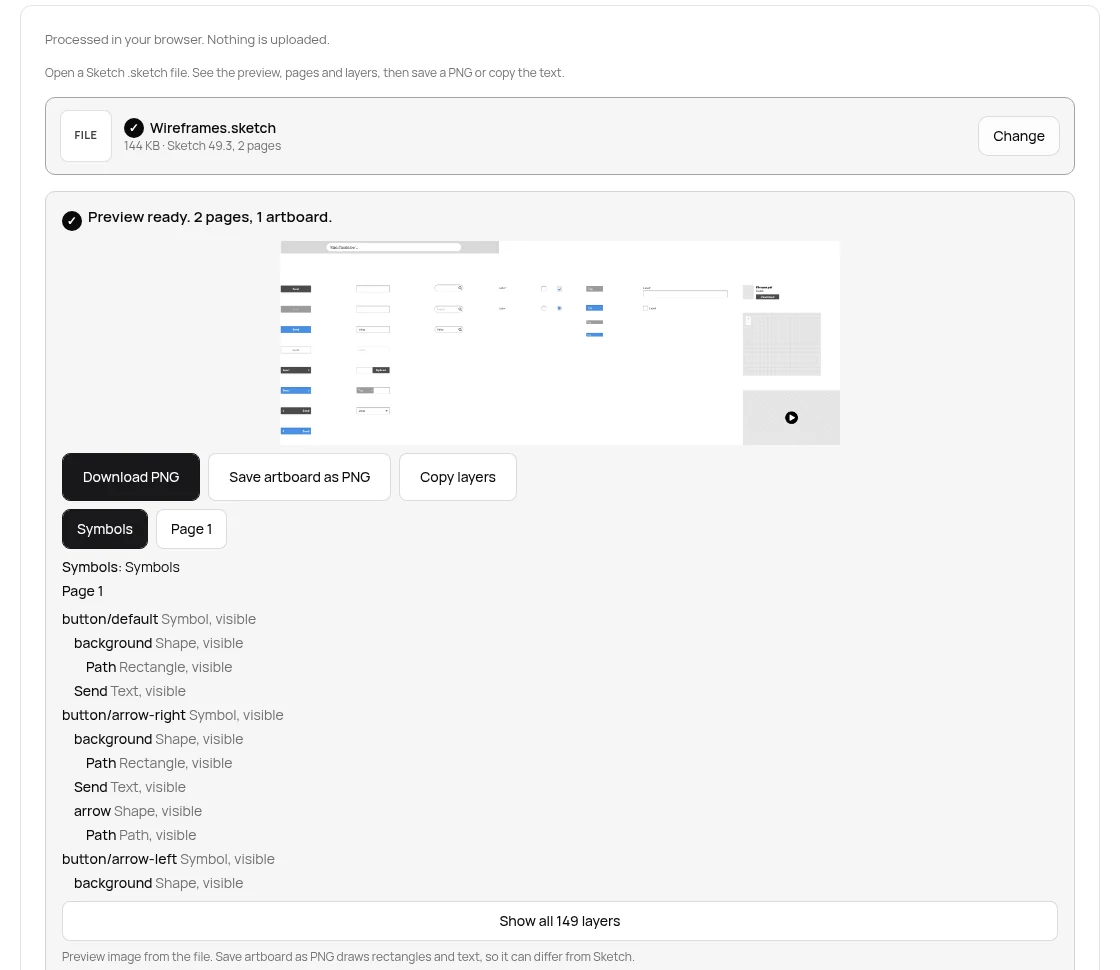
Each layer row shows a name, a type and whether it is visible, such as "Send Text, visible". Show all 149 layers opens the rest for this file. Hidden layers stay listed, so a note missing from the preview still shows up.
What happened with three real files
| File | What it is | What the viewer said |
|---|---|---|
| Wireframes.sketch | Zip, Sketch 49.3, 147,609 bytes | Preview ready. 2 pages, 1 artboard. 149 layers: 51 symbols, 35 shapes, 24 rectangles, 22 text, 12 paths, 4 groups, 1 oval. |
| Web Design.sketch (sketch-hq templates) | SQLite database, 417,792 bytes | This is not a Sketch 43 file. Older Sketch files use a private binary format. Save it again in Sketch 43 or newer. |
| A zip renamed to .sketch | Zip with a notes CSV, no Sketch JSON | This zip is not a Sketch file. It needs document.json and meta.json inside it. |
For the first message, ask the designer to save it again in a current Sketch. The second means the wrong attachment was sent.
Download PNG, Save artboard as PNG, and copying text
Download PNG saves the preview image from the file, byte for byte, so it matches what Sketch drew. Here that is the 2048 by 746 picture.
Save artboard as PNG draws the chosen artboard from its rectangles, ovals and text. Images, symbols, blurs and boolean shapes are not painted, and text uses a plain font, so it can differ from Sketch. The page says so.
Copy text puts the words from every text layer on the clipboard. For Wireframes.sketch the button read Copy layers instead: Sketch 49.3 kept text in an older encoded field (archivedAttributedString) that this page does not decode. Copy layers copies the layer outline.
The file stays on your device
Design files often hold unreleased screens and client names. The viewer unzips and reads the file in your browser tab. We watched the network while opening the sample, and no request carried the file. TaskNinja does not receive or store it, or send it to an AI model.
When you still need Sketch, Figma or Lunacy
- Editing anything, even a single word. The viewer is read only.
- A faithful render with images, symbols, effects and fonts. Ask for an export from Sketch, or a Workspace link.
- Pre-43 files. Use Sketch, or Lunacy, which reads old files.
- Files over 300 MB, or with one page over 128 MB.
FAQ
Can I open a .sketch file on Windows?
Yes. Sketch itself is Mac only, but you can view the file in a browser with the Sketch File Viewer, import it into Figma, or install Lunacy, which opens and saves .sketch on Windows.
Can I open a Sketch file on my phone?
Yes. Open the Sketch File Viewer in Chrome or Safari, press Open Sketch file and pick it from your downloads.
Is the .sketch file uploaded?
No. The zip is read in your browser tab. TaskNinja does not receive or store the file.
Why does my file say it is not a Sketch 43 file?
It was saved before Sketch 43, in a database format instead of a zip of JSON. Ask for it to be saved again in a current Sketch.
Can I convert a Sketch file to PNG?
Yes. Download PNG saves the preview image stored in the file. Save artboard as PNG draws one artboard from its shapes and text, which can differ from Sketch.
Can I edit a Sketch file without a Mac?
Not in Sketch itself. Figma can import it as a Figma file, and Lunacy can edit and save it as .sketch on Windows or Linux.
Sources
- Sketch file format (Sketch Developer)
- Sketch 43 release notes: a new file format (Sketch blog)
- Setting up Sketch: system requirements (Sketch docs)
- What is Sketch? Mac app, web app and iOS app (Sketch docs)
- Sketch Mac app releases and macOS requirements
- Real-time collaboration: uploading a local document (Sketch docs)
- Import Sketch files (Figma Learn)
- About Lunacy (Icons8)
- Wireframes.sketch sample (spatie/sketch, MIT)
- Sketch templates (sketch-hq/SketchTemplates, MIT)
Sources checked 17 Oct 2026. Entry sizes, the preview size, layer counts and the three messages come from the sample files run through this viewer's own code on that date. Button labels and limits are from the live page.
Written by the TaskNinja team with help from an AI writing tool, then checked against Sketch's file format docs, Figma's and Icons8's help pages, and the viewer itself.