How to convert STEP to STL for 3D printing (free, on Mac or Windows, no upload)
Convert a STEP or STP file to STL in your browser, free on Mac, Windows or Linux. We tested 4 files for mesh quality, units, assemblies and 3MF.
Suppliers and part libraries send STEP files, but slicers such as Cura, PrusaSlicer and Bambu Studio want a mesh: STL or 3MF. The conversion sounds simple until the details bite. Which converter can you trust with a client part? What resolution? Why did the print come out 25 times too small?
We made four test files, converted each one in the browser on 13 Nov 2026 and checked every STL with a mesh checker. Here are the steps and the measured results.
The quick answer
- Open the STEP to STL converter in any modern browser. It works on a Mac in Safari or Chrome, and on Windows, Linux and ChromeOS.
- Choose your .step or .stp file (IGES and BREP work too). It is read on your computer and never uploaded.
- Turn the model around and check the size line. In an assembly, untick any part you do not want to print.
- Press Download STL and open the file in your slicer.
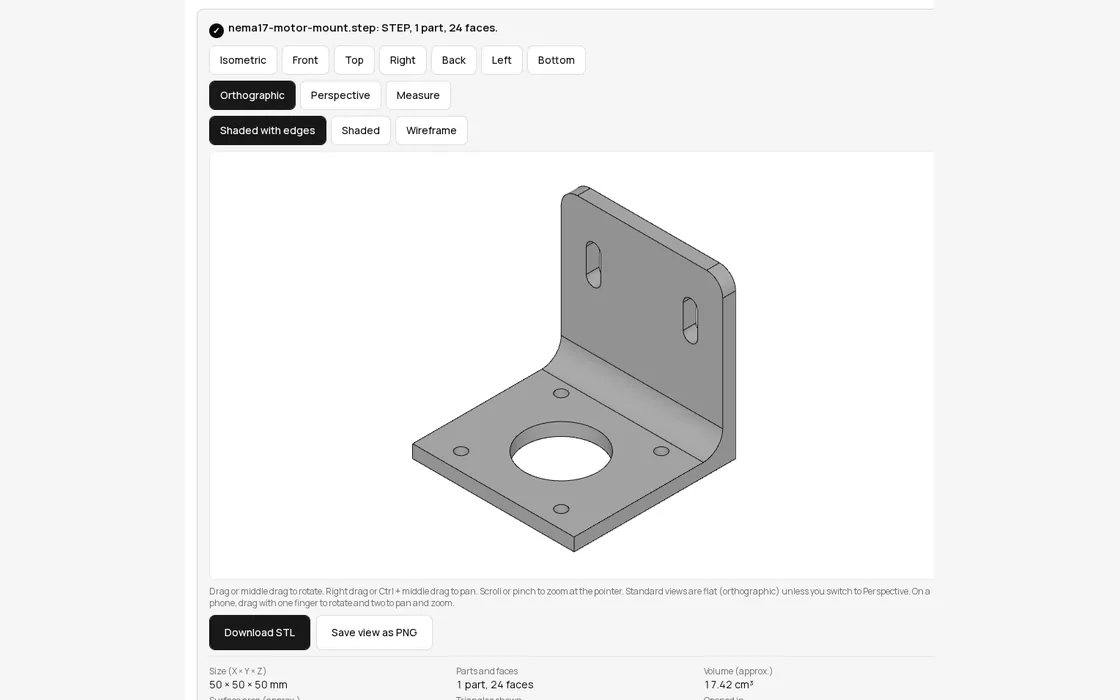
If you would rather change the part first, for example open up a hole or add a chamfer, open the same STEP file in Trevolyx, our free browser CAD app, edit it, then export. That route is further down.
What we tested
All four files were made in CadQuery 2.8, so we know the exact volume of each solid and can compare it with the mesh. You can download the bracket and repeat the test yourself.
- NEMA 17 motor mount: a 50 mm L bracket, 4 mm thick, with a 22.5 mm pilot bore, four 3.4 mm holes on a 31 mm square, two slots and a 6 mm inside bend radius. 24 faces, exact volume 17,410.43 mm³.
- The same bracket saved in inches. Same shape, but the STEP file declares inch as its length unit.
- A fluted knob: 30 mm across and 16 mm tall, with a rounded top and 18 flutes. 59 faces, lots of curves, exact volume 10,194.91 mm³.
- An assembly: the bracket and the knob in one STEP file, as two named parts.
| File | Opened in | Triangles | STL size | Mesh volume vs exact | Watertight |
|---|---|---|---|---|---|
| Motor mount (mm) | 0.44 s | 980 | 47.9 KB | +0.08% | Yes |
| Motor mount (inch STEP) | 0.43 s | 980 | 47.9 KB | +0.08%, still 50 mm | Yes |
| Fluted knob | 0.48 s | 3,876 | 189 KB | -0.02% | Yes |
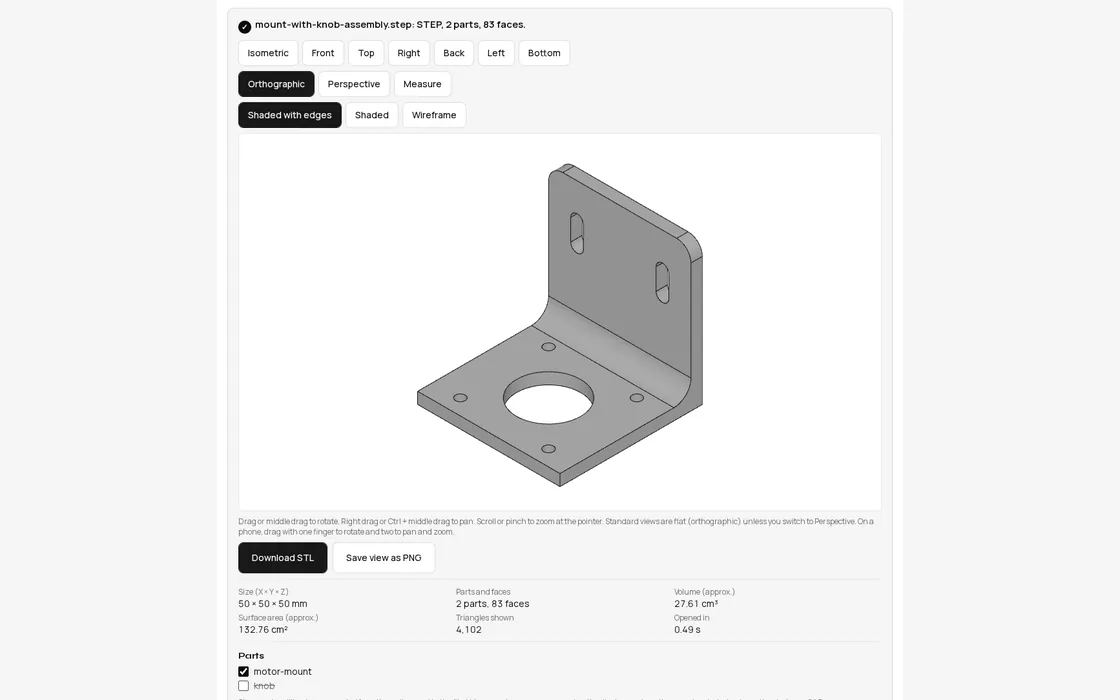
| Assembly, both parts | 0.52 s | 4,102 | 200 KB | 2 separate solids | Yes |
| Assembly, knob unticked | same file | 980 | 47.9 KB | +0.08% | Yes |
Every STL was watertight with consistent normals, which a slicer needs to fill the inside, and volumes were within a tenth of a percent of the exact solid, so material estimates will be right.
How fine is the mesh, and does it matter?
An STL has no circles. Every curved face becomes flat triangles, and the question is how far those triangles stray from the true surface. In the wireframe view you can see what the converter did with our bracket: the 22.5 mm bore became a 48 sided polygon, one corner every 7.5 degrees, and each 3.4 mm hole got 26 sides.
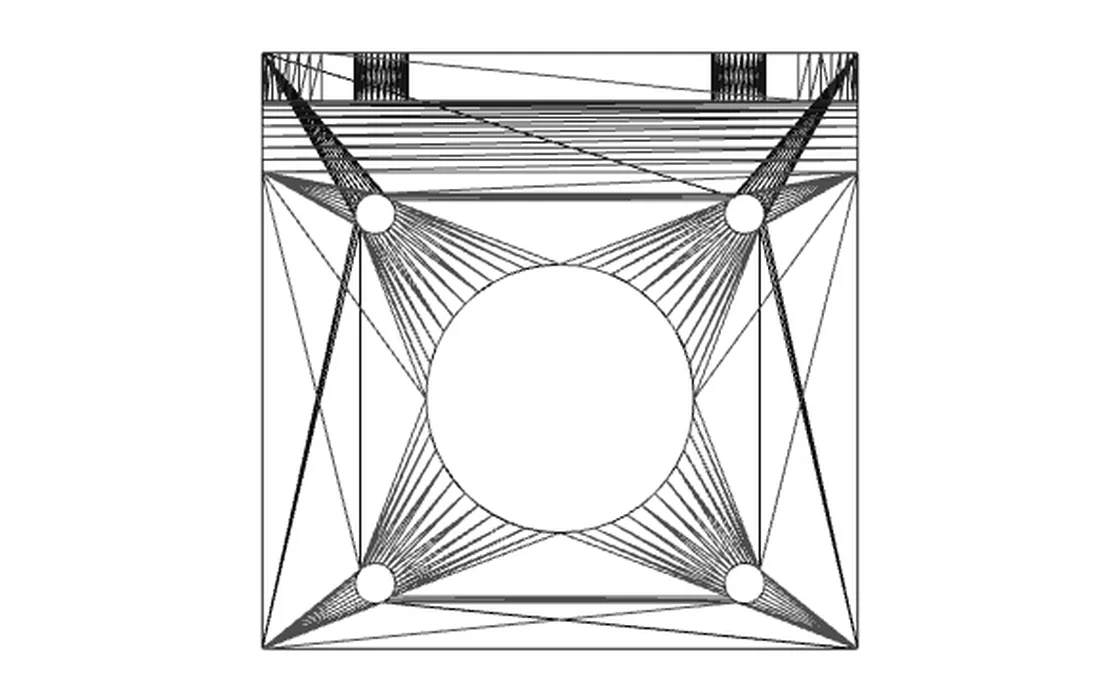
For the bore that means the flats sit at most 0.024 mm inside the true circle, and for the small holes 0.012 mm. A typical FDM printer lays 0.2 mm layers with a 0.4 mm nozzle, so the mesh error is roughly ten times smaller than anything the printer can show. The converter sets this automatically from the size of the model, so small parts get fine meshes and big flat faces stay light.
Can you push it finer? Yes, but it costs file size and buys nothing on a printer. To show the trade-off, we exported the same bracket from CadQuery at four chord tolerances. A binary STL is 84 bytes plus exactly 50 bytes per triangle, so the size follows the triangle count.
| Chord tolerance | Triangles | STL size | Volume error |
|---|---|---|---|
| 0.1 mm | 876 | 42.9 KB | +0.16% |
| 0.05 mm | 2,028 | 99.1 KB | +0.03% |
| 0.01 mm | 3,976 | 194 KB | +0.007% |
| 0.002 mm | 7,876 | 385 KB | +0.002% |
If an M3 screw does not fit, the mesh is not the problem. Small holes on FDM printers often come out a little undersize, so print a test piece or run a drill through. Our 3.4 mm holes are the ISO 273 normal clearance for M3.
Units: why prints come out 25 times too small
STL stores only triangle corners and normals. It has no unit, no colour and no part names; the Library of Congress format description says the same. Slicers assume millimetres. So if someone exports an STL from a model drawn in inches, a 2 inch part arrives as a 2 mm speck, 25.4 times too small.
A STEP file does carry its unit, and that is one more reason to convert from STEP rather than ask for someone else's STL. Our inch version of the bracket came out as 50 × 50 × 50 mm, identical to the millimetre file, triangle for triangle. Check the size line before you press Download STL; if it looks 25 times off, the original file was saved without proper units.
Assemblies: print one part at a time
When a STEP file holds several parts, the converter lists them by name. Untick what you do not want and only the ticked parts go into the STL. Parts keep the positions they have in the assembly, so if you export everything you get the whole layout as separate solids in one file. With the knob unticked, our STL was exactly the bracket alone: 980 triangles and the same volume.
Need to change the part first? Use Trevolyx
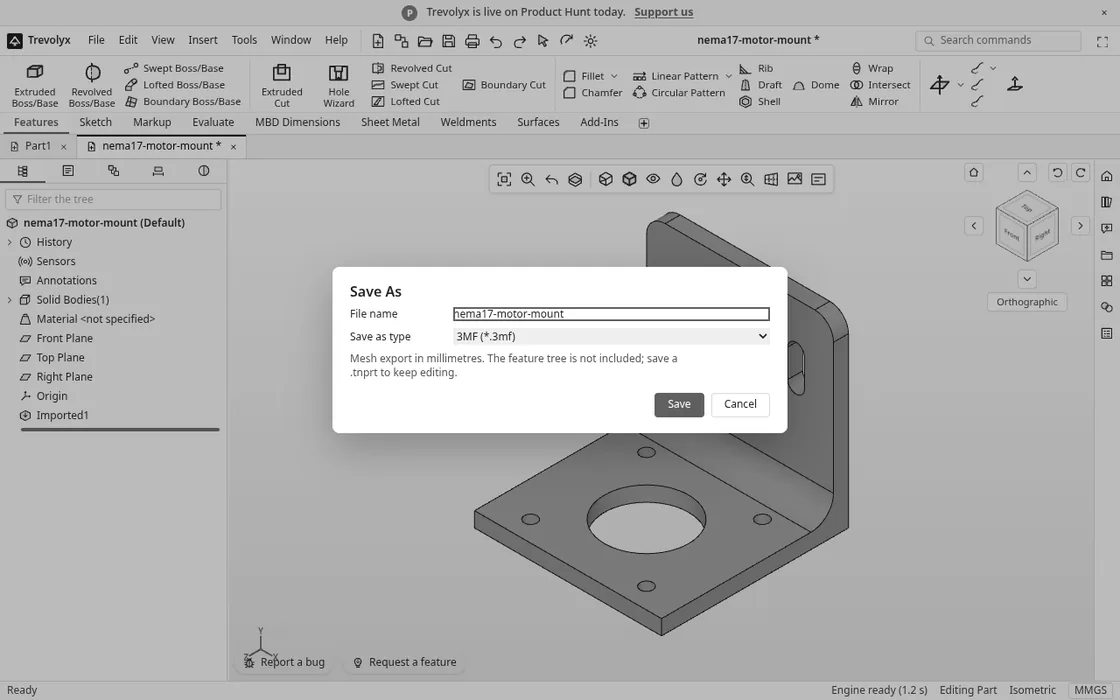
The converter shows and converts, but it does not edit. If the supplier's bracket needs a bigger bore or one slot moved, open the STEP file in Trevolyx in Chrome or Edge on a laptop or desktop. Our bracket opened in about 3 seconds as an exact solid, with flat faces you can sketch on and holes you can measure. Add your features, then use File, Export (STL, OBJ, 3MF, GLB, STEP)....
| Format | Size | Notes |
|---|---|---|
| STL | 47.9 KB | 980 triangles, identical to the converter |
| 3MF | 10.1 KB | Zipped, declares unit="millimeter" inside |
| OBJ | 34.9 KB | Same 980 triangles |
| GLB | 24.1 KB | For web viewers and AR, not slicers |
The open STEP files online page lists everything Trevolyx can do with an imported STEP.
STL or 3MF?
Both carry the same triangles. 3MF is a zipped XML format from the 3MF Consortium, and its specification has a unit field (millimetre by default), so the unit mix up above cannot happen. It was about a fifth of the size of the STL in our test. Cura, PrusaSlicer and Bambu Studio all open 3MF, so use it when your slicer accepts it. Use STL when a print service or an older tool asks for it, which is still very common.
Honest limits
- Keep your original STEP. When we exported the imported bracket back to STEP from Trevolyx, it was saved as a faceted STEP (mesh) of 639 KB, not the exact 92 KB original. Edit and print from Trevolyx, but archive the supplier's STEP.
- Open surfaces do not make solids. Some IGES files are loose surfaces. The converter then says the model is not a closed solid, and the STL will not be watertight. Ask for a solid STEP.
- No resolution slider. The converter picks the mesh density from the model size. In our tests that was fine for printing, but if you need a very coarse or very fine mesh for another purpose, use a desktop CAD program.
FAQ
How do I convert a STEP file to STL for free?
Open the STEP to STL converter, choose the .step or .stp file and press Download STL. There is no account, no watermark and no upload, so it costs ₹0.
Is there a STEP to STL converter for Mac?
Yes. The converter runs in the browser, so Safari or Chrome on a Mac is enough. We also ran our bracket through WebKit, the engine behind Safari, and got the same 980 triangle STL.
What resolution should I use for 3D printing?
A chord error well under your layer height is plenty. The converter's automatic mesh kept our holes within 0.024 mm of the true circle, about a tenth of a 0.2 mm layer. Going finer mostly makes the file bigger.
Why is my STL tiny in the slicer?
STL has no units and slicers assume millimetres, so a model exported in inches shows up 25.4 times too small. Converting from the STEP file avoids this, because STEP records its unit and the converter writes millimetres.
Is my STEP file uploaded?
No. Both the converter and Trevolyx read the file in your browser tab and save the STL straight to your computer. That matters when the part belongs to a client.
Sources
- ISO 10303-21:2016, STEP clear text encoding of the exchange structure
- Library of Congress: STL (STereoLithography) File Format Family
- 3MF Consortium: 3MF Core Specification (unit attribute, millimetre default)
- Open CASCADE: mesh (tessellation) user guide, the engine both tools use
- ISO 273:1979, Clearance holes for bolts and screws (M3 medium 3.4 mm)
- Every timing, triangle count and file size above was measured on the live STEP to STL converter and Trevolyx on 13 Nov 2026
Written by the TaskNinja team with help from an AI writing tool, then checked against the live converter and Trevolyx.