How to open a OneNote .one file without OneNote (Mac, phone, any browser)
Open a OneNote .one section, .onepkg notebook or notebook ZIP on a Mac, phone or any PC without OneNote. What Microsoft's apps refuse, tested on 14 files.
Someone sends you a file called Class notes.one, or a colleague leaves and their project notes turn up on a shared drive as a folder of .one files. You double click it on a Mac or a phone and nothing happens. You put it in OneDrive and OneNote on the web will not open it.
That is not your fault. A .one file is a OneNote section saved as a file, and Microsoft's apps mostly expect notebooks to live in OneDrive. Below is what each Microsoft app can open, what happened when we ran 14 real OneNote files through our viewer, and the quickest way to read the notes or save them as PDF.
What is in a .one, .onepkg or .onetoc2 file?
- .one is one section of a notebook: its pages, text, tables, pictures, pen drawings and attached files.
- .onetoc2 is the notebook's table of contents. It holds no notes.
- .onepkg is a whole notebook packed into one file. Our test package starts with the bytes MSCF, the signature of a Microsoft cabinet (CAB) archive, with the .one sections inside.
- A ZIP is what OneDrive gives you when you download a notebook folder: the .one sections plus a .onetoc2.
Which Microsoft app opens which file
This is from Microsoft's support pages, checked on 22 Oct 2026. The short version: only the OneNote desktop app on Windows opens local files.
| App | Opens a loose .one file? | What Microsoft says |
|---|---|---|
| OneNote on Windows (desktop app) | Yes | Free download. Microsoft's fix for standalone sections is to open them here with Open with > OneNote, then copy them into a OneDrive notebook. |
| OneNote for Mac | No | Needs a Microsoft account and works with notebooks in OneDrive. Local .one and .onetoc2 files do not open. |
| OneNote for the web | No | Opens OneNote 2010 and later notebooks stored in OneDrive. Does not open .onepkg packages or OneNote 2003 and 2007 notebooks. |
| OneNote for Windows 10 | Read only | Reached end of support on 14 Oct 2025. Existing notes can be viewed and exported, but not edited or synced. |
| Phones (Android, iPhone) | No | The apps open notebooks from OneDrive or SharePoint, so local notebooks have to be moved there first from a Windows PC. |
Microsoft also says OneNote no longer supports standalone section files, so a single emailed .one file is the hardest case. On a Mac, a Chromebook, a phone or a locked work laptop, you need something else.
Open it in your browser instead
Our OneNote File Viewer reads the file inside your browser tab with onenote.rs, an open-source parser that follows Microsoft's published file format. No account, no install, no upload.
- Open OneNote File Viewer on any computer or phone.
- Choose or drop the file. You can pick several .one files at once, a .onepkg notebook, or the ZIP that OneDrive downloaded. Use Add more to add sections later.
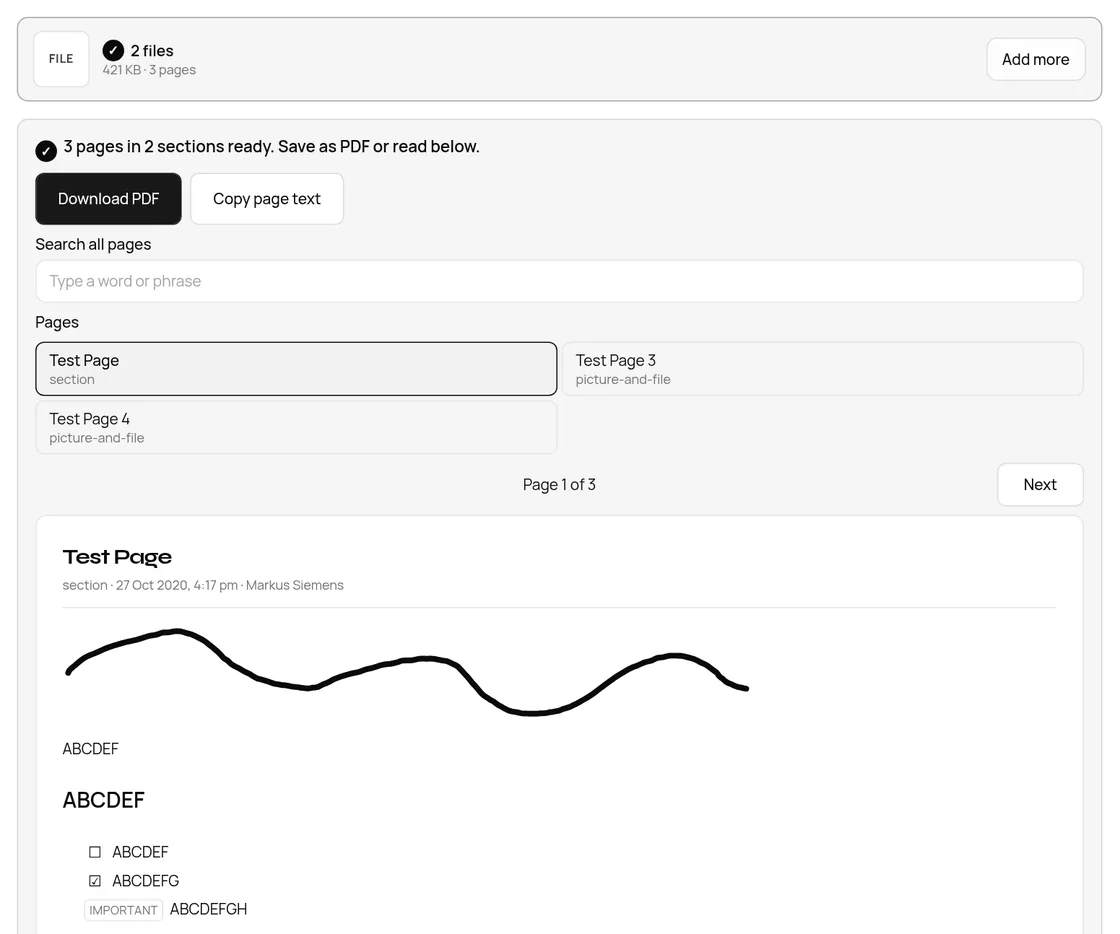
- Wait for the line that says how many pages and sections are ready. Pick a page in the Pages list, or use Next.
- Type in Search all pages to find a word anywhere in the notebook.
- Press Download PDF for every page, or Copy page text for the page on screen. You can also save all the text, or the pictures and attached files as a ZIP.
What we found when we ran 14 OneNote files
We ran the public test files from the onenote.rs project (including samples from Microsoft's Office interop tests and the Joplin importer) through the same code our viewer uses, src/lib/onenote with the one2json WebAssembly reader, and built a PDF of each. Times are on our test machine; a phone will be slower.
| File | Size | Pages | Inside | Read time | PDF pages |
|---|---|---|---|---|---|
| section.one (OneDrive) | 258.2 KB | 1 | 1 picture, 1 pen drawing, 2 tables, to-do tags | 16 ms | 2 |
| picture-and-file.one | 162.8 KB | 2 | 1 PNG, 1 attached MP3 | 2 ms | 2 |
| OneWithFileData.one (OneNote 2016 desktop) | 29.6 KB | 1 | 1 attached Word file (14,660 bytes) | 4 ms | 1 |
| notebook.onepkg | 6.7 KB | 3 | 2 sections in one package | 9 ms | 3 |
| checkboxes_and_unicode.one | 148.7 KB | 4 | 2 pictures, 5 tables, accented titles | 7 ms | 5 |
| Section 1.one (with subpages) | 108.4 KB | 9 | Pages and subpages | 6 ms | 9 |
| desktop_missing_ink.one | 251.9 KB | 2 | 34 pen drawings | 14 ms | 3 |
| Quick Notes.one (audio) | 567.7 KB | 1 | 1 audio recording (.wav) | 4 ms | 1 |
| Quick Notes.one (Chinese titles) | 62.8 KB | 4 | Titles such as 风景, web links | 2 ms | 4 |
| Math.one | 22.0 KB | 1 | 9 equations (see below) | 2 ms | 1 |
| OneNote_DeletedPages.one (recycle bin) | 19.3 KB | 1 | A deleted page | 7 ms | 1 |
| Large Desktop.one | 107.7 MB | 1 | 8 pictures, 5 attached PDFs | 839 ms | 8 |
| Large OneDrive.one | 154.0 MB | 1 | Same notes, OneDrive packaging | 687 ms | 8 |
| Open Notebook.onetoc2 | 2.2 KB | 0 | Table of contents only | 1 ms | Refused with a clear message |
Thirteen of the 14 opened, and the one that did not is the .onetoc2, which has no notes in it. The viewer says so in plain words and asks for the .one files from the same folder. On the live site in headless Chrome, the 107.7 MB section opened in 1.3 seconds and the 154 MB one in 1.1 seconds. A ZIP of a notebook folder with three sections inside two levels of section groups opened in 0.4 seconds as 3 pages in 3 sections.
We also checked the PDF. For the two-section notebook in the screenshot it is 4 A4 pages, and pdftotext reads the text straight back out, including the to-do tags as [ ] and [x]. That means you can search and copy from it. The font is Liberation Sans, embedded.
What does not come across
- Layout: note containers that sat side by side are shown one under the other.
- Colours and fonts: text is shown in black, and the PDF uses one font.
- Audio and video: recordings are listed and saved in the ZIP under their names, but not played.
- Equations: they come out as one line of text. In our Math.one test, OneNote's hidden equation markers also showed up as odd box symbols around the fractions and powers, so treat equations as a rough copy.
- Old and locked sections: OneNote 2007 sections and password protected sections cannot be read. For a 2007 file you still need the Windows desktop app.
Is my notebook uploaded?
No. We watched the network while opening the files above on the live site. For the screenshot, the only requests after the page loaded were for the viewer's own code and reader from taskninja.ai and one Google ad-quality check. Across every test, including the 154 MB section, no request carried a file body. Notebooks often hold meeting notes and phone numbers, so this matters.
FAQ
How do I open a .one file on a Mac?
OneNote for Mac cannot open local .one files. Open the file in a browser with our OneNote File Viewer, or open it on a Windows PC with the OneNote desktop app and move it into a OneDrive notebook.
Why does OneNote on the web say the section needs to be converted?
A .one file copied into OneDrive by hand is a standalone section, not a OneDrive notebook. Microsoft's fix is to open it in the desktop app on Windows and copy it into a notebook. To just read it, open it in the browser viewer instead.
Can I open a .onepkg file without OneNote?
Yes. Choose the .onepkg in the viewer and every section inside is listed with its pages. OneNote for the web does not open .onepkg files at all.
How do I convert a OneNote file to PDF without OneNote?
Open it in OneNote to PDF and press Download PDF. Every page goes into one A4 PDF with real, selectable text. There is no watermark.
Sources
- Microsoft Support: Differences between using a notebook in the browser and in OneNote (file formats OneNote for the web opens)
- Microsoft Support: Resolve the "This section was originally created in an older version of OneNote" error (standalone sections)
- Microsoft Support: Frequently asked questions about OneNote for Mac
- Microsoft Support: How to move local notebooks to OneDrive or SharePoint
- Microsoft Support: What is happening to OneNote for Windows 10
- Microsoft Support: Export OneNote notebooks (notebook download as a ZIP)
- [Microsoft Learn: [MS-ONESTORE] OneNote Revision Store File Format](https://learn.microsoft.com/en-us/openspecs/office_file_formats/ms-onestore/ae670cd2-4b38-4b24-82d1-87cfb2cc3725)
- onenote.rs, the open-source OneNote parser, and its test samples
Sources checked 22 Oct 2026. Every count, size and time in the tables comes from running our viewer's code, or the live viewer, on that date.
Written by the TaskNinja team with help from an AI writing tool, then checked against the Microsoft pages above and the tool itself.