How to open a Mathcad file without Mathcad (.mcdx and .xmcd), free on any computer
Open a Mathcad Prime .mcdx or Mathcad 15 .xmcd file without Mathcad, on a Mac, phone or locked PC. Read the maths and results, save PDF or CSV. No upload.
A checking engineer sends back your column design as a .mcdx file. A client forwards a pump sizing sheet from 2012 saved as .xmcd. A lecturer shares the worked solutions for an assignment. You double click and nothing happens, because the file belongs to PTC Mathcad and this computer does not have it.
Most of the time you do not need to edit the sheet. You need to read the maths, check a few numbers and maybe print it for a calculation pack. Here are the ways to do that, what each one costs, and what we saw when we opened a real Mathcad Prime worksheet in our free Mathcad Viewer.
Which Mathcad file do you have?
- .mcdx is a Mathcad Prime worksheet. It is a ZIP package. Inside our sample are mathcad/worksheet.xml (the regions and their layout), mathcad/result.xml (the numbers Mathcad saved) and the text blocks and pictures.
- .xmcd is a worksheet from Mathcad 12 to 15, stored as XML. .xmcdz is the same thing compressed.
- .mcd is the older binary format from Mathcad 11 and earlier.
The extension matters because Mathcad Prime itself does not open the older two. PTC says Prime does not natively open legacy files: you run them through its XMCD, MCD Converter, which writes a new .mcdx next to the original.
Your options
| Option | Cost | Runs on | Catch |
|---|---|---|---|
| Mathcad Prime (full licence) | Paid subscription | Windows x64 (needs the .NET Desktop Runtime) | A full install to read one file; older .xmcd and .mcd files must be converted first |
| Mathcad Prime 30-day trial | Free for 30 days | Windows x64 | Needs a PTC sign-up; turns into Express when it ends |
| Mathcad Express | Free, no time limit | Windows x64 | Basic features only, watermark on worksheets, not allowed for commercial use |
| XMCD, MCD Converter | Comes with Prime and the trial | Windows, inside Prime | Converts .mcd, .xmcd and .xmcdz to .mcdx; results show again only after you recalculate |
| TaskNinja Mathcad Viewer | Free | Any current browser, including Mac, Chromebook and phones | Read only: shows the saved results, does not recalculate |
If you write Mathcad sheets every week, the licence through your employer or university is the right tool. If you only need to read what someone sent you, on a Mac, a site laptop without admin rights or your phone, a viewer is quicker than a Windows install and a sign-up.
How to open a .mcdx or .xmcd file in your browser
- Open Mathcad Viewer on any computer or phone.
- Choose the .mcdx, .xmcd or .xmcdz file, or drop it on the box. The file is read in your browser tab and is not uploaded.
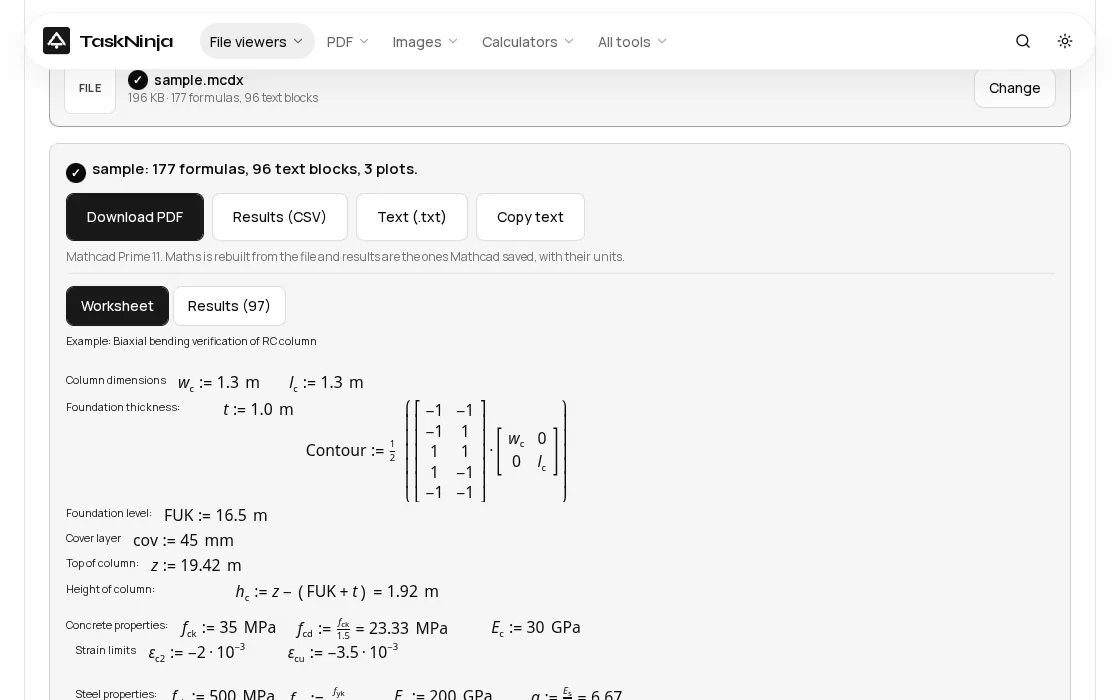
- Read the Worksheet tab. Maths regions are typeset with subscripts, fractions, matrices and units, and text, pictures and plots sit where the author placed them.
- Open the Results tab for one table of every variable Mathcad worked out, with its value and unit.
- Press Download PDF for an A4 copy, Results (CSV) for the numbers in Excel, or Text (.txt) for the whole sheet as plain text.
What we saw on a real worksheet
Our test file is the sample on the tool page: a 196 KB Mathcad Prime 11 worksheet that checks a 1.3 m by 1.3 m concrete column for biaxial bending. On our test machine it was ready about 0.2 seconds after choosing it, with 177 formulas, 96 text blocks and 3 plots. A phone will take a little longer.
The Results tab listed 97 variables. These are a few of the numbers a checker would look for first, copied from the tab:
| Variable | Value | Unit | What it is in this sheet |
|---|---|---|---|
| f_cd | 23.33 | MPa | Design concrete strength, f_ck / 1.5 with f_ck = 35 MPa |
| G_c | 81.12 | kN | Self weight of the column |
| λ | 15.35 | Slenderness of the column | |
| λ_lim | 23.45 | Slenderness limit, so second order effects can be skipped | |
| N_j | -8.41E3 | kN | Axial force in the governing load case (number 7) |
| M_y_j | 2.09E3 | kN · m | Bending moment about y in the same case |
| min(σ_c) | -12.88 | MPa | Largest concrete compression stress |
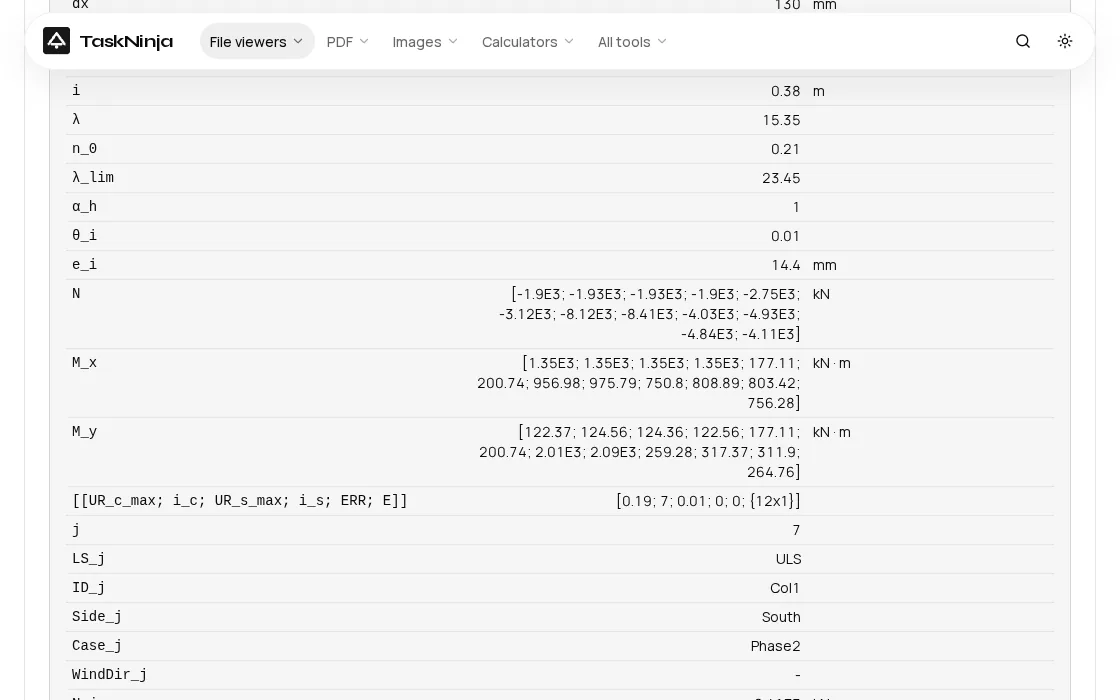
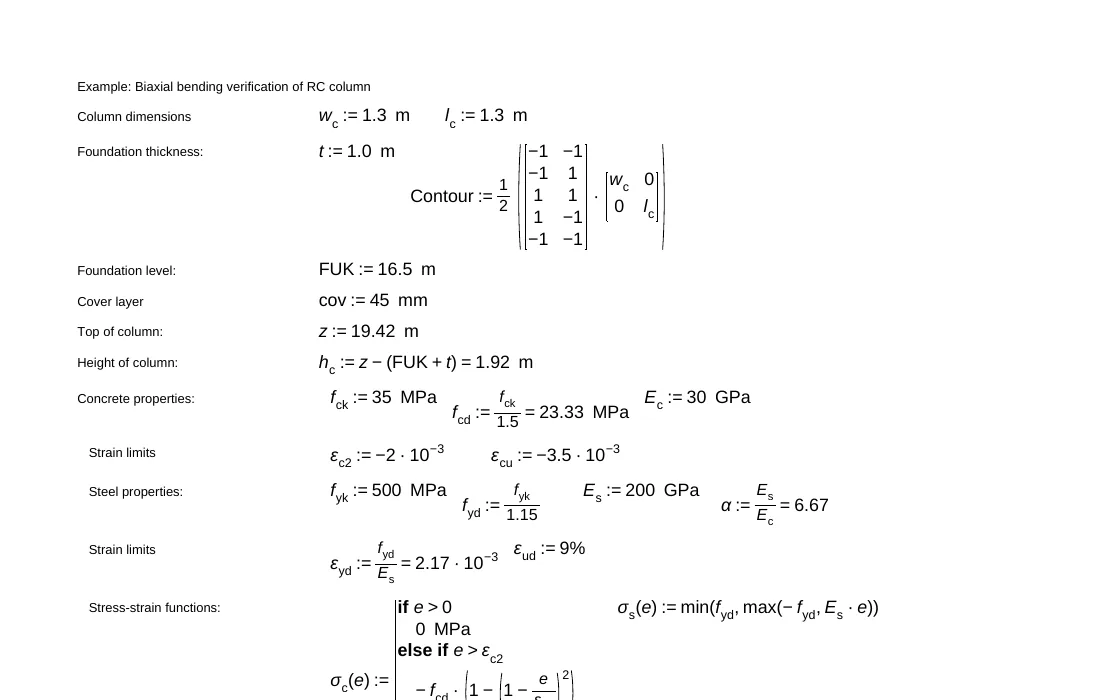
Download PDF gave a 13 page A4 file with the maths as real, searchable text, and Results (CSV) a 98 line file (a header and 97 rows) that opened straight in Excel. While the file was open we watched the network: no request carried any part of the worksheet.
One honest note. While checking this sample we found a bug: the moment vectors M_x and M_y showed their unit as just m instead of kN · m. The author had typed kN in the unit box of a kN·m result, and Mathcad saves the value already in kN with only the leftover metre in the file. The viewer now shows kN · m, and a few unit-carrying matrix entries that printed as long raw numbers are formatted like the rest. Both fixes went live with this post.
What a viewer cannot do
- No recalculation. You see the results the author saved. If they changed an input and saved without calculating, those results are empty. PTC gives the same advice for converted files: press Calculate Worksheet in Prime.
- Old .mcd files from Mathcad 11 and earlier use a closed binary format and do not open. Prime's converter can turn them into .mcdx.
- Mathcad 15 maths (.xmcd) is shown from the picture of each region that Mathcad saved inside the file, so it reads well but is not searchable text. Text regions and results are real text.
- Password protected worksheets need Mathcad. 3D plots and components are listed by name, and colours become black and white.
For a checking engineer that is usually fine: the job is to read the method and compare the numbers. To change an input and see what happens, you need Prime or Express.
FAQ
Can I open a .mcdx file without Mathcad?
Yes. Choose it in our Mathcad Viewer and the worksheet opens in Chrome, Edge, Firefox or Safari, with its maths, results, text and plots. Nothing to install and no licence.
Is Mathcad Express free forever?
PTC says the trial gives the full Prime features for 30 days and then reverts to Mathcad Express, a limited version you can keep using. Express adds a watermark, locks the advanced features and is not authorised for commercial use. It runs on Windows only.
How do I open an old .xmcd file in Mathcad Prime?
In Prime, go to the Input/Output tab and press XMCD, MCD Converter, add the worksheets and press Convert. It writes a new .mcdx in the same folder and leaves the original alone. Open it and calculate once to see the results. To just read the file, open the .xmcd in the viewer instead.
Can I convert a Mathcad file to PDF without Mathcad?
Yes. Open it in MCDX to PDF and press Download PDF. The PDF is made in your browser on A4 pages, with the file name and page number in the footer.
Is my worksheet uploaded?
No. The file is read by code in your browser tab, and the PDF, CSV and text files are made on your device. Close the tab and it is gone, which matters for client designs and tender calculations.
Sources
- PTC: Moving from legacy Mathcad to Mathcad Prime (worksheet converter)
- PTC Mathcad Prime 11 Migration Guide (PDF)
- PTC Mathcad Prime product page: Express vs full licence
- PTC Mathcad Help: About PTC Mathcad Express
- PTC: Mathcad Prime free 30-day trial and .NET requirement
Sources checked 20 Nov 2026. Counts, timings and values are from the live tool and our test on that date. PTC and Mathcad are trademarks of PTC Inc. TaskNinja is not connected to PTC.
Written by the TaskNinja team with help from an AI writing tool, then checked against PTC's documentation and the tool itself.