How to format and validate JSON online without uploading it
Use a JSON formatter online to validate JSON in your browser. See the line and column, fix a trailing comma, and keep pasted text on your device.
A JSON formatter online is what you open when an API body is one long line, or when a parser only gave a character offset. It is a bad place to paste a customer record, a webhook, or a config, unless the page never uploads the text.
Below: how to format JSON, validate JSON online, fix a JSON trailing comma, and keep integers past 9007199254740991. Use the JSON Formatter or the JSON Validator. Both open the same tool.
Why pasting JSON into a random formatter is risky
The text people need to format is rarely a sample. It is an API response with a phone number, a config with a database password, or a webhook with a payment id. Once it leaves the browser, you do not control who can read it.
In November 2025 the security firm watchTowr reported that saved links on two popular online formatters exposed more than 80,000 pasted snippets, including passwords, cloud keys and personal data.
These pages have no save button and no share link. Formatting, validation and repair run in the tab, and the pasted text is not sent in a request. A file is read locally. Anonymous events (opened, typed, copied) do not include the JSON, a file name, or the exact byte size. Ads can still load. Close the tab and the copy is gone. Rotate a key already pasted into a site that stores snippets.
How to format JSON online
Open the JSON Formatter. Paste into the box labelled Paste your JSON, or press Open a .json file. .jsonl and .ndjson files work too. Files up to 100 MB open. Above about 1 MB the text stays out of the box, and you can still format it.
- Pick an indent: 2 spaces, 4 spaces, or a tab. Sort keys A to Z reorders keys (uppercase before lowercase) and does not change values.
- Press Format JSON. Valid text comes back indented, with a Valid JSON line and counts of keys, objects, arrays, lines and depth.
- Press Minify for one line. Then Copy JSON or Download .json. Ctrl+Enter formats too (Cmd+Enter on a Mac).
Numbers and strings are copied as written, so 1.10 stays 1.10.
How to validate JSON and read the error
On the JSON Validator, press Format JSON. Invalid JSON is not a silent no-op. Under the button: "Not valid JSON. Line 3, column 12: There is a comma before }". The page shows that line with a ^ under the character, plus a hint.
RFC 8259 is the grammar. Strings use a straight double quote. Commas separate items, and there is no comma after the last one. The only bare words are true, false and null, in lower case. Whitespace is a space, a tab, a line feed or a carriage return. Comments are absent. Infinity and NaN are not numbers. JSON.parse on MDN rejects a trailing comma and single quotes with SyntaxError.
- Trailing comma. With two-space indent,
{, then"name": "Asha",, then"age": 29,, then}fails on line 3, column 12. - Missing comma.
{"a": 1 "b": 2}points at the second key. On several lines the marker is on the next line, and the hint says to check the line above. - Unclosed bracket.
{"a": {"b": 1}says "This { is never closed." and points at the opening{, not the end of the file. - Extra text.
{"a": 1} extra, a spare}, or two objects on one line: the value was already finished.
Duplicate keys still format, and both copies are kept ($.user.name). RFC 8259 says names should be unique. Many programs keep only the last.
Common mistakes, and what Fix mistakes changes
If the error can be repaired, Fix mistakes and format appears under the hint. The result lists every change with a count. A cut-off value such as {"a": [1, 2 stays an error. Repair does not invent a missing bracket.
| What you pasted | What it means | What Fix mistakes does |
|---|---|---|
| Comma before } or ] | Commas go between items only. | Removes those commas. |
| Single quotes or curly quotes | Keys and strings need straight double quotes. | Changes them to straight double quotes. |
| A bare key, {name: "Asha"} | A key must be a quoted string. | Adds the double quotes. |
| A missing comma | The next item started too soon. | Inserts the comma. |
| A // or /* */ comment | Comments are not JSON whitespace. | Removes them. |
| True, False, None, undefined, NaN, Infinity | Only true, false and null are literals. Infinity and NaN are banned. | True and False become true and false. The others become null. |
| .5, 5., +5, or 0412 | No leading plus or zeros. A dot needs a digit on both sides. | Becomes 0.5, 5, 5 or 412. Quote a PIN first if the zero matters. |
| C:\Users inside a string | A lone backslash is not a legal escape. | Writes the backslash as \\ so the text is kept. |
| Two commas, = instead of :, a cut-off bracket, or a leading # | Unfinished, or not marked fixable, so the button stays hidden. | Does not guess. A # line is dropped only if repair is already running. |
TRUE, yes and no are not repaired. Try a broken example, then Fix mistakes, turns the built-in sample into indented JSON and keeps the long order id.
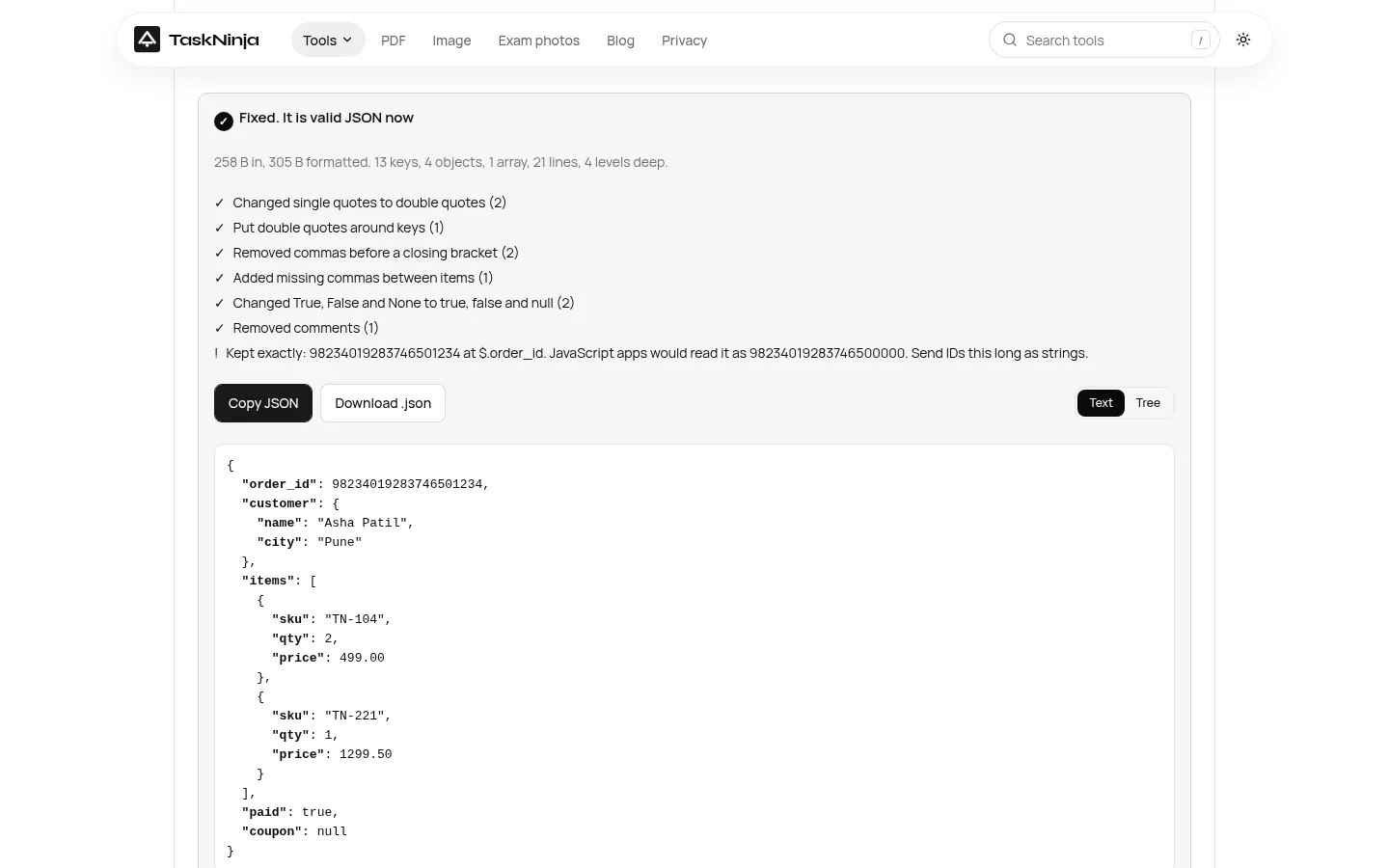
Big numbers past 9007199254740991
RFC 8259 section 6 says integers from -(2 to the 53rd power)+1 through (2 to the 53rd power)-1 stay interoperable on IEEE 754 binary64 software, because programs agree on them exactly. The top of that range is 9007199254740991. MDN calls it Number.MAX_SAFE_INTEGER. Adding 1 and adding 2 to it produce the same JavaScript number.
JSON.parse converts numbers before a reviver runs, so precision can already be lost. MDN's advice is to send a large number as a string. This formatter copies the digits instead, and warns with the path and the value JavaScript would use. Decimals are copied too and skip that warning, so 1.10 stays 1.10.
| Text | What this tool does |
|---|---|
| 9007199254740991 | Kept, no warning. This is Number.MAX_SAFE_INTEGER. |
| 9007199254740993 | Kept. JavaScript would read 9007199254740992. |
| 12345678901234567890 | Kept. JavaScript would read 12345678901234567000. |
| 1.10 | Kept as 1.10. Not part of the integer warning. |
JSON Lines
jsonlines.org describes newline-delimited JSON. Each line is one JSON value, the break is \n, and the usual extension is .jsonl. Objects and arrays are typical, but any JSON value is allowed. null is valid. A blank line is not. A byte order mark must not be included.
One value stays one document. JSON Lines starts only when the first value is an object or array and the next value begins on a later line. Format puts a blank line between records, Minify keeps one per line, and the download is .jsonl. Blank lines between records are skipped. Two values on one line are an error, and so is more text after a number, string, true, false or null. A byte order mark at the start is removed and reported.
FAQ
Does a JSON formatter online upload what I paste?
This one does not. The JSON Formatter and the JSON Validator read the text in your browser. There is no save link, and usage events do not include the JSON.
How do I validate JSON online and see the exact error?
Paste and press Format JSON. Valid JSON is formatted. Invalid JSON shows the line, the column, the reason, a ^ under the problem, and a hint.
How do I fix a JSON trailing comma?
Delete the comma after the last item, or press Fix mistakes and format. It removes commas before } and ], and lists the change. It will not invent a missing bracket.
Will formatting change a long order id?
No. Integers past 9007199254740991 are copied exactly, with a warning of the rounded JavaScript value. Send the id as a string if the digits must survive.
Can I format JSON Lines or NDJSON?
Yes, when each record is on its own line and the first value is an object or an array. The download is a .jsonl file. Two values on one line are an error.
What will Fix mistakes refuse to change?
It will not close an open bracket, delete an extra one, fill a double comma, or turn = into a colon. TRUE, yes and no stay errors. A file whose only problem is a # comment does not get the button.
Sources
- RFC 8259: The JavaScript Object Notation (JSON) Data Interchange Format
- MDN: JSON.parse()
- MDN: Number.MAX_SAFE_INTEGER
- JSON Lines
- watchTowr Labs: secrets exposed through online code formatters (November 2025)
Sources last checked on 15 October 2026. The line, column, repair and rounding examples come from this tool's parser and its self-check.
Written by the TaskNinja team with help from an AI writing tool, then checked against RFC 8259, MDN, jsonlines.org and the formatter's tests.